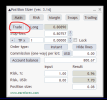
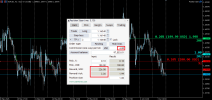
Hello, I am encountering a minor issue regarding the display of the "Buy Instant" and "Sell Instant" buttons. Previously, these buttons appeared on the main tab. However, they no longer appear there and are now visible only directly on the price chart. This makes it very difficult to click them accurately during periods of high market volatility, and the fixed-position buttons currently do not seem to be functioning. Could you please kindly add an order execution button directly within the Position Sizer EA control panel? (I use it on MT5)
 
Hello, I am encountering a minor issue regarding the display of the "Buy Instant" and "Sell Instant" buttons. Previously, these buttons appeared on the main tab. However, they no longer appear there and are now visible only directly on the price chart. This makes it very difficult to click them accurately during periods of high market volatility, and the fixed-position buttons currently do not seem to be functioning. Could you please kindly add an order execution button directly within the Position Sizer EA control panel? (I use it on MT5)
There is the AdditionalTradeButtons input parameter - please set it to Main tab or Both.
 
Yes, I tried setting AdditionalTradeButtons to "Main tab" or "Both," but the main tab still didn't appear, only the button on the price line showed up.
Are you sure this button doesn't appear?
1779522944958.png
If so, could you please record a video of what you are doing? Because I cannot reproduce this behavior...
 
  • 👍
Reactions: freelersss
Are you sure this button doesn't appear?
View attachment 37779
If so, could you please record a video of what you are doing? Because I cannot reproduce this behavior...
Thank you so much for your enthusiastic support. I understand the issue now, and it's resolved. I was confused because the trade button was previously located above the toolbar. Everything is great now.
 
  • 👍
Reactions: Enivid
Hello, my account got 5000usd then I want risk 2% which is 100usd per trade and my broker commission was 4usd per lot....How can I set commission+risk all together not exceed 100usd which is 2% risk.
 
Hello, my account got 5000usd then I want risk 2% which is 100usd per trade and my broker commission was 4usd per lot....How can I set commission+risk all together not exceed 100usd which is 2% risk.
If 4 USD is a round-turn commission, you enter 2 in the Commission field. If it's a one-way commission, you enter 4 there. The Position Sizer will take it into account when calculating your trade's risk.
 
So if I wanna TP exceed 100usd should I input TP 1.1 or 1.2 to cover the round turn commission which is 4usd.... And commission one way per lot I should insert 2usd right? My broker was round turn commission one lot = 4usd.
 

Attachments

  • 17797080589438318487606899127668.jpg
    17797080589438318487606899127668.jpg
    148.9 KB · Views: 3
So if I wanna TP exceed 100usd should I input TP 1.1 or 1.2 to cover the round turn commission which is 4usd.... And commission one way per lot I should insert 2usd right? My broker was round turn commission one lot = 4usd.
For the commission, yes, you enter 2.

For the TP, as I understand you want to keep your R/R despite the commission size, right? For that, I recommend setting the UseCommissionToSetTPDistance input parameter to true. The Position Sizer will then automatically adjust your TP to the distance that would cover the commission loss.
 
Position Sizer has been updated to version 3.15 to fix multiple issues:
  • Added support for point value display when it is less than 0.01. (@lei abiezey)
  • Added alerts when SL/TP application fails in the Market Execution mode.
  • Optimized hotkey processing.
  • Changed how the Max risk % per trade field on the Trading tab works when LessRestrictiveMaxLimits is set to true. It will now allow opening a smaller trade. (@EnrichWave)
  • Changed how trailing stop and breakeven filter trades by magic number. Now, if the Magic number field is set to zero, they will work with all trades irrespective of their magic numbers.
  • Changed how SL/TP is applied post-opening in the Market Execution mode. It will now retry up to 10 times per position if failing. This change applies to MT5 only. In MT4, it already worked liked that before.
  • Fixed take-profit update speed when it is locked to the stop-loss and the latter is updated via a hotkey. (@EnrichWave)
  • Fixed multiple code typos.
  • Fixed a potential infinite loop issue.
  • Fixed a bug in swaps calculation in MT4.
  • Fixed a potential bug with custom balance calculation.
  • Fixed multiple instances of potentially incorrect comparison of double variables.
  • Fixed a bug that would wipe additional TP values when changing the number of take-profits via input parameters.
  • Fixed a bug that would prevent the TP multiplier entered via the panel to load properly when restarting MT5.
  • Fixed some chart object tooltips.
  • Fixed a bug that would sometimes allow opening more trades than allowed via the Max number of trades field.
  • Fixed some error message texts.
  • Fixed some translation issues.
  • Fixed a bug with the custom leverage not getting updated when changing the respective input parameter on an already attached instance of the Position Sizer (MT5 only).
  • Fixed a potential memory leak from undeleted CTrade objects (MT5 only).
Please download and let me know how it works for you.
 
  • 🎉
Reactions: EnrichWave
Hi, and thanks for this excellent tool.

I'm using Position Sizer ver. 3.15 on MT5. I have a feature request related to the Spread Adjustment for SL option.

My use case: I trade with very tight, precision stop-losses, and I want the stop-loss to automatically account for the spread (so on a short, the SL distance is measured from the price the trade can actually close at, with the spread added to the stop). The "Spread Adjustment for SL" (SA) checkbox does exactly what I need.

The problem: that checkbox is only available when ATR options are enabled (ShowATROptions = true). I keep the ATR SL multiplier at 0 because I place my SL/TP lines manually at exact structural levels — I don't use ATR-based stops at all. But with ATR options enabled, my SL and TP lines no longer stay fixed where I place them; they move/recalculate on their own (and the SL multiplier field jumps from 0 to a value like 0.52). Before I enabled ATR options, the lines stayed put when I didn't touch them, which is the behavior I want.

My request: would it be possible to make the Spread Adjustment for SL (and TP) option available independently of ATR mode — i.e. a standalone setting that adds the spread to the stop-loss for manually placed, fixed SL/TP lines, without enabling ATR and without the lines moving on their own?

Essentially: spread adjustment for precision manual stops, decoupled from ATR.

Thanks a lot for considering this — it would be very valuable for tight-stop manual traders.
 
Position Sizer has been updated to version 3.15 to fix multiple issues:
Wonderful Enivid,

With enabled TP line, Are you sure this section works fine If the Commission set and used for the TP distance (UseCommissionToSetTPDistance = true/false)?.

Screenshot 2026-06-04 023728.png

Instead of those.. If there is result for "Risk margin %" that will be more helpful..
I'll provide with details later (Tomorrow will post with scrnshots. So it'll be easy to understand)
 
Yes, it looks fine. The Input column is "before commission".
Kindly see the commission is $4 but the results seems more than that..

feature LessRestrictiveMaxLimits missed to calculate the max margin % for the trading fuses.


1780683775799.png
Moving the margin utilization, % from the Margin Tab Tab to Risk Tab will be more good to
calculate with Include orders, Include Symbols, Include (All,Buy,Sell)
and currently it doesn't calculate with the pending orders
 
Kindly see the commission is $4 but the results seems more than that..
Please show your calculations that show that "it seems more".
feature LessRestrictiveMaxLimits missed to calculate the max margin % for the trading fuses.
I will implement that in the next version.
1780683775799.png

Moving the margin utilization, % from the Margin Tab Tab to Risk Tab will be more good to
calculate with Include orders, Include Symbols, Include (All,Buy,Sell)
and currently it doesn't calculate with the pending orders
This is less likely...
 
Please show your calculations that show that "it seems more".
screenshot-2026-06-04-023728-png.37909


in this screenshot the result shows 226.08 which is higher than the commission include.. with the commission include for 1 lot is 207.99 isn't?.. And If I move the entry near the SL Line it increase even more..

This is less likely...
It is margin risk calculation So, having that values in the Risk Tab will be more helpful to understand the Risk of Margin.
 
in this screenshot the result shows 226.08 which is higher than the commission include.. with the commission include for 1 lot is 207.99 isn't?.. And If I move the entry near the SL Line it increase even more..
No, without the commission, you'd take a bigger trade, which would have resulted in bigger profits (226.08).
 
Hi, and thanks for this excellent tool.

I'm using Position Sizer ver. 3.15 on MT5. I have a feature request related to the Spread Adjustment for SL option.

My use case: I trade with very tight, precision stop-losses, and I want the stop-loss to automatically account for the spread (so on a short, the SL distance is measured from the price the trade can actually close at, with the spread added to the stop). The "Spread Adjustment for SL" (SA) checkbox does exactly what I need.

The problem: that checkbox is only available when ATR options are enabled (ShowATROptions = true). I keep the ATR SL multiplier at 0 because I place my SL/TP lines manually at exact structural levels — I don't use ATR-based stops at all. But with ATR options enabled, my SL and TP lines no longer stay fixed where I place them; they move/recalculate on their own (and the SL multiplier field jumps from 0 to a value like 0.52). Before I enabled ATR options, the lines stayed put when I didn't touch them, which is the behavior I want.

My request: would it be possible to make the Spread Adjustment for SL (and TP) option available independently of ATR mode — i.e. a standalone setting that adds the spread to the stop-loss for manually placed, fixed SL/TP lines, without enabling ATR and without the lines moving on their own?

Essentially: spread adjustment for precision manual stops, decoupled from ATR.

Thanks a lot for considering this — it would be very valuable for tight-stop manual traders.

What do you think about the idea brother? @Enivid?