If you have ever opened MetaTrader 5, tried to calculate the correct lot size under pressure, and thought “there must be a faster way”, Trade Manager was built for exactly that moment.
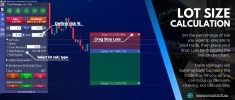
Trade Manager MT5 is a practical trading panel that combines visual trade planning, position sizing, and trade management into one workflow directly on the chart. You plan the trade where you actually trade, set your risk once, and the tool calculates everything in real time.
For traders looking for an MT5 Trade Manager that behaves like a Position Size Calculator MT5 and a Lot Size Calculator MT5, the benefit is simple: you stop guessing, stop switching tools, and stop doing manual math. If you trade on MetaTrader 4, the same workflow is available as Trade Manager MT4, so you can use it like a position size calculator MT4 and lot size calculator MT4 inside the terminal.
If you want to see the workflow in action before going through the full feature list, the quickest way is to watch this video showcasing the most important Trade Manager MT5 features:
It shows how trade planning on the chart works, how the lot size updates in real time, and how quickly you can execute and manage a position.
How it works (simple workflow)
Markets and custom charts
Trade Manager can be used across markets available in your terminal: forex, indices, commodities, and crypto (depending on your broker). It is also compatible with custom charts such as Renko and second based charts.
Benefits you feel immediately
Key features
Position Size Calculator
Determine trade size instantly based on defined risk.
Easy Trade Planning
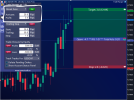
Plan trades directly on the chart with draggable lines for entry, stop loss, and take profit.
Real time display of SL and TP
View stop loss and take profit in account currency, pips, or points.
Advanced protection tools
Break Even options
Secure profits gradually with partial TP and SL adjustments.
Equity Protect
Automatically closes trades at a set profit or loss limit to protect capital and control drawdowns.
Stealth and efficiency tools
Hidden Mode
Hide SL, TP, and pending orders.
Automated set SL and TP for external orders
Protect orders opened by mobile or other EA.
Trailing pending orders
Allow pending orders to follow price dynamically.
Precision trade execution
Official product page:
https://www.investsoft.eu/forex-trade-manager-position-size-calculator.html
Full user manual:
https://www.investsoft.eu/blog/index.php/2021/11/30/trade-manager-user-manual/
Support and trial requests:
https://www.investsoft.eu/contact
Best Regards,
InvestSoft Team
Trade Manager MT5 is a practical trading panel that combines visual trade planning, position sizing, and trade management into one workflow directly on the chart. You plan the trade where you actually trade, set your risk once, and the tool calculates everything in real time.
For traders looking for an MT5 Trade Manager that behaves like a Position Size Calculator MT5 and a Lot Size Calculator MT5, the benefit is simple: you stop guessing, stop switching tools, and stop doing manual math. If you trade on MetaTrader 4, the same workflow is available as Trade Manager MT4, so you can use it like a position size calculator MT4 and lot size calculator MT4 inside the terminal.
If you want to see the workflow in action before going through the full feature list, the quickest way is to watch this video showcasing the most important Trade Manager MT5 features:
It shows how trade planning on the chart works, how the lot size updates in real time, and how quickly you can execute and manage a position.
How it works (simple workflow)
- Mark entry, stop loss, and take profit on the chart using draggable lines
- Choose risk mode: cash amount, percent of balance, or percent of equity
- Position size updates instantly as you move the stop loss
- SL and TP are displayed in pips, points, or account currency
- Execute quickly, then manage the trade with protection tools
Markets and custom charts
Trade Manager can be used across markets available in your terminal: forex, indices, commodities, and crypto (depending on your broker). It is also compatible with custom charts such as Renko and second based charts.
Benefits you feel immediately
- Faster entries with fewer manual steps and fewer errors
- Consistent risk per trade through real time position sizing
- Clear SL and TP display in pips, points, or account currency
- Better discipline through visual planning and risk to reward ratio control
- Stronger protection after entry using break even, trailing stop variations, partial close logic, and equity protection
- Extra safety for external orders (for example from mobile) via automated set SL and TP
- Optional stealth execution logic via Hidden Mode for SL, TP, and pending orders
Key features
Position Size Calculator
Determine trade size instantly based on defined risk.
Easy Trade Planning
Plan trades directly on the chart with draggable lines for entry, stop loss, and take profit.
Real time display of SL and TP
View stop loss and take profit in account currency, pips, or points.
Advanced protection tools
Break Even options
- Basic Break Even: automatic breakeven placement
- Multi level Break Even: up to 4 levels as the trade progresses
- Basic trailing stop
- Multi level trailing stop (up to 4 levels)
- Trailing stop following highs and lows
- Moving average based trailing stop
- ATR based trailing stop
- Partial closure trailing stop
Secure profits gradually with partial TP and SL adjustments.
Equity Protect
Automatically closes trades at a set profit or loss limit to protect capital and control drawdowns.
Stealth and efficiency tools
Hidden Mode
Hide SL, TP, and pending orders.
Automated set SL and TP for external orders
Protect orders opened by mobile or other EA.
Trailing pending orders
Allow pending orders to follow price dynamically.
Precision trade execution
- Limit Pullback Orders (LPO): enter on strategic pullbacks
- Quick trade closure: close all trades, or only profitable, losing, buy, or sell trades
- One click pending order deletion: clean up pending orders instantly
- Large trade splitting: split high volume trades into manageable portions
- Save and load settings templates
- OCO (One Cancels the Other) for pending orders
- Risk to reward ratio management while planning trades
Official product page:
https://www.investsoft.eu/forex-trade-manager-position-size-calculator.html
Full user manual:
https://www.investsoft.eu/blog/index.php/2021/11/30/trade-manager-user-manual/
Support and trial requests:
https://www.investsoft.eu/contact
Best Regards,
InvestSoft Team