

Position Sizer
- Thread starter Enivid
- Start date
- Watchers 483
You are using an out of date browser. It may not display this or other websites correctly.
You should upgrade or use an alternative browser.
You should upgrade or use an alternative browser.


Unfortunately, 5ers don't offer demo account (at least I couldn't find one), but I will keep testing it with your settings on a different broker on indices and gold. I'll let you know if I happen to reproduce the freezing.@Enivid Good Morning, its the version 5, build 5833

have you tried by entering the custom balance?...hi Enivid,
For the next update, could there be an option to display SL and TP only as a percentage of the initial deposit? I am avoid displaying them in money and pips. This helps me keep my trading risk planning simple. Thanks, friend.
Unfortunately, it will distort the position size calculation.have you tried by entering the custom balance?...

I am requesting the inclusion of a partial close feature for this tool. I am using this for props challenges. For now, we have the option to add multiple TPs, but we don't have the partial close feature, and most prop firms take multiple TP trades as one-sided betting behavior and flag the account. Adding a partial close feature would be extremely beneficial
Do you mean automatic partial close at some level or an option to manually close a part of a trade when needed?I am requesting the inclusion of a partial close feature for this tool. I am using this for props challenges. For now, we have the option to add multiple TPs, but we don't have the partial close feature, and most prop firms take multiple TP trades as one-sided betting behavior and flag the account. Adding a partial close feature would be extremely beneficial
No, not the manual close; auto-close at some level.Do you mean automatic partial close at some level or an option to manually close a part of a trade when needed?
This isn't something that will be added to the Position Sizer (by me at least), but you can use a combination of the Position Sizer and Account Protector to achieve this. Set profit or price conditions with a partial close action on the AP and apply Magic numbers to both if you are working with multiple trade setups.No, not the manual close; auto-close at some level.
Seems doable. I will try it out. Thanks for your suggestionThis isn't something that will be added to the Position Sizer (by me at least), but you can use a combination of the Position Sizer and Account Protector to achieve this. Set profit or price conditions with a partial close action on the AP and apply Magic numbers to both if you are working with multiple trade setups.
[feature suggestion]
Hi Enivid, Thank you very much for this amazing EA. It helps me alot as my position is R-value based and splits to multiple positions.
However, as my targets are not multiples of the 1st target (4/6/8R vs 4/8/12R - current setting), after adding my order, I have to adjust the target for the 3rd partial to 6R.
Is there any chance in the next version you add a feature to input multiple number for other splits, like in the 1st split?
Thank you.
Hi Enivid, Thank you very much for this amazing EA. It helps me alot as my position is R-value based and splits to multiple positions.
However, as my targets are not multiples of the 1st target (4/6/8R vs 4/8/12R - current setting), after adding my order, I have to adjust the target for the 3rd partial to 6R.
Is there any chance in the next version you add a feature to input multiple number for other splits, like in the 1st split?
Thank you.

Can anyone explain to me why when I use the MT5 Version of Position Sizer & I trade for the 1st time the XAUUSD (Gold) My Stop Loss Is Based on the ATR 11x2 in points Why does The Position Sizer Stop Loss Line & Position Sizer Entry Line Is Way Below The Candle Stick of The M5 Gold Chart For A Sell Trade ? Shouldn't The Stop Loss Line Be Above The Candle Sticks and Entries Line when Entering a Sell Trade On Gold?... FTMO.anda.com MT5 Demo Version The Position Sizer Lines Are off Balance In the wrong place. But The Position Sizer MT5 is in perfect order when trading the Buy & Sell Entries regular FTM😵anda.com MT5 Regular Forex Majors & Minor Currency Pairs. Is this some kind of glitch with the Position Sizer MT5 when initiating a Sell Trade? Only thing I can think of is that Gold has a huge Spread which is 250 points. But Even with That High Spread The Position Sizer MT5 Entries & Stop Loss Lines shouldn't be that low . I never seen a Sell Trade In The Stop Loss Line is way below the entry candles It looks totally Different on having A Gold Sell Trade On FTM😵anda.com MT5 platform But maybe I'm wrong... But Your Insights On This Matter Will Be Highly Appreciated.
Last edited:
Sorry, but your screenshot contains too many objects. I cannot see the PS lines behind all the other stuff. Could you please provide a clearer screenshot for me to see what the actual problem is?Can anyone explain to me why when I use the MT5 Version of Position Sizer & I trade for the 1st time the XAUUSD (Gold) My Stop Loss Is Based on the ATR 11x2 in points Why does The Position Sizer Stop Loss Line & Position Sizer Entry Line Is Way Below The Candle Stick of The M5 Gold Chart For A Sell Trade ? Shouldn't The Stop Loss Line Be Above The Candle Sticks and Entries Line when Entering a Sell Trade On Gold?... FTMO.anda.com MT5 Demo Version The Position Sizer Lines Are off Balance In the wrong place. But The Position Sizer MT5 is in perfect order when trading the Buy & Sell Entries regular FTM😵anda.com MT5 Regular Forex Majors & Minor Currency Pairs. Is this some kind of glitch with the Position Sizer MT5 when initiating a Sell Trade? Only thing I can think of is that Gold has a huge Spread which is 250 points. But Even with That High Spread The Position Sizer MT5 Entries & Stop Loss Lines shouldn't be that low . I never seen a Sell Trade In The Stop Loss Line is way below the entry candles It looks totally Different on having A Gold Sell Trade On FTM😵anda.com MT5 platform But maybe I'm wrong... But Your Insights On This Matter Will Be Highly Appreciated.View attachment 39003

MT5 3.15 Translated to Portuguese-Brazilian (PTBR)
MT4 3.15 Translated to Portuguese-Brazilian (PTBR)
Sorry for the long gap from 3.10 to 3.15 — I didn’t realize the Position Sizer had been updated through so many releases. I started getting messages from our community asking for an update, so here it goes: everything ready for 3.15, fully PT-BR, for both MT5 and MT4.
What I did for this version:
• Fully updated Portuguese.mqh for MT5 and MT4 (all new strings / keys since 3.10)
• Translated the full panel interface + messages + descriptions
• Translated new / updated input parameters (including the MT5 input descriptions)
• Fixed missing Portuguese defines that appeared after 3.11–3.15 (risk filters, margin utilization, TP lock, TP multiplier, etc.)
• Applied the same translation approach as in previous versions for both .mq5 and .mq4
@Enivid
I’ve fully translated both Portuguese.mqh files again, and the language include is set for PT-BR on both platforms, just as I did with previous versions.
Thanks a lot for all the updates from 3.11 through 3.15 — a lot of great improvements (margin utilization / prop-style limits, panel TP multiplier, better Risk tab filters, dark mode, hotkey fixes, and many stability fixes). The community I’m part of still loves this tool and uses it every day.
Thanks in advance for your help!
MT4 3.15 Translated to Portuguese-Brazilian (PTBR)
Sorry for the long gap from 3.10 to 3.15 — I didn’t realize the Position Sizer had been updated through so many releases. I started getting messages from our community asking for an update, so here it goes: everything ready for 3.15, fully PT-BR, for both MT5 and MT4.
What I did for this version:
• Fully updated Portuguese.mqh for MT5 and MT4 (all new strings / keys since 3.10)
• Translated the full panel interface + messages + descriptions
• Translated new / updated input parameters (including the MT5 input descriptions)
• Fixed missing Portuguese defines that appeared after 3.11–3.15 (risk filters, margin utilization, TP lock, TP multiplier, etc.)
• Applied the same translation approach as in previous versions for both .mq5 and .mq4
@Enivid
I’ve fully translated both Portuguese.mqh files again, and the language include is set for PT-BR on both platforms, just as I did with previous versions.
Thanks a lot for all the updates from 3.11 through 3.15 — a lot of great improvements (margin utilization / prop-style limits, panel TP multiplier, better Risk tab filters, dark mode, hotkey fixes, and many stability fixes). The community I’m part of still loves this tool and uses it every day.
Thanks in advance for your help!
Attached File(s)
-
 Position Sizer 3.15 MT4 PTBR.zip 149.1 KB · Views: 3
 -
Position Sizer 3.15 MT5 PTBR.zip 1.1 MB · Views: 2
Thank you! I've now updated the translation files both on our website and in the GitHub repository.MT5 3.15 Translated to Portuguese-Brazilian (PTBR)
MT4 3.15 Translated to Portuguese-Brazilian (PTBR)
Sorry for the long gap from 3.10 to 3.15 — I didn’t realize the Position Sizer had been updated through so many releases. I started getting messages from our community asking for an update, so here it goes: everything ready for 3.15, fully PT-BR, for both MT5 and MT4.
What I did for this version:
• Fully updated Portuguese.mqh for MT5 and MT4 (all new strings / keys since 3.10)
• Translated the full panel interface + messages + descriptions
• Translated new / updated input parameters (including the MT5 input descriptions)
• Fixed missing Portuguese defines that appeared after 3.11–3.15 (risk filters, margin utilization, TP lock, TP multiplier, etc.)
• Applied the same translation approach as in previous versions for both .mq5 and .mq4
@Enivid
I’ve fully translated both Portuguese.mqh files again, and the language include is set for PT-BR on both platforms, just as I did with previous versions.
Thanks a lot for all the updates from 3.11 through 3.15 — a lot of great improvements (margin utilization / prop-style limits, panel TP multiplier, better Risk tab filters, dark mode, hotkey fixes, and many stability fixes). The community I’m part of still loves this tool and uses it every day.
Thanks in advance for your help!
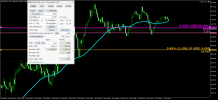

There is something very wrong with this chart. That thin gray line at 4103.300 should be the current Bid price. However, the current candle's Close should always be equal to the current Bid price. Moreover, the Position Sizer always uses the Bid price for sell trades. This means that the Bid price it receives from the server (4100.650) differs quite a lot from the one displayed on the chart (4103.300).FTM😵anda.com MT5 Demo View attachment 39040XAUUSD.sim M5 P1 M5 Sell Entry Stop Loss=ATR 11x2 Didn't Entry Yet With MT5 Position Size EA Stop Loss Line & Entry Line Is below Candle
I'd guess there is something wrong with either the MT5 installation or FTMO's data feed for this symbol. Or perhaps it's a custom symbol?
I understand Thank you for your feed back XAUUSD(Gold) on my FTM😵anda.com Position sizer lines are not in the proper place on the Gold Chart. But The US100(Nasdaq) is fine.There is something very wrong with this chart. That thin gray line at 4103.300 should be the current Bid price. However, the current candle's Close should always be equal to the current Bid price. Moreover, the Position Sizer always uses the Bid price for sell trades. This means that the Bid price it receives from the server (4100.650) differs quite a lot from the one displayed on the chart (4103.300).
I'd guess there is something wrong with either the MT5 installation or FTMO's data feed for this symbol. Or perhaps it's a custom symbol?
What you can try is to to remove the Position Sizer from your XAUUSD chart and enable it to show both Ask and Bid lines and verify if they are displayed correctly. The bid line has to coincide with the current candle's close while both line values should coincide with those displayed in the Market Watch window.I understand Thank you for your feed back XAUUSD(Gold) on my FTM😵anda.com Position sizer lines are not in the proper place on the Gold Chart. But The US100(Nasdaq) is fine.
To display both lines on the chart, press F8 and then tick the Show bid price and Show ask price checkboxes:

Similar threads
- Replies
- 206
- Views
- 57K
- Replies
- 2K
- Views
- 775K

- Replies
- 0
- Views
- 1K
