It's in the menu: Help->About

Also, could you try installing a different MT5 instance from some other broker and verify if the issues (keyboard shortcuts or freezing) persist there? That way we would know whether it's a PS+system or a PS+broker issue.
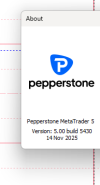
1764662548626.png
Post automatically merged:

It's in the menu: Help->About

Also, could you try installing a different MT5 instance from some other broker and verify if the issues (keyboard shortcuts or freezing) persist there? That way we would know whether it's a PS+system or a PS+broker issue.
Right, I have 2 other MT5 isntalls from different brokers so yeah I'll test it.
 
It's in the menu: Help->About

Also, could you try installing a different MT5 instance from some other broker and verify if the issues (keyboard shortcuts or freezing) persist there? That way we would know whether it's a PS+system or a PS+broker issue.
This is bizarre, It worked fine and then it didn't. Same thing with the first Broker Pepperstone - sometimes it works sometimes it doesn't - Broker FXPRO 1764663652605.png
 
It's in the menu: Help->About

Also, could you try installing a different MT5 instance from some other broker and verify if the issues (keyboard shortcuts or freezing) persist there? That way we would know whether it's a PS+system or a PS+broker issue.
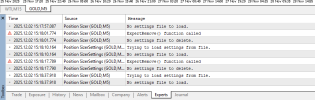
Its just saying no settings file to load. The hotkey issue. Then I load it again and it works. Also -it starts all of a sudden after loading it 5 minutes prior when it wasn't working at first.
 
View attachment 35225
Post automatically merged:


Right, I have 2 other MT5 isntalls from different brokers so yeah I'll test it.
The funny thing is, I am testing all this in exactly the same Pepperstone MT5 Build 5430 MT5. So, it shouldn't be a broker issue.
Its just saying no settings file to load. The hotkey issue. Then I load it again and it works. Also -it starts all of a sudden after loading it 5 minutes prior when it wasn't working at first.
You can ignore the messages about the settings file - they aren't related to this. Like @EnrichWave suggested, please try deleting all .ini and .txt files from the /MQL5/Files/ folder. Before re-loading the Position Sizer. This might help.
 
The funny thing is, I am testing all this in exactly the same Pepperstone MT5 Build 5430 MT5. So, it shouldn't be a broker issue.

You can ignore the messages about the settings file - they aren't related to this. Like @EnrichWave suggested, please try deleting all .ini and .txt files from the /MQL5/Files/ folder. Before re-loading the Position Sizer. This might help.
Remove old settings file that is in the "\MQL5\Files" folder then check it please.
That seems to have fixed it! Thank You!
 
  • 🎉
Reactions: Enivid