Yes happens when I risk any %. Although this morning it was working on EURUSD, but now it isn't. I think yo ucan set up a trial account with Alpha to test it with?Yes, that's it. Looks like a bug in the Position Sizer, MetaTrader 5, or broker's server configuration. Unfortunately, I cannot test this on their Pro account. Do you get the same error when trying to open a slightly smaller or larger trade (0.49 or 0.51)?


Position Sizer
- Thread starter Enivid
- Start date
- Watchers 474
You are using an out of date browser. It may not display this or other websites correctly.
You should upgrade or use an alternative browser.
You should upgrade or use an alternative browser.

Yes, I can, but it looks like automated trading is disabled server-side on trial accounts.Yes happens when I risk any %. Although this morning it was working on EURUSD, but now it isn't. I think yo ucan set up a trial account with Alpha to test it with?
UPDATE: After a few back and forth DM's between myself and Enivid, we managed to get to the bottom of this issue.Yes, I can, but it looks like automated trading is disabled server-side on trial accounts.
I had enabled the 'CalculateUnadjustedPositionSize' to true because I though it could be more accurate and it seems my prop firm broker has restrictions on the lot size input. I put this setting back to false and the EA started taking trades again!
Once again thank you for your support, Enivid.
Thanks, bro. Your additional code solved my problem, panel position constantly changing when I set x = -60 and y = -30 to save space on my old monitor. Also, big thanks to enivid for providing the best open position management tools on the planet.Problem
Position Sizer allows configuring which corner of the chart the panel should be placed through the PanelPositionCorner input, with options for all four corners: upper left, upper right, lower left, and lower right.
When setting the panel anchor to the right side of the chart, in a dual monitor setup, a positioning problem was identified. MetaTrader at normal size (when opening the program) opens on monitor 1 (left). When resizing the MetaTrader window to the right side (occupying monitor 2), the panel position did not follow correctly, ending up in different positions with each window size change.
The original EA behavior of saving each interface position change to the INI file also made it difficult to keep the panel in the same place when resizing the window. With each resize, a new (incorrect) position was saved, and that position was used as reference for the next calculation, creating inconsistency. Additionally, the constant I/O to the INI file brought some delay during transitions.
With the anchor on the left side, the problem did not occur, since the left corner of the chart remains fixed when the window is expanded to the right.
Solution
I added the LockPanelToCorner input that allows the user to choose between two behaviors:
false (default): Original behavior maintained — position is saved to INI file and panel can be dragged freely
true: Panel always calculates its position from the configured inputs (PanelPositionX, PanelPositionY, PanelPositionCorner), correctly following window resizing without saving to INI
This way I preserved the original code and logic for those who prefer the EA working the previous way, while I offered the new option for those who face the positioning problem.
Please I used it and passed an account. The prop firm is requesting for the source code and set files of the EA. Please how do I get it
The source code is available in the archive file that you downloaded to install the Position Sizer. Look for the Position Sizer subfolder in your \MQL5\Experts\ folder.Please I used it and passed an account. The prop firm is requesting for the source code and set files of the EA. Please how do I get it

Which firm are you using?. Just tell them that you are using EA to manage the positions.Thanks, bro. Your additional code solved my problem, panel position constantly changing when I set x = -60 and y = -30 to save space on my old monitor. Also, big thanks to enivid for providing the best open position management tools on the planet.
BR
Hello admin, everytime I try locking my position sizer to 1:2RR it never gives me 1:2RR and I have it locked to 2RR and when I lock it I always get 1:1.7/ or1.6 how do I fix that and I’m aware every time price move the EA needs to adjust but it not even close I’m expecting 1:1.98 or something near but is far off
Please show a screenshot of this. Most likely, this has to do with the commission. If you have non-zero commission and you want fixed TP/SL ratio to be the same as without the commission, then you need to set the UseCommissionToSetTPDistance input parameter to true.Hello admin, everytime I try locking my position sizer to 1:2RR it never gives me 1:2RR and I have it locked to 2RR and when I lock it I always get 1:1.7/ or1.6 how do I fix that and I’m aware every time price move the EA needs to adjust but it not even close I’m expecting 1:1.98 or something near but is far off

In this version, with minor customizations for my personal use, I've rearranged the input parameters.


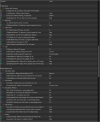

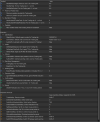
Attached File(s)
-
 Position_Sizer_Layout_Structure.pdf 1.3 MB · Views: 2
 -
 Position_Sizer_Layout_Flowchart.txt 21.4 KB · Views: 1
 -
 Position_Sizer_Input_Parameters_NEW_LAYOUT.docx 13.2 KB · Views: 1
Last edited:
Yeah it has something to do with the commission, how do I make it give me 1:2RR with commissionPlease show a screenshot of this. Most likely, this has to do with the commission. If you have non-zero commission and you want fixed TP/SL ratio to be the same as without the commission, then you need to set the UseCommissionToSetTPDistance input parameter to true.
Attached File(s)

You need to set the UseCommissionToSetTPDistance input parameter to true.Yeah it has something to do with the commission, how do I make it give me 1:2RR with commission
ThanksYou need to set the UseCommissionToSetTPDistance input parameter to true.
MT5 Build 5570 that was released yesterday makes
ChartTimePriceToXY function very slow. It is extensively used in the Position Sizer's code to draw line labels. If you experience problems with the Position Sizer in new the version of MetaTrader 5, please disable text labels (setting the ShowMainLineLabels input parameter to false) as a temporary measure. I will try to release a hotfix to circumvent this issue as soon as possible.Is it just me that experiencing mt5 being very slow and there’s nothing wrong with my laptop everything else is running fine but mt5 is just being very slowMT5 Build 5570 that was released yesterday makesChartTimePriceToXYfunction very slow. It is extensively used in the Position Sizer's code to draw line labels. If you experience problems with the Position Sizer in new the version of MetaTrader 5, please disable text labels (setting the ShowMainLineLabels input parameter to false) as a temporary measure. I will try to release a hotfix to circumvent this issue as soon as possible.
Yes, Build 5570 is definitely somewhat slower.Is it just me that experiencing mt5 being very slow and there’s nothing wrong with my laptop everything else is running fine but mt5 is just being very slow
The current best solution to builds 5570/5571 freezing is setting the Labels Font Face parameter to Arial or Tahoma. The performance is issue is happening only with some fonts. Unfortunately, it happens with the default Courier font as well.
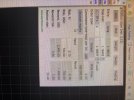
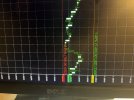
If you want the commission to be taken into account when setting the TP, please set the UseCommissionToSetTPDistance input parameter to true.Why is it not giving me exactly 1:2RR, that a 1:2.5RR how do I fix this?
My problem is that my distance from TP is not 1:2 is more and I will be in the trade longer for smaller profitIf you want the commission to be taken into account when setting the TP, please set the UseCommissionToSetTPDistance input parameter to true.
Similar threads
- Replies
- 205
- Views
- 54K

- Replies
- 2K
- Views
- 765K

- Replies
- 0
- Views
- 1K
