

Position Sizer
- Thread starter Enivid
- Start date
- Watchers 483
You are using an out of date browser. It may not display this or other websites correctly.
You should upgrade or use an alternative browser.
You should upgrade or use an alternative browser.

Thank you so much  Envid Thank you so much for your Feedback & good & wonderful suggestions of using and inputting both the Bid & Ask line in the properties Settings Of The FTM😵anda.com MT5 Demo Platform. Now The Position- Sizer EA Entry Lines, Stop Loss Lines & Take Profits Lines is in the proper location and order Stop Loss Line is above the Current Candle of Sell Trades that are initiated on the XAUUSD(Gold) Pair. All is well & Gratitude.
Envid Thank you so much for your Feedback & good & wonderful suggestions of using and inputting both the Bid & Ask line in the properties Settings Of The FTM😵anda.com MT5 Demo Platform. Now The Position- Sizer EA Entry Lines, Stop Loss Lines & Take Profits Lines is in the proper location and order Stop Loss Line is above the Current Candle of Sell Trades that are initiated on the XAUUSD(Gold) Pair. All is well & Gratitude.
Last edited:

Hi, I downloaded the ver.3.15 and applied it to trade the indice ( SP500) in CFD, found out that the price which the "instant" mode picked is wrong, and it would not move along with the market. Due to that, It used the wrong order type to trade in "Pending" mode, fail to execute trade. Please take a look. THX
Last edited:

What build of MT5 are you using? Can you enable showing both Ask and Bid lines in your chart settings and post here a screenshot with the Position Sizer attached?Hi, I downloaded the ver.3.15 and applied it to trade the indice ( SP500) in CFD, found out that the price which the "instant" mode picked is wrong, and it would not move along with the market. Due to that, It used the wrong order type to trade in "Pending" mode, fail to execute trade. Please take a look. THX
MT5 Build 6090What build of MT5 are you using? Can you enable showing both Ask and Bid lines in your chart settings and post here a screenshot with the Position Sizer attached?

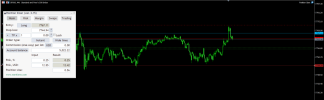
Yes, it looks completely decoupled. And what does the Market Watch Ask show for SP500? Is it the same as the Ask line's value or as the Entry line's value?
Also, when does this happen? Does this behavior start immediately as you attach the Position Sizer to a chart or does it start after some event?
Oh, I figured it out. The issue related to the old v.3.13. I have to restart the platform after replaced it by the new version 3.15.Yes, it looks completely decoupled. And what does the Market Watch Ask show for SP500? Is it the same as the Ask line's value or as the Entry line's value?
Also, when does this happen? Does this behavior start immediately as you attach the Position Sizer to a chart or does it start after some event?
Problem solve.
Thank you so much.

Hello,
Lately been having the same issue as the previous poster. I think, this started happening after recent MT5 updates over last couple of weekends or so, Build 6090 on FTMO.
It happens immediately after account is changed, Instant Order line stops following current price and pending order lines get somewhat out of whack too when in closer proximity to price, like Sell Limit below current price.
Everything goes back to normal when Terminal is restarted, but only until the next account change.
View attachment 2026-08-12_03-58-30.mp4

Lately been having the same issue as the previous poster. I think, this started happening after recent MT5 updates over last couple of weekends or so, Build 6090 on FTMO.
It happens immediately after account is changed, Instant Order line stops following current price and pending order lines get somewhat out of whack too when in closer proximity to price, like Sell Limit below current price.
Everything goes back to normal when Terminal is restarted, but only until the next account change.
View attachment 2026-08-12_03-58-30.mp4
Yes, there's a bug in 6090. The only solution right now is to restart the platform when this happens.Hello,
Lately been having the same issue as the previous poster. I think, this started happening after recent MT5 updates over last couple of weekends or so, Build 6090 on FTMO.
It happens immediately after account is changed, Instant Order line stops following current price and pending order lines get somewhat out of whack too when in closer proximity to price, like Sell Limit below current price.
Everything goes back to normal when Terminal is restarted, but only until the next account change.
View attachment 39285
View attachment 39286
Position Sizer EA v3.15 on MT5 — "trade disabled" when pressing Trade
When I press the Trade button, the EA logs:
CTrade::OrderSend: market buy 0.05 EURUSD sl: 1.15324 tp: 1.16123 [trade disabled]
Error sending order: trade disabled.
What I have already checked:
- Global Algo Trading is ON. The Journal confirms "automated trading is enabled".
- "Allow Algo Trading" is checked in the EA properties (Common tab).
- Manual order placement via F9 on the same symbol works fine.
- Removing the EA and re-attaching it does not help.
- Restarting MT5 does not help.
- All limits on the Trading tab are 0 / 0.00, "Disable trading when lines are
hidden" is unchecked.
Broker: OANDA TMS Brokers S.A. demo account (server OANDATMS-MT5), hedging account,
EUR denominated. Symbol EURUSD, H4 chart.
Which check in the EA produces the "[trade disabled]" flag? I cannot find anything
else that is switched off.
When I press the Trade button, the EA logs:
CTrade::OrderSend: market buy 0.05 EURUSD sl: 1.15324 tp: 1.16123 [trade disabled]
Error sending order: trade disabled.
What I have already checked:
- Global Algo Trading is ON. The Journal confirms "automated trading is enabled".
- "Allow Algo Trading" is checked in the EA properties (Common tab).
- Manual order placement via F9 on the same symbol works fine.
- Removing the EA and re-attaching it does not help.
- Restarting MT5 does not help.
- All limits on the Trading tab are 0 / 0.00, "Disable trading when lines are
hidden" is unchecked.
Broker: OANDA TMS Brokers S.A. demo account (server OANDATMS-MT5), hedging account,
EUR denominated. Symbol EURUSD, H4 chart.
Which check in the EA produces the "[trade disabled]" flag? I cannot find anything
else that is switched off.
Neither check produces that error. It's the server response that the EA receives when sending an order. Please make sure that automated trading is enabled on the server for EURUSD.Position Sizer EA v3.15 on MT5 — "trade disabled" when pressing Trade
When I press the Trade button, the EA logs:
CTrade::OrderSend: market buy 0.05 EURUSD sl: 1.15324 tp: 1.16123 [trade disabled]
Error sending order: trade disabled.
What I have already checked:
- Global Algo Trading is ON. The Journal confirms "automated trading is enabled".
- "Allow Algo Trading" is checked in the EA properties (Common tab).
- Manual order placement via F9 on the same symbol works fine.
- Removing the EA and re-attaching it does not help.
- Restarting MT5 does not help.
- All limits on the Trading tab are 0 / 0.00, "Disable trading when lines are
hidden" is unchecked.
Broker: OANDA TMS Brokers S.A. demo account (server OANDATMS-MT5), hedging account,
EUR denominated. Symbol EURUSD, H4 chart.
Which check in the EA produces the "[trade disabled]" flag? I cannot find anything
else that is switched off.
One small note, the EA is trying to trade EURUSD, but perhaps the symbol should be called something else? Like EURUSD.r or EURUSD.s - brokers sometimes have separate symbols for trading.
Hi there! I'm having issues in Metatrader 5 recently. When the Order type is set to Instant, the entry line follows the asset, but when I change account it freezes and the Entry line no longer follows the price., and when I toggle the order type it will not follow the price again. I have to close MT5 and reopen it again for the entry line to follow the price, but again when I change account it freezes. Any fix for this? I uninstalled Position Sizer and installed it again (Version 3.15 for MT5), but still the same issue.
Please see this post:Hi there! I'm having issues in Metatrader 5 recently. When the Order type is set to Instant, the entry line follows the asset, but when I change account it freezes and the Entry line no longer follows the price., and when I toggle the order type it will not follow the price again. I have to close MT5 and reopen it again for the entry line to follow the price, but again when I change account it freezes. Any fix for this? I uninstalled Position Sizer and installed it again (Version 3.15 for MT5), but still the same issue.
Yes, there's a bug in 6090. The only solution right now is...Hello,
Lately been having the same issue as the previous poster. I think, this started happening after recent MT5 updates over last couple of weekends or so, Build 6090 on FTMO.
It happens immediately after account is changed, Instant Order line stops following current price and pending order lines get somewhat out of whack too when in closer proximity to price, like Sell Limit below current price.
Everything goes back to normal when Terminal is restarted, but only until the next account change.
View attachment 39285
View attachment 39286
- 👍
Thanks for the quick response. I actually searched for the issue in the search box and couldn't find anything related, and it was just above. Thanks!Please see this post:
Yes, there's a bug in 6090. The only solution right now is...Hello,
Lately been having the same issue as the previous poster. I think, this started happening after recent MT5 updates over last couple of weekends or so, Build 6090 on FTMO.
It happens immediately after account is changed, Instant Order line stops following current price and pending order lines get somewhat out of whack too when in closer proximity to price, like Sell Limit below current price.
Everything goes back to normal when Terminal is restarted, but only until the next account change.
View attachment 39285
View attachment 39286
- 👍
Thank you so much View attachment 39086Envid Thank you so much for your Feedback & good & wonderful suggestions of using and inputting both the Bid & Ask line in the properties Settings Of The FTM😵anda.com MT5 Demo Platform. Now The Position- Sizer EA Entry Lines, Stop Loss Lines & Take Profits Lines is in the proper location and order Stop Loss Line is above the Current Candle of Sell Trades that are initiated on the XAUUSD(Gold) Pair. All is well & Gratitude.
Hi, I downloaded the ver.3.15 and applied it to trade the indice ( SP500) in CFD, found out that the price which the "instant" mode picked is wrong, and it would not move along with the market. Due to that, It used the wrong order type to trade in "Pending" mode, fail to execute trade. Please take a look. THX
The issue should now be completely gone in the most recent MT5 update - Build 6140.Hi there! I'm having issues in Metatrader 5 recently. When the Order type is set to Instant, the entry line follows the asset, but when I change account it freezes and the Entry line no longer follows the price., and when I toggle the order type it will not follow the price again. I have to close MT5 and reopen it again for the entry line to follow the price, but again when I change account it freezes. Any fix for this? I uninstalled Position Sizer and installed it again (Version 3.15 for MT5), but still the same issue.
Position Sizer version 3.16 has been released. Some new features have been implemented and several bugs have been fixed:
- Added basic support for Strategy Tester backtesting in MT5.
- Added automatic commission retrieval from the broker's server in MetaTrader 5 version. It is now a default method. Set AutoCommission to false to disable.
- Added an option (HideMoneyAndPointsValues) to hide all risk and reward values in points and currency units, leaving only percentage values. (@mahday12)
- Added an option (ConvertToPendingIfMaxMinEntrySLFails) to convert an instant (market) order to a pending (stop or limit) one when maximum or minimum distance from entry to stop-loss (set via the Trading tab) fails its check.
- Added an option (StopLimitDistanceInPoints) for the Stop-Limit price to be changed to distance in points for MT5 Stop-Limit orders. (@juiceofdoom)
- Added new trade error return codes to errordescription.mqh in MT5.
- Changed spread adjustment checkboxes to buttons that now work in all modes (not only ATR-based).
- Changed the max margin fuse on the Trading tab to respect the LessRestrictiveMaxLimits input setting. (@EnrichWave)
- Changed margin utilization to ignore pending orders' margin.
- Fixed a minor glitch in label positioning in MT4.
- Fixed a bug with TP line becoming selected in TP-locked-on-SL mode sometimes. (@EnrichWave)
- Fixed a small bug with SL label/button not changing correctly when switching between distance and level using a hotkey.
- Fixed a bug in the MT5 version when breakeven and trailing stop functions could use point and digits values of an incorrect symbol.
- Fixed a glitch when breakeven lines could stay on the chart after disabling the breakeven (by setting it to zero).
- Fixed a minor bug with Stop-Limit price and its normalization.

Similar threads
- Replies
- 206
- Views
- 57K
- Replies
- 2K
- Views
- 771K

- Replies
- 0
- Views
- 1K
