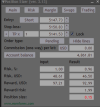
Hello, does anyone know why every time I add the Position Sizer to my charts, MetaTrader starts to freeze/crash?

I've tried it on 3 different MetaTrader versions. All 3 start freezing when I add the Position Sizer.
If I delete the EA, MetaTrader works normally.

The Position Sizer always worked fine, but last week my MetaTrader started to become very very slow.
Then I discovered that if I delete the Position Sizer from the chart, MetaTrader starts working fine again.

Does anyone know why?

Thank you.
https://www.earnforex.com/forum/goto/post?id=252713
 
Hello. I tried to install "Position Sizer" EA. After I press the "compile" button in the toolbox I get 100 errors and 73 warnings. Can you help me? Thank you
 
Hello. I tried to install "Position Sizer" EA. After I press the "compile" button in the toolbox I get 100 errors and 73 warnings. Can you help me? Thank you
You need to make sure you copied all the files and folders from the archive into a separate subfolder of your MQL5\Experts\ folder.
Also, make sure you are compiling Position Sizer.mq5 and not Position Sizer.mqh.
 
hi, im having an small problem with de panel in mt4, the candles overlap the panel
 

Attachments

  • 1771378108220.png
    1771378108220.png
    28.6 KB · Views: 7
Last edited:
hi, im having an small problem with de panel in mt4, the candles overlap the panel
Check the chart setting, Press F8 (or right click on the chart then properties), in the common tab uncheck the "Chart on foreground"

or

If you are using any other Indicator/EA that may automatically enables the charts on foreground.
 
  • 👍
Reactions: Enivid
View attachment 36270
Why won't the position sizer let me open a trade? Can you help me?
It won't let you open a trade how? What does it say in the Experts tab log when you try to open a trade? Most likely, you just don't have enough margin for that trade.
The tight stop loss is causing a margin error. My balance isn't enough for that position size. Thanks
 
Position Sizer has been updated to version 3.14. It implements quite a few changes:
  • Added an option to display margin utilization information on the Margin tab (the Show additional margin settings/info? parameter). This can be useful when trading with some prop firms who restrict how much margin can be used by your trades. (@EnrichWave)
  • Added an option to restrict position opening based on total margin utilization, per-symbol margin utilization, or margin utilization of the currently calculated position. (@EnrichWave)
  • Added an option to append current account balance to order commentary when a trade is taken (the CommentBalance parameter). (Via GitHub)
  • Improved performance by optimizing the text label drawing function.
  • Changed the MT5 version to work with GetTickCount64 function to avoid the internal timer overflowing.
  • Fixed how hotkeys work so that they would still trigger when a non-English keyboard layout is used. (@smart4trader)
  • Fixed dummy horizontal line objects appearing on the chart. (@cacb)
  • Fixed a bug when margin calculations weren't carried out when the panel was minimized. (Via GitHub)
  • Fixed the display of line labels going off-screen on HiDPI screens in MT5. (@Mike3)
Please download, test, and let me know if there are some issues with this version.
 
  • 🎉
Reactions: EnrichWave
Is there a way I can automatically calculate my breakeven number and always use half way of the TP Instead of calculating it in my head or dividing it by 2
 
Dear Enivid,

Kindly have SL lock option. Let me explain in detail so you will understand exactly what I like to suggest. We have TP lock near end of the TP input text box which always will lock to the TP Multiplier with SL value.. like the same.... trader can input value in the point value of the SL (Initially it can take value from the Default SL value in point input value, if trader need to change he/she can change it, if trader click on the SL button it can get the default points from the input Default SL value, in points.. If the both value is locked.. While trader move the Entry line.. the both (SL,TP) will follow


image.png
 
Last edited:
Is there a way I can automatically calculate my breakeven number and always use half way of the TP Instead of calculating it in my head or dividing it by 2
Yes, you can set the TP multiplier to 0.5 and use the TP button to set your take-profit.
Dear Enivid,

Kindly have SL lock option. Let me explain in detail so you will understand exactly what I like to suggest. We have TP lock near end of the TP input text box which always will lock to the TP Multiplier with SL value.. like the same.... trader can input value in the point value of the SL (Initially it can take value from the Default SL value in point input value, if trader need to change he/she can change it, if trader click on the SL button it can get the default points from the input Default SL value, in points.. If the both value is locked.. While trader move the Entry line.. the both (SL,TP) will follow

image.png
That offers only a minor advantage over the currently available option for switching the SL to points. It does so at the price of cluttering/complicating the main tab even more. I am not convinced that it will be an overall improvement for the PS.
 
Yes, you can set the TP multiplier to 0.5 and use the TP button to set your take-profit.

That offers only a minor advantage over the currently available option for switching the SL to points. It does so at the price of cluttering/complicating the main tab even more. I am not convinced that it will be an overall improvement for the PS.
What you mean, I want to automatically go breakeven when price reach half way from my TP, instead of me putting number in the break even input is there a way I can just add it in the settings
 
What you mean, I want to automatically go breakeven when price reach half way from my TP, instead of me putting number in the break even input is there a way I can just add it in the settings
Sorry, I thought you wanted your TP at the half R distance. No, for breakeven, there is no such option.
 
Sorry, I thought you wanted your TP at the half R distance. No, for breakeven, there is no such option.
Could you guys add it in the future, I believe this feature could help a lot especially traders who needs to go breakeven and don’t have time to calculate the numbers that required them to go breakeven at a certain point
 
Could you guys add it in the future, I believe this feature could help a lot especially traders who needs to go breakeven and don’t have time to calculate the numbers that required them to go breakeven at a certain point
Enivid created this PS EA to manage the positions/orders sizing for Risk Management. It seems that is different concept of trades management.. I hope it needs different EA development.

That offers only a minor advantage over the currently available option for switching the SL to points. It does so at the price of cluttering/complicating the main tab even more. I am not convinced that it will be an overall improvement for the PS.
OKay Enivid. Now the Fonts problem fixed?. Any fonts we can set?.
 
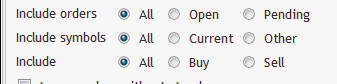
Enivid the Margin calculation doesn't have option include the pending orders which is very much needed.... Also you can move the Risk calculation for the margin things to Risk Tab, so you can make it for all the rest of the calculations with the radio button options (Trader use the margin related calculations to calculate the Risk)
1772116818864.png
 
Last edited:
OKay Enivid. Now the Fonts problem fixed?. Any fonts we can set?.
If you updated your MT5 to Build 5574 or newer, all fonts should work fine.
Enivid the Margin calculation doesn't have option include the pending orders which is very much needed.... Also you can move the Risk calculation for the margin things to Risk Tab, so you can make it for all the rest of the calculations with the radio button options (Trader use the margin related calculations to calculate the Risk)
View attachment 36342
I will consider that for the future versions.
 
  • 👍
Reactions: EnrichWave