Is there a way I can turn off the EA function and just use the calculator? My prop firm which is equity edge don’t allow ea but the position sizer is not really a ea I only use it to calculate my risk very quick


Position Sizer
- Thread starter Enivid
- Start date
- Watchers 487
You are using an out of date browser. It may not display this or other websites correctly.
You should upgrade or use an alternative browser.
You should upgrade or use an alternative browser.

Disable the Live trading in MT4, Algo Trading in MT5 in Common tab, while you loading the EA,Is there a way I can turn off the EA function and just use the calculator? My prop firm which is equity edge don’t allow ea but the position sizer is not really a ea I only use it to calculate my risk very quick
Autotrading should be disabled MetaTrader 4, Algo trading in MT5
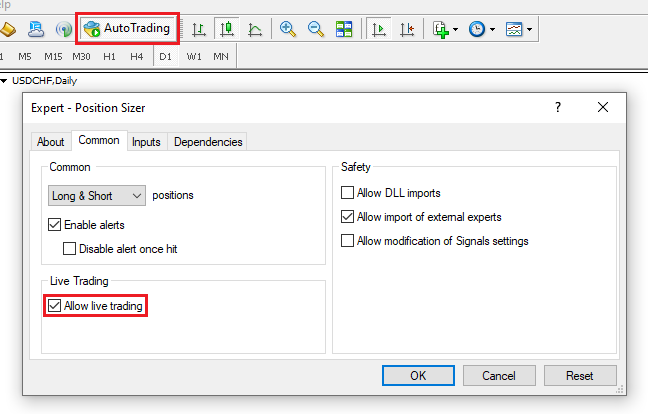
MetaTrader 5:
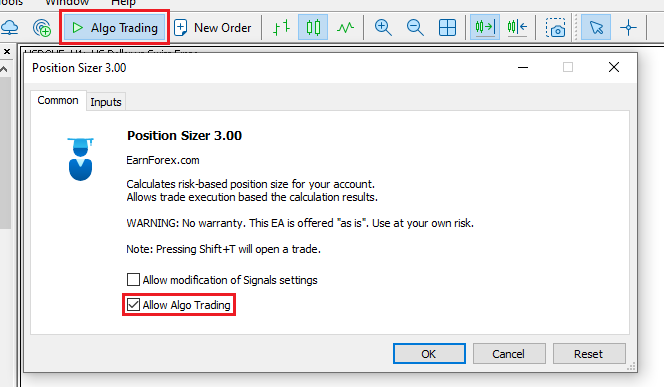
Simple to understand from the scrnshot just reverse it not to work with the EA

If your prop firm doesn't allow attaching EAs to charts at all - even Position Sizer - you can use the indicator version of it:Is there a way I can turn off the EA function and just use the calculator? My prop firm which is equity edge don’t allow ea but the position sizer is not really a ea I only use it to calculate my risk very quick
https://github.com/EarnForex/PositionSizer/releases/tag/2.42
Unfortunately, it is very old and might not be very accurate.
I recommend talking to your prop firm about allowing Position Sizer.

Two days ago, something started happening: when the indicator is active, MT5 lags completely. This has never happened before, but when I turn it off, it goes back to normal. I also have it in MT4 and it doesn't have this problem.
Please read at least last few posts in the thread before reporting the same issue that has already been reported several times (and got answers).Two days ago, something started happening: when the indicator is active, MT5 lags completely. This has never happened before, but when I turn it off, it goes back to normal. I also have it in MT4 and it doesn't have this problem.


it may happen if you have set the profile folder read only mode. Just create a new profile and save it in different name.. while you load the EA, change the Font. That's it.But every time I load the position sizer I have to change it back or load the profile.
Anyway I right clicked on position sizer > modify > ctlr +f to open find window , search "Courier" and replaced with "Arial" hit save and then build menu > compile

Hello I had the issue of MT5 freezing and unistall and reinstall everything and no more issues. But now the hotkeys are not being detected, the only hotkey that worked is the Tab Key to change the type of position from short to long or viceversa. Thank you!
Hello I had the issue of MT5 freezing and unistall and reinstall everything and no more issues. But now the hotkeys are not being detected, the only hotkey that worked is the Tab Key to change the type of position from short to long or viceversa. Thank you!
Remove old settings file that is in the "\MQL5\Files" folder then check it please.Its just saying no settings file to load. The hotkey issue. Then I load it again and it works. Also -it starts all of a sudden after loading it 5 minutes prior when it wasn't working at first.
Were you using English keyboard layout when you tried the hotkeys?Hello I had the issue of MT5 freezing and unistall and reinstall everything and no more issues. But now the hotkeys are not being detected, the only hotkey that worked is the Tab Key to change the type of position from short to long or viceversa. Thank you!
Could you please provide more information on how to reproduce this? Because I've tested this and the BE lines get deleted automatically by the Position Sizer.Position Sizer:盈亏平衡线,交易通过手动平仓或者脚本平仓,盈亏平衡线在平仓后不自动删除。Position Sizer: The break-even line, trades are closed manually or scripted, and the break-even line is not automatically deleted after the position is closed.
It worked thank you!Remove old settings file that is in the "\MQL5\Files" folder then check it please.Its just saying no settings file to load. The hotkey issue. Then I load it again and it works. Also -it starts all of a sudden after loading it 5 minutes prior when it wasn't working at first.
Hi Team !
Position sizer 3.13 : Can you enter the number of extra points to add to the breakeven level if you want to capture some minimum profit with the trade. This value is important because when breakeven is occured the SL price reach entry price (same price), if you have commission fee, thus your profit is negative ? Thank you!
Position sizer 3.13 : Can you enter the number of extra points to add to the breakeven level if you want to capture some minimum profit with the trade. This value is important because when breakeven is occured the SL price reach entry price (same price), if you have commission fee, thus your profit is negative ? Thank you!
No, there is no such a feature and it's not likely to be implemented.Hi Team !
Position sizer 3.13 : Can you enter the number of extra points to add to the breakeven level if you want to capture some minimum profit with the trade. This value is important because when breakeven is occured the SL price reach entry price (same price), if you have commission fee, thus your profit is negative ? Thank you!
I should not work like that.Is there a way to keep the SL and TP lines from moving after I’ve placed them? I’ve noticed that when I drag them to my desired levels, they often snap back to their original positions even though the “Lock” option is turned off.
May be some settings mingled with old settings. Just remove old settings file that is in the "\MQL5\Files" folder then load the EA with default settings and check it please.

Hello mates, When I use the position sizer, I enter $200 in the Input Risk USD field, but in the Result section it shows $139. In other words, it doesn’t open the trade with the risk amount I want. Has anyone else experienced this? What could be the reason or the solution? Because of this, I can’t risk the amount I want in my trades. I’m using MT5, and when I drag the stop-loss, the risk amount I entered keeps changing. It doesn’t change a little — it changes a lot. 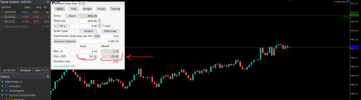

Yep, that was it. I was using an old preset from an earlier version. It is working perfect now. Won't be doing that anymore. Thank you! 🙂I should not work like that.
May be some settings mingled with old settings. Just remove old settings file that is in the "\MQL5\Files" folder then load the EA with default settings and check it please.
Hey there,,, If you enter 0.03 for that much SL, it would go to above $200. So, it always keeps the lot size less to match within the risk parameter which makes the $ amount less. Use any major currency pair with less SL you will see very near risk $.Hello mates, When I use the position sizer, I enter $200 in the Input Risk USD field, but in the Result section it shows $139. In other words, it doesn’t open the trade with the risk amount I want. Has anyone else experienced this? What could be the reason or the solution? Because of this, I can’t risk the amount I want in my trades. I’m using MT5, and when I drag the stop-loss, the risk amount I entered keeps changing. It doesn’t change a little — it changes a lot. View attachment 36103
Last edited:
Similar threads
- Replies
- 206
- Views
- 59K
- Replies
- 2K
- Views
- 780K

- Replies
- 0
- Views
- 1K
