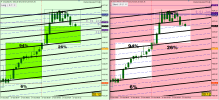
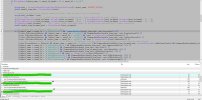
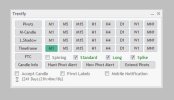
I more or less understand what the stuff on the margin tab.
oh!. Sorry, It was my misunderstand. It should be on the Risk tab instead of the Margin tab, to view the current positions /pending orders Margin Risks..
Kindly check the screenshots, (I updated the screenshot with the old one I shared with you)
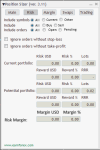
RM Scrnt.png
what do those input fields on the Main tab do? For example, the trader enters 5 in the Risk Margin % field. What effect would it have?
lets say an example, The balance is 10K and the symbol is EURUSD and the leverage for that is 1:100, the lot size should be adjusted to 0.43 while the EURUSD price is 1.16248 which mean, the Required margin USD is $499.87 (around 500 USD) = 5%

if the leverage is 1:50 for the same scenario the lot size should be adjusted to 0.21 that mean, the Required margin USD is $488.24 (around 500 USD) = 5%
 
oh!. Sorry, It was my misunderstand. It should be on the Risk tab instead of the Margin tab, to view the current positions /pending orders Margin Risks..
Kindly check the screenshots, (I updated the screenshot with the old one I shared with you)

View attachment 34662

lets say an example, The balance is 10K and the symbol is EURUSD and the leverage for that is 1:100, the lot size should be adjusted to 0.43 while the EURUSD price is 1.16248 which mean, the Required margin USD is $499.87 (around 500 USD) = 5%

if the leverage is 1:50 for the same scenario the lot size should be adjusted to 0.21 that mean, the Required margin USD is $488.24 (around 500 USD) = 5%
Not sure why do you call that a risk? It's more like a margin limiter? So, like a restriction on a position size to not exceed some given margin % or $ value, no?
 
It's more like a margin limiter? So, like a restriction on a position size to not exceed some given margin % or $ value, no?
Yes correct. Even if trader don't have limiting ability for the margin option in the trading tab, he can check the risk tab for the margin risks and limit himself.
 
Would it be possible to include an automatic break even point based on custom RR choice? (for example: move to break even when Price reaches 1R from the original stop loss placement).
If yes, could it also be set in such a way to move slightly above true break even, so to cover fees/commissions/potential spread/potential slippage?
Post automatically merged:

Also is there a setting to enter a position with more lots than the lot size limit per ticket imposed by brokers? (blackbull markets allows 50 lots per opened position - however you could enter more trades as long as the margin allows). Would be nice if you can enter in your risk, even if above lot size limit per ticket (not above lot size limit by margin), and split all the opened positions equally, at once, instead of entering many trades manually (150 lots needed per position - open 3 positions at 50 lots each)
 
Also is there a setting to enter a position with more lots than the lot size limit per ticket imposed by brokers? (blackbull markets allows 50 lots per opened position - however you could enter more trades as long as the margin allows). Would be nice if you can enter in your risk, even if above lot size limit per ticket (not above lot size limit by margin), and split all the opened positions equally, at once, instead of entering many trades manually (150 lots needed per position - open 3 positions at 50 lots each)
Yes, there is the SurpassBrokerMaxPositionSize input parameter for that.
 
I have 2 suggestions.


1 - Buffer Pips for Breakeven (can be positive or negative)
2 - Pending Order Line Type: Horizontal or TrendLine (just for entry point, the EA can monitor price to send market execution order when price touch the trendline or modify the server pending order entry point every new bar....)

As you can see in my HUD, I trade 2 accounts same time and strategy is channels based structured, so will be ACE Tool if possible to add buffer pips for breakeven and most wanted feature for me is pending order type TrendLine design

1760674394833.png
 
Last edited:
I have 2 suggestions.


1 - Buffer Pips for Breakeven (can be positive or negative)
2 - Pending Order Line Type: Horizontal or TrendLine (just for entry point, the EA can monitor price to send market execution order when price touch the trendline or modify the server pending order entry point every new bar....)

As you can see in my HUD, I trade 2 accounts same time and strategy is channels based structured, so will be ACE Tool if possible to add buffer pips for breakeven and most wanted feature for me is pending order type TrendLine design

View attachment 34747
Thank you for the suggestion, but there are specialized EAs for complex breakeven strategies and for trendline entries. These features won't likely be added to the Position Sizer.
 
hi everyone , i have a question.
what does the IgnoreMarketExecutionMode do exactly?
At some brokers, when execution mode is set to SYMBOL_TRADE_EXECUTION_MARKET, a trade cannot be opened with SL and TP on it. It should first be opened without SL/TP, and then SL/TP can be added to it. But most brokers nowadays ignore this limitation and let you set SL/TP during the opening even when the mode is SYMBOL_TRADE_EXECUTION_MARKET. IgnoreMarketExecutionMode in true, makes the position sizer ignore execution mode and always assign SL/TP during the opening. You should only set it to false when trade opening fails at your broker.
 
  • 👍
Reactions: paymanz
Hi, I love the EA. But is it possible to manually set SL and use Spread adjustment tool without using ATR? I don't want the spread adjusted stop loss to keep moving because of the ATR.
 
Hi, I love the EA. But is it possible to manually set SL and use Spread adjustment tool without using ATR? I don't want the spread adjusted stop loss to keep moving because of the ATR.
No, it will set the SL exactly where you tell it to set. You can subtract the spread on your own when you are setting it.
 
Hi dear developers,

First of all, I want to thank you for developing such a professional panel with great money management features — I really appreciate your work.
And also, thank you so much for sharing the source code with us.

I was exploring the code to add another tab for my own features, next to the “Main” and “Trading” tabs.
But after compiling, I ran into this error:

MQL4:
'CompareDoubles' - ambiguous call to overloaded function with the same parameters    TesterSupport.mqh    69    68

While compiling in MQL4, I got 9 errors in total, all related to how the CompareDoubles method is used.
It seems that there’s a misuse or wrong parameter type somewhere.

I did some research but couldn’t find any clear answer, so I decided to ask here.
I’d really appreciate it if someone could help me fix these compile errors.

Also, I have a small suggestion based on my own needs (maybe others would like it too):
It would be great if we could have a Two entry option.
For example, the first entry is the main trade with a specific R:R (let’s say 1:5 and 1% risk).
The second entry could be somewhere between the main entry and the stop loss — let’s say at 30% closer to the SL — with a smaller risk (like 0.1%) and its own take profit.

Thanks again for your time and awesome work!
 

Attachments

  • Screenshot 2025-10-29 090546.jpg
    Screenshot 2025-10-29 090546.jpg
    316.4 KB · Views: 5
I was exploring the code to add another tab for my own features, next to the “Main” and “Trading” tabs.
But after compiling, I ran into this error:

MQL4:
'CompareDoubles' - ambiguous call to overloaded function with the same parameters TesterSupport.mqh 69 68

While compiling in MQL4, I got 9 errors in total, all related to how the CompareDoubles method is used.
It seems that there’s a misuse or wrong parameter type somewhere.

I did some research but couldn’t find any clear answer, so I decided to ask here.
I’d really appreciate it if someone could help me fix these compile errors.
What Build of MT4 MetaEditor do you have?
You can avoid that error by adding zero as the third parameter to CompareDoubles calls where this error is popping up.

Also, I have a small suggestion based on my own needs (maybe others would like it too):
It would be great if we could have a Two entry option.
For example, the first entry is the main trade with a specific R:R (let’s say 1:5 and 1% risk).
The second entry could be somewhere between the main entry and the stop loss — let’s say at 30% closer to the SL — with a smaller risk (like 0.1%) and its own take profit.
Are you talking about opening two pending orders with different entry prices? You can do that by opening the first order first and then opening the second order.
 
What Build of MT4 MetaEditor do you have?
You can avoid that error by adding zero as the third parameter to CompareDoubles calls where this error is popping up.


Are you talking about opening two pending orders with different entry prices? You can do that by opening the first order first and then opening the second order.
Hi again, and thanks a lot for your reply!


I set the third parameter to 0 as you suggested — it fixed the CompareDoubles issue, but now I’m getting many new errors inside the TesterSupport.mqh file.
I checked the code myself (I’m a Java developer), but I couldn’t figure out what’s causing them.


To show exactly what happens, I recorded a short video and attached it here.
Thanks again for your time and help!
 

Attachments

Hi again, and thanks a lot for your reply!


I set the third parameter to 0 as you suggested — it fixed the CompareDoubles issue, but now I’m getting many new errors inside the TesterSupport.mqh file.
I checked the code myself (I’m a Java developer), but I couldn’t figure out what’s causing them.


To show exactly what happens, I recorded a short video and attached it here.
Thanks again for your time and help!
You are compiling the wrong file. It's Position Sizer.mq4 that has to be compiled.
 
  • 👍
Reactions: vesaldivan
You are compiling the wrong file. It's Position Sizer.mq4 that has to be compiled.
Thank you so much, my brother!
My problem is solved now.


The mistake was mine — I added the third parameter (0) correctly, but I was compiling the .mqh file itself instead of the main .mq4 file.
So there was no need to compile the .mqh file, even if it shows errors. After that change, PositionSizer.mq4 compiled and worked fine.


Thanks again for your reply and for helping me reach the solution.
Wish you all the best and good luck with your projects!
 
You are compiling the wrong file. It's Position Sizer.mq4 that has to be compiled.

And in term of coding's :
I also have a similar panel (I’ll attach a picture of mine below), but I’m facing a small issue.
When I change the timeframe or switch to another currency pair, my panel resets its position to the default and also becomes minimized again.


I noticed that in the Dialog.mqh library (which you also use), there isn’t any variable or method that keeps the last minimized/maximized state — at least not in the official MetaTrader version.
The only way I can think of is to manually modify the library to save that state and then restore it in OnInit().


I’d really appreciate it if you could explain how you manage to keep the X/Y position and panel state (open or minimized) saved and restored after changing the timeframe or the symbol.


Thanks again for your time and for this amazing work!
 

Attachments

  • Screenshot 2025-10-30 101407.jpg
    Screenshot 2025-10-30 101407.jpg
    30.7 KB · Views: 4
And in term of coding's :
I also have a similar panel (I’ll attach a picture of mine below), but I’m facing a small issue.
When I change the timeframe or switch to another currency pair, my panel resets its position to the default and also becomes minimized again.


I noticed that in the Dialog.mqh library (which you also use), there isn’t any variable or method that keeps the last minimized/maximized state — at least not in the official MetaTrader version.
The only way I can think of is to manually modify the library to save that state and then restore it in OnInit().


I’d really appreciate it if you could explain how you manage to keep the X/Y position and panel state (open or minimized) saved and restored after changing the timeframe or the symbol.


Thanks again for your time and for this amazing work!
This is handled by the IniFileLoad method of the standard CAppDialog class.
 
  • 👍
Reactions: vesaldivan