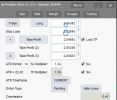
cTrader Position Sizer

Olá! Já tinha utilizado o Position Size no MT5 e recentemente o importei para uso no Ctrader. aparentemente está tudo normal, exceto no ato de executar uma ordem. Estou estipulando o risco em 2%, o que é aceitável pela corretora, porém a ordem não é realizada. Seria um problema na configuração ou nenhum processo de instalação? Li aqui que pode ser instalado pelo código em vez de simplesmente importado. Algum tutorial ensinando como instalar pelo código?
Se puderem me auxiliar de alguma forma fico grato.

[MODERATOR-ADDED TRANSLATION:]
Hello! I had already used Position Size in MT5 and recently imported it for use in Ctrader. Everything seems normal, except when executing an order. I'm setting the risk at 2%, which is acceptable to the broker, but the order is not executed. Could it be a configuration problem or a problem with the installation process? I read here that it can be installed via code instead of simply being imported. Is there a tutorial teaching how to install it via code?
If you can help me in any way, I would be grateful.
In case the position opening fails, you can check the Journal tab for details on why that happens. Most likely, you don't have enough margin.
 
I did what you said. Downloaded source code from GitHub. Compiled it. The background is still transparent. Any other suggestions, please? View attachment 35604
It isn't transparent. Had it been transparent, you'd see the chart through it. What you see is that cTrader is drawing indicator titles (and some other chart objects) on top of anything else, including the PS panel. There isn't much you can do about it except turning off Indicator titles in the Viewing options (after right-clicking on the chart).
 
  • 👍
Reactions: ZAZAZAZ
Can you help me change the input, which originally used commas to periods like the example in the Interface on the main earnforex Tab?Screenshot (163).pngScreenshot (164).png
 
After a while the Entry line on Instant Order type freezes in place. When I switch to other order types, to switch it back to Instant, the line comes to the current price level, but again, freezes in place. It's not only a visual glitch, as lot size calculations also won't calculate as price is moving closer or further from stop loss level. I also tried with the stock settings, and after around 10 minutes, it freezes again.

Restarting ctrader app does make it work again for a while, until it freezes again.
Noticed it only happens after I turn my laptop to sleep, and restarting the bot will make the line on instant order type work again.

Is there any workaround to have it always work, or do I just have to restart the bot everytime i turn the laptop to sleep/standby?
 
After a while the Entry line on Instant Order type freezes in place. When I switch to other order types, to switch it back to Instant, the line comes to the current price level, but again, freezes in place. It's not only a visual glitch, as lot size calculations also won't calculate as price is moving closer or further from stop loss level. I also tried with the stock settings, and after around 10 minutes, it freezes again.

Restarting ctrader app does make it work again for a while, until it freezes again.
Noticed it only happens after I turn my laptop to sleep, and restarting the bot will make the line on instant order type work again.

Is there any workaround to have it always work, or do I just have to restart the bot everytime i turn the laptop to sleep/standby?

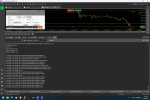
There should be some output in the Algo tab for the Position Sizer when this happens. Could you please take a screenshot of it?
 
There should be some output in the Algo tab for the Position Sizer when this happens. Could you please take a screenshot of it?
Hi so I restarted the bot to try and replicate the issue. Put the laptop to sleep, turned it back on and here it is:
You can see the white line being the entry line. The distance isn't spread or anything, it simply isnt moving, and as price approaches the green line (SL), there are no real time lot size calculations happening.

In the 2nd picture, I changed the order type from instant, to pending, back to instant. The shift back to instant did move price to the current price, but then again, no further adjustments as it stood in Instant order type.

Thanks! 🙂
 

Attachments

  • ctrader issue.png
    ctrader issue.png
    404.5 KB · Views: 1
  • Screenshot 2026-01-31 134325.png
    Screenshot 2026-01-31 134325.png
    521.1 KB · Views: 1
Hi so I restarted the bot to try and replicate the issue. Put the laptop to sleep, turned it back on and here it is:
You can see the white line being the entry line. The distance isn't spread or anything, it simply isnt moving, and as price approaches the green line (SL), there are no real time lot size calculations happening.

In the 2nd picture, I changed the order type from instant, to pending, back to instant. The shift back to instant did move price to the current price, but then again, no further adjustments as it stood in Instant order type.

Thanks! 🙂
Thanks! I will look into this.
 
Can someone help me on something. If i want to have the lines take into consideration spread, does it adjust the TP and SL in line with spread for a long and short? It will be different for both, the Stop loss should be above the point you take for a short and for a long it should be slightly higher. This will then cause it tigger at the exact value you are desiring. Is there a setting that does that? Thanks.
 
Can someone help me on something. If i want to have the lines take into consideration spread, does it adjust the TP and SL in line with spread for a long and short? It will be different for both, the Stop loss should be above the point you take for a short and for a long it should be slightly higher. This will then cause it tigger at the exact value you are desiring. Is there a setting that does that? Thanks.
You just put the SL and TP lines where you want the levels to be. If you want to account for a spread, you adjust the lines manually.
 
I have a questioin about the SL line moving with the price.

In the mt5 version, when you set the SL line where you would want it to be, it stays in place, but here it keeps moving with the price, so I have to keep readjusting it and then quickly pressing "Trade".

So when I set the TP to a certain point and then the price moves up 1 pip, the SL also moves up 1 pip.
 
Last edited:
I have a questioin about the SL line moving with the price.

In the mt5 version, when you set the SL line where you would want it to be, it stays in place, but here it keeps moving with the price, so I have to keep readjusting it and then quickly pressing "Trade".

So when I set the TP to a certain point and then the price moves up 1 pip, the SL also moves up 1 pip.
What do you mean? If you set the SL value as level (default), it stays at that level. If you set it as a distance in points it follows the entry line. That's the same behavior as in MT5. You can switch the modes by pressing Shift+S.
 
  • 👍
Reactions: mojster_jaka
That was it. I thought I had both of them set up the same. Also, I guess I didn't understand correctly what this setting does.

Thank you.