


Hello everyone,
We're developing PipWires, a visual programming application for creating trading-strategy logic and generating editable MQL4 and MQL5 source code.
PipWires is not a ready-made EA, signal provider, or automated profitability system. Users create the strategy logic themselves by connecting visual elements for events, conditions, indicators, variables, calculations, and trading actions.
The resulting MQL code can be viewed, copied, edited, and compiled using the normal MetaTrader development workflow.
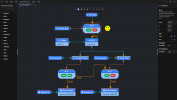
Current features
- Visual flow and data connections
- MQL4 and MQL5 code generation
- Trading events and conditional logic
- Indicators, variables, calculations, and trade actions
- Grid snapping and alignment
- Wire jumpers for organizing larger workflows
- Visible and editable generated source code
- Free browser-based demo
You can try the browser demo here: PipWires Website
The browser demo is intentionally limited. Its purpose is to let users test the visual workflow and inspect the generated code before the desktop early-access version becomes available.
What PipWires does not do
- It does not generate profitable strategies automatically.
- It does not provide trading signals or financial advice.
- It does not remove the need for compilation, testing, backtesting, and risk validation.
- It does not hide the generated strategy inside a black box.
The project is still under active development, and I’m currently looking for feedback from MetaTrader users and MQL developers.
In particular, I would like to know:
1. Is the visual workflow easy to understand?
2. Is the generated MQL structure readable?
3. Which indicators, order-management tools, or other elements should be prioritized?
4. Would you use a tool like this for prototyping or maintaining an EA?
5. Which limitations would prevent you from using it?
Website and free browser demo: PipWires Website
I’ll use this thread for relevant development updates and to respond to questions or technical feedback.
PipWires is a software development tool. It does not provide financial advice, trading signals, or guarantees of trading performance.
We're developing PipWires, a visual programming application for creating trading-strategy logic and generating editable MQL4 and MQL5 source code.
PipWires is not a ready-made EA, signal provider, or automated profitability system. Users create the strategy logic themselves by connecting visual elements for events, conditions, indicators, variables, calculations, and trading actions.
The resulting MQL code can be viewed, copied, edited, and compiled using the normal MetaTrader development workflow.
Current features
- Visual flow and data connections
- MQL4 and MQL5 code generation
- Trading events and conditional logic
- Indicators, variables, calculations, and trade actions
- Grid snapping and alignment
- Wire jumpers for organizing larger workflows
- Visible and editable generated source code
- Free browser-based demo
You can try the browser demo here: PipWires Website
The browser demo is intentionally limited. Its purpose is to let users test the visual workflow and inspect the generated code before the desktop early-access version becomes available.
What PipWires does not do
- It does not generate profitable strategies automatically.
- It does not provide trading signals or financial advice.
- It does not remove the need for compilation, testing, backtesting, and risk validation.
- It does not hide the generated strategy inside a black box.
The project is still under active development, and I’m currently looking for feedback from MetaTrader users and MQL developers.
In particular, I would like to know:
1. Is the visual workflow easy to understand?
2. Is the generated MQL structure readable?
3. Which indicators, order-management tools, or other elements should be prioritized?
4. Would you use a tool like this for prototyping or maintaining an EA?
5. Which limitations would prevent you from using it?
Website and free browser demo: PipWires Website
I’ll use this thread for relevant development updates and to respond to questions or technical feedback.
PipWires is a software development tool. It does not provide financial advice, trading signals, or guarantees of trading performance.

