
For most Forex traders, stop-loss and take-profit orders are indispensable. They help limit risk and secure profit in a fully automated way. At the same time, it is not always practical to set SL and TP orders manually, especially so when opening multiple positions in a short period of time. Whether you are trading manually or with an expert advisor, an automated way to assign stop-loss and take-profit values to your positions might prove useful. That is where the Set Fixed SL and TP expert advisor can be useful to you. This EA is free to download and use.
It is based on the Set Fixed SL and TP script, which does the same job but only once when you execute it. If you need a more durable solution without a constant need to re-run the script, the expert advisor form works much better.
Additionally, the Set Fixed SL and TP expert advisor is available in the form of a cTrader robot (cBot), which lets you run it in cTrader platform.
What is Set Fixed SL and TP EA?
The Set Fixed SL and TP EA for MT4, MT5, and cTrader is an expert advisor, or a trading robot, that goes through all your open trades, checks whether they pass your filters (currency pair, trade direction, magic number, commentary), and sets stop-loss and take-profit levels according to your preferences.
It will make sure your positions and pending orders will not remain without stop-loss protection. You will also be able to control whether existing SL or TP levels should be overwritten on your trades. This comes especially useful when you wish to override the SL/TP decisions of another EA running on the same account.
You can turn this EA (cBot) on and off anytime using its minimalistic control panel.
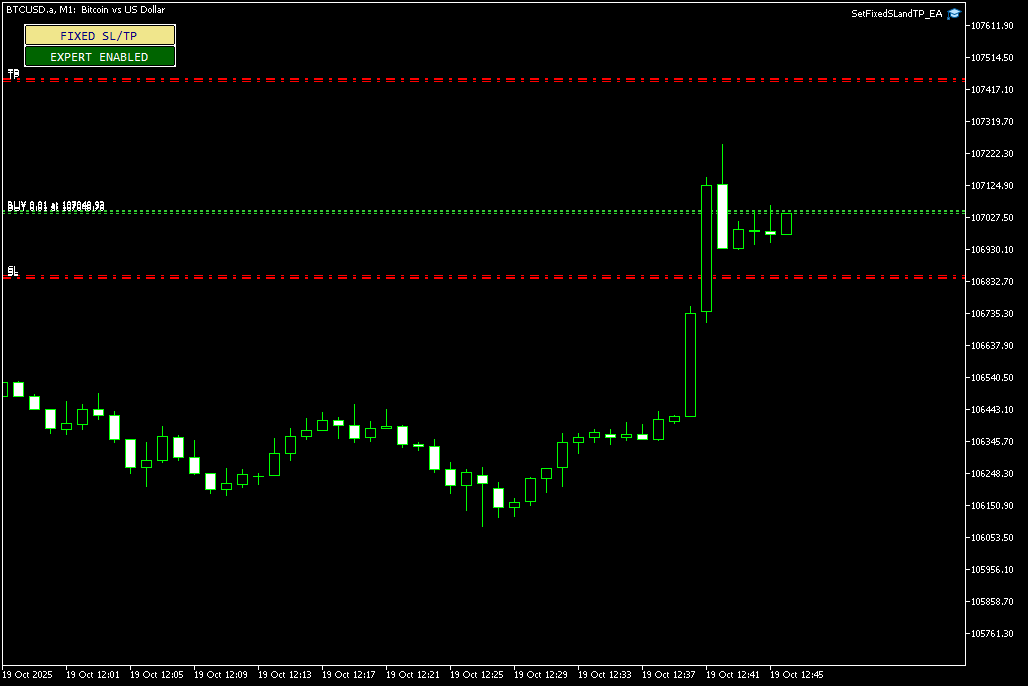
Overall, Set Fixed SL and TP EA is a quick and simple way to control the stop-loss and take-profit levels of your trades, be it in MT4, MT5, or cTrader.
Why use Set Fixed SL and TP EA?
One of the ways to manage your risk is trading is to assign stop-loss levels for your positions. At the same time, fixing your profits with a predefined take-profit level helps you exit your trades at a right time.
When working with high-frequency trading strategies, such as scalping, or using a grid-based expert advisor, it helps to have a simple configurable solution to automate your SL and TP level setting. In other words, the Set Fixed SL and TP EA is useful when assigning stop-loss and take-profit levels manually is impractical.
Using the Set Fixed SL and TP EA for MetaTrader 4/5 (or its robot version for cTrader) provides the following advantages:
- Filters to manage only those trades that you want modified.
- Fully automatic SL/TP modification.
- Define SL method: points or price.
- Define TP method: points, price, or percentage of SL.
- Define modification order delay to avoid sending too many orders to the server.
Input parameters
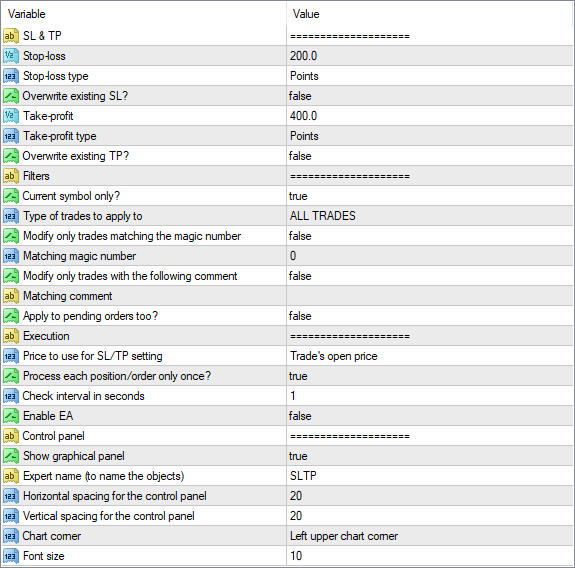
The Set Fixed SL and TP expert advisor supports a set of input parameters that you can modify. The most important ones are described below.
SL & TP
- Stop-loss: either a number of points or a price level to be set as stop-loss.
- Stop-loss type: lets you decide whether SL is defined in points, price level, or should be left unchanged.
- Overwrite existing SL? if true, even positions and orders with some SL value will have their SL modified by this EA.
- Take-profit: a number of points, a price level, or a percentage of SL to be set as take-profit.
- Take-profit type: lets you decide whether TP is defined in points, price level, SL percentage, or should be left unchanged.
- Overwrite existing TP? if true, even positions and orders with some TP value will have their TP modified by this EA.
Filters
- Current symbol only? if true, Set Fixed SL and TP will only work with trades on the current chart's symbol. You should be very careful when setting this parameter to false as it is rather rare that the same SL/TP values would work for multiple trading symbols.
- Type of trades to apply to: whether to apply the EA to buy orders, sell orders, or all orders.
- Filter by magic number: if true, the EA will modify only the orders with a specific magic number.
- Magic number: specify the magic number in case the above is true.
- Filter by comment: if true, the EA will modify only the orders with a specific comment.
- Comment: specify the comment if the above is true.
- Apply to pending orders too? if true, Set Fixed SL and TP will also process pending orders.
Execution
- Price to use for SL/TP setting: if SL or TP is set in points, this parameter controls whether it is the trade's entry price or current Bid/Ask price that is used for SL/TP calculation.
- Process each position/order only once? if true, the EA will remember positions and orders it has already modified and will not try to process them again even if their SL/TP get modified by you or by some other EA/script.
- Check interval in seconds: the number of seconds to re-check the trades.
- Enable EA: if true, the EA will start in active mode and will be monitoring your trades immediately.
Control panel
- Show graphical panel: if true, a control panel will be created on the chart to let you turn the EA on and off with a single click.
Download (ver. 1.00, 2025-10-20)
You can download the expert advisor using the link below and install it by following the presented instructions.
➥ Set Fixed SL and TP EA for MetaTrader 4
MT4 Set Fixed SL and TP EA installation
To install the MT4 version of the EA, please follow the instructions below:
- Download the expert advisor archive file.
- Open the MetaTrader 4 data folder (via File→Open Data Folder).
- Open the MQL4 Folder.
- Copy all the folders from the archive directly to the MQL4 folder.
- Restart MetaTrader 4 or refresh the expert advisors list by right-clicking the Navigator subwindow of the platform and choosing Refresh.
You can also read a more detailed instruction to aid you with the installation process.
You can open a trading account with any of the MT4 Forex brokers to freely use this expert advisor for MetaTrader 4.
MT5 Set Fixed SL and TP EA installation
To install the MT5 version of this EA, please follow the instructions below:
- Download the expert advisor archive file.
- Open the MetaTrader 5 data folder (via File→Open Data Folder).
- Open the MQL5 Folder.
- Copy all the folders from the archive directly to the MQL5 folder.
- Restart MetaTrader 5 or refresh the expert advisors list by right-clicking the Navigator subwindow of the platform and choosing Refresh.
If you want to use an MT5 version of the EA — Set Fixed SL and TP — feel free to look for a broker that offers MetaTrader 5.
cTrader Set Fixed SL and TP robot installation
To install the cTrader version of this robot, please follow the instructions below:
- Download the archive file with the cBot.
- Double-click the SetFixedSLandTP Robot.algo file to install the cBot without the source code.
- Open the Robots folder, which can be normally found at
C:\Users\<Username>\Documents\cAlgo\Sources\Robots. - Copy the SetFixedSLandTP Robot folder and the SetFixedSLandTP Robot.algo file to the Robots folder to install with the source code.
If you want to use the cTrader version of this robot — Set Fixed SL and TP — feel free to choose a broker that supports cTrader.
Discussion
Do you have any suggestions or questions regarding this expert advisor? You can always discuss Set Fixed SL and TP with other traders and coders on our forum.


