
Popular results
Position Sizer
Calculate risk-based position size directly in your MetaTrader platform and execute a trade in one click or a press of a button.What Is Forex
Learn what Forex is and how it works from this simple explanation.Supertrend
Download the Supertrend indicator for MT4 and MT5 to detect trend changes based on the price action.Position Size Calculator
Calculate your position size based on risk, stop-loss, account size, and the currencies involved. A simple online calculator for quick results.OriginalSL — MetaTrader 5 and cTrader Indicator
Table of contents
OriginalSL indicator — draws a price-aligned marker on the chart at the location of every past trade's original stop-loss. The SL value used is the one set at the moment the order was filled, before any subsequent trailing or manual edits, so you can see whether your initial stops were placed in danger zones, whether modifications saved or cost you money, and whether your stops cluster in recurring price ranges. The indicator is available for MetaTrader 5 and cTrader.
Both MetaTrader 5 and cTrader can display your past trades on the chart. Unfortunately, neither platform offers a built-in way to see the initial stop-loss level of your trade in those chart markups of historical trades.
This is where the OriginalSL indicator comes handy as both platforms preserve the at-execution stop-loss in their trade history — MT5 stores it on the entry deal, cTrader on the opening order. The exact data path and the on-chart visual differ slightly between versions.
The most direct use of the indicator is to compare how your original SL would fare against the actual course your trade took, especially if you are using trailing stop, breakeven, or similar post-entry stop-loss modification techniques.
How each version sources the data
MetaTrader 5
MT5 stores the SL set at execution as a property of each entry deal. The MT5 version of OriginalSL reads it directly from the platform's deal history.
The indicator subscribes to the OnTrade() event and refreshes automatically whenever a new deal lands in history (with a HistoryDealsTotal() change-detector to skip wasteful reloads on order modifications, which don't generate deals). SL-hit detection is definitive on MT5: a closing deal with DEAL_REASON_SL unambiguously marks an SL trigger.
cTrader
The cTrader version of OriginalSL uses the HistoricalOrders collection, where each opening order carries StopLoss and StopLossPips properties holding the SL set when the order was placed.
Refresh is driven by the Positions.Closed event. Unfortunately, there is no way to detect that a position was closed SL in cTrader. So, unlike the MT5 version, OriginalSL for cTrader doesn't offer filtering by that parameter.
Visual differences between the versions
Each platform's chart object set is different, so each version renders the marker with the cleanest objects available to it:
- MT5 — price label + trendline: a short horizontal trendline drawn from the open bar to the bar immediately after, at the SL price, plus a text label. Line width and style are configurable.
- cTrader — price label + dash: a text label with the price is placed at the open bar at the SL price. A trailing dash visually tails into the chart directly at the original stop-loss level.
Both versions color buy and sell markers separately (red for buys and blue for sells, by default).
Input parameters
Common to both versions
- DirectionFilter (default = Both) — restrict to buys only, sells only, or both directions.
- DaysBack (default = 0) — only mark trades closed within the given number of days back. 0 = no limit, mark everything.
- ObjectPrefix (default = "OSL_") — prefix for chart objects so the indicator's markers don't collide with other indicators' objects.
MetaTrader 5 specific parameters
- OutcomeFilter (default = All) — restrict to winners only, losers only, SL-hit only, or all outcomes. The SL-hit filter is the most useful one for backtest analysis: it shows only the trades that closed by stop-loss.
- MagicFilter (default = -1) — restrict to trades with a specific magic number. -1 = any.
- BuyLineColor (default = clrCrimson) — line and text colors for buy SL markers.
- SellLineColor (default = clrDodgerBlue) — line and text colors for sell SL markers.
- LineWidth (default = 1) — width of the trend-line segment that marks the SL price over the open bar.
- LineStyle (default = STYLE_SOLID) — line style: solid, dash, dot, dash-dot, or dash-dot-dot.
- TextFont (default = "Verdana") — font face for the price label.
- TextFontSize (default = 10) — price-label font size.
- ObjectsInBack (default = false) — draw the markers behind the price action instead of in front of it.
cTrader specific parameters
- OutcomeFilter (default = All) — restrict to winners only and losers only. cTrader doesn't support filtering positions by whether they've been closed by SL or by some other method.
- LabelFilter (default = "") — restrict to trades opened with this exact label. cTrader uses string labels in place of MQL5's integer magic numbers; leave empty to match any label.
- BuyColor (default = Crimson) — text colors for buy SL markers.
- SellColor (default = DodgerBlue) — text colors for sell SL markers.
- TextFontSize (default = 10) — text-label font size.
How to use in MT5
Attaching the indicator to the chart by itself won't provide much useful information. You would also want to enable the trade history display on the chart to understand how the displayed original stop-loss levels relate with the closed positions.
To enable trade history for a MetaTrader 5 chart, right-click on the chart and select Properties (alternatively, you can simply press
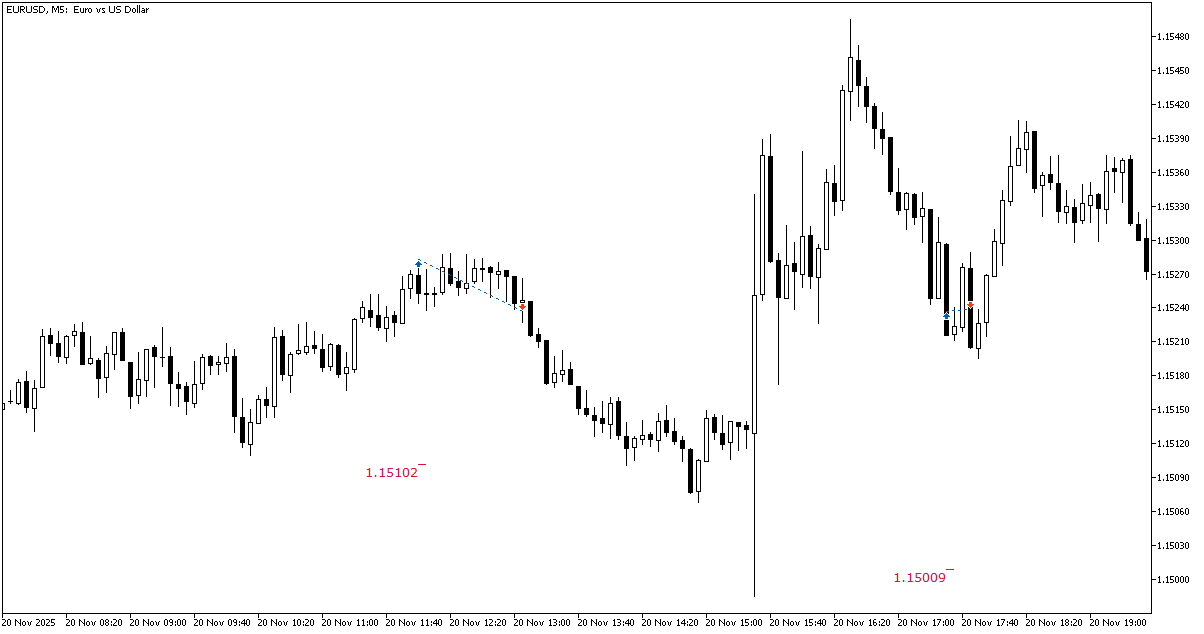
Blue and red up and down arrows will appear designating buy and sell trades respectively. Long positions will have their entry and exit arrows connected with blue trendlines. Short positions will have their entry and exit arrows connected with red trendlines.
How to use in cTrader
Enabling trade history in cTrader is done by ticking the Deal map option under Viewing options after right-clicking on the chart.
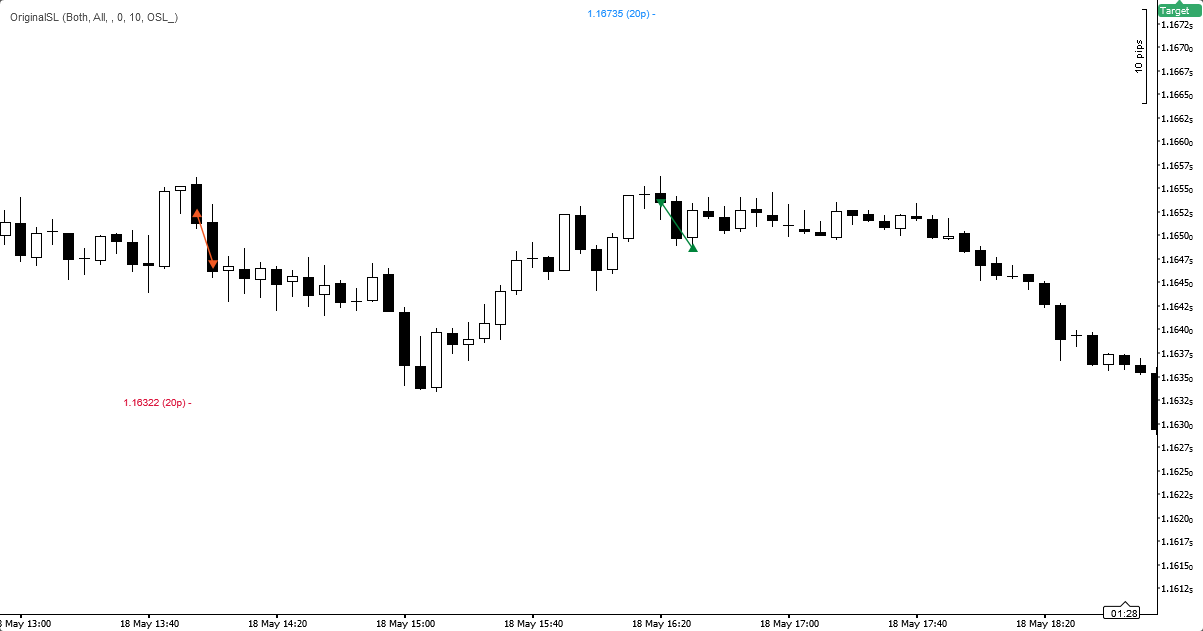
cTrader's markup consists of orange (for losing positions) and green (for profitable ones) arrows connected with a solid lines. Hovering over them provides detailed entry and exit information.
MT5 example
The chart below shows two historical long trades on the EUR/USD pair with their original stop-loss levels marked at the open bar. Both SL markers are crimson (default color the buy SL markers). The price labels give the exact SL values, and hovering any marker reveals the order ticket and the SL-from-entry distance.
cTrader example
You can see here two EUR/USD trades: one buy and and one sell. The original stop-loss levels are marked at the opening bars. The SL marker color identifies the direction (crimson for buys, light blue for sells), the price label gives the exact SL value as a price and as a distance.
Download (ver. 1.00, 2026-05-19)
OriginalSL for MetaTrader 5 in .zip
OriginalSL for MetaTrader 5 in .mq5
OriginalSL for cTrader in .zip
Discussion
Warning!
If you do not know how to install this indicator, please read the MetaTrader Indicators Tutorial or the cTrader Indicators Tutorial.
Do you have any suggestions or questions regarding this indicator? You can always discuss OriginalSL with the other traders and coders on our forum.
You might also be interested in our guide on choosing stop-loss strategies — OriginalSL is a natural companion when you want to evaluate how a chosen SL strategy is performing on your actual trade history.
Changelog
1.00 - 2026-05-19
- Initial release for MetaTrader 5 and cTrader.


