
Popular results
Position Sizer
Calculate risk-based position size directly in your MetaTrader platform and execute a trade in one click or a press of a button.What Is Forex
Learn what Forex is and how it works from this simple explanation.Supertrend
Download the Supertrend indicator for MT4 and MT5 to detect trend changes based on the price action.Position Size Calculator
Calculate your position size based on risk, stop-loss, account size, and the currencies involved. A simple online calculator for quick results.Anchored VWAP — MetaTrader/cTrader Indicator
Anchored VWAP indicator calculates a volume-weighted average price (VWAP) starting from a user-chosen anchor bar rather than from the start of the trading session. The anchor is rendered as a vertical line on the chart that can be moved with the mouse — the VWAP curve and its standard deviation bands recalculate instantly. The default anchor placement is configurable: either a fixed number of bars in the past or the start of a chosen calendar period (day, week, month, or year), with optional auto-update so the anchor stays at the configured offset as new bars form. The indicator is available for MT4, MT5, and cTrader platforms.
It supports all types of alerts: popup, email, push-notifications to mobile devices, and a simple sound alert. Three independent alert conditions can be enabled: VWAP crossings, price exits from the standard deviation band, and price returns inside the band.
Input parameters
Anchor
- AnchorMode (default = ANCHOR_BARS_BACK) — how the default anchor point is placed: ANCHOR_BARS_BACK places it a fixed number of bars in the past; ANCHOR_PERIOD_START places it at the start of the current day, week, month, or year.
- BarsBack (default = 100) — number of bars in the past where the anchor is placed (used only in ANCHOR_BARS_BACK mode).
- AnchorPeriodType (default = APT_DAY) — calendar period (Day, Week, Month, or Year) used for anchoring (used only in ANCHOR_PERIOD_START mode).
- AutoUpdate (default = true) — if true, the anchor automatically re-positions itself on each new bar (or on each new period in ANCHOR_PERIOD_START mode) to maintain the configured offset. Manual drags by the user always take precedence between resets.
VWAP
- PriceType (default = PT_TYPICAL) — which price representative is used in the VWAP calculation: Typical (HLC/3), Weighted (HLCC/4), Median (HL/2), Close, or Open.
- VolumeType (default = VOLUME_TICK) — whether to use tick volume or real (exchange) volume in the VWAP calculation. Real volume is only meaningful on symbols that publish exchange data. Available in the MT5 version; the MT4 and cTrader versions use tick volume only.
- ShowBand (default = true) — if true, the standard deviation bands are displayed.
- SDMultiplier (default = 2.0) — multiplier for the standard deviation bands. Larger values produce wider bands.
Anchor line
- AnchorLineColor (default = clrDodgerBlue) — color of the vertical anchor line.
- AnchorLineStyle (default = STYLE_DASH) — style of the anchor line (solid, dash, dot, dash-dot).
- AnchorLineWidth (default = 1) — thickness of the anchor line in pixels.
Alerts
- AlertOnVWAPCross (default = false) — if true, an alert is issued when the close price moves to the opposite side of the VWAP between two consecutive bars.
- AlertOnBandExit (default = false) — if true, an alert is issued when price closes outside the standard deviation band having closed inside on the previous bar.
- AlertOnBandReturn (default = false) — if true, an alert is issued when price closes inside the standard deviation band having closed outside on the previous bar.
- AlertPopup (default = true) — if true, a native MetaTrader popup alert is used for any of the above three conditions.
- AlertSound (default = false) — if true, the indicator plays a sound file when an alert condition fires.
- AlertSoundFile (default = "alert.wav") — the sound file to play for sound alerts.
- AlertEmail (default = false) — if true, an email message is sent on alert conditions. Email should be properly configured in MetaTrader via Tools->Options->Email.
- AlertPush (default = false) — if true, a push notification is sent on alert conditions. Notifications should be properly configured in MetaTrader via Tools->Options->Notifications.
- ObjectPrefix (default = "AVWAP_") — prefix used for the chart object name (the anchor line) to allow use multiple instances of this indicator on the same chart.
Example charts
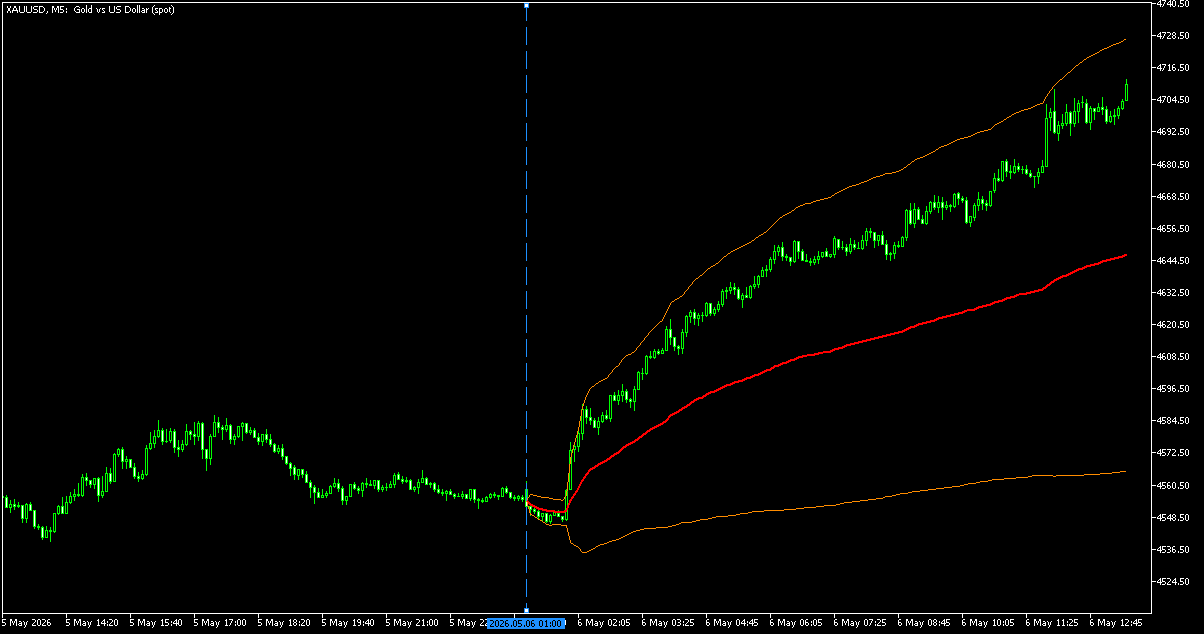
In the images below, you can see the Anchored VWAP in three trading platforms. The bold red line is the main VWAP line. The two orange lines on either side are the standard deviation bands. The vertical blue dashed line is the anchor point — it can be dragged with the mouse to recalculate the VWAP from a different starting bar.
MetaTrader 4

MetaTrader 5
cTrader

Strategy
The indicator behaves as follows:
- When the anchor is set at a swing high or swing low, the VWAP shows the average price paid by participants since that pivot. Price above the VWAP indicates the average buyer is in profit; below indicates the average buyer is at a loss.
- When the anchor is set at the start of the trading day, week, month, or year (using ANCHOR_PERIOD_START with auto-update enabled), the indicator becomes a session VWAP that resets at each new period.
- The standard deviation bands act as dynamic support/resistance levels and as natural mean-reversion targets. Wider bands indicate higher volatility since the anchor; narrower bands indicate consolidation.
- Bars before the anchor are not drawn — the curve only begins at the anchor bar and grows forward as new bars form.
A common strategy is to wait for price to deviate beyond the standard deviation band and look for mean-reversion setups back toward the VWAP. Conversely, a decisive break of the VWAP from below combined with continuation past the upper band can mark a regime change. The Anchored VWAP is also used to confirm bias from significant events. You can anchor it at an NY or London open, central bank announcement, or other news catalyst, and the VWAP reveals whether market participants are net long or net short since the event.
Download (ver. 1.00, 2026-05-06)
Anchored VWAP for MetaTrader 4 (.zip)
Anchored VWAP for MetaTrader 4 (.mq4)
Anchored VWAP for MetaTrader 5 (.zip)
Anchored VWAP for MetaTrader 5 (.mq5)
Anchored VWAP for cTrader (.zip)
Anchored VWAP for cTrader (.cs)
Discussion
Warning!
You can read how to install this indicator in our MetaTrader Indicators Tutorial or cTrader Indicators Tutorial.
Do you have any suggestions or questions regarding this indicator? You can always discuss Anchored VWAP with the other traders and coders in our forums.
Changelog
1.00 - 2026-05-06
- Initial release of the Anchored VWAP indicator for MetaTrader 4, MetaTrader 5, and cTrader.


