
Popular results
Position Sizer
Calculate risk-based position size directly in your MetaTrader platform and execute a trade in one click or a press of a button.What Is Forex
Learn what Forex is and how it works from this simple explanation.Supertrend
Download the Supertrend indicator for MT4 and MT5 to detect trend changes based on the price action.Position Size Calculator
Calculate your position size based on risk, stop-loss, account size, and the currencies involved. A simple online calculator for quick results.Round Levels
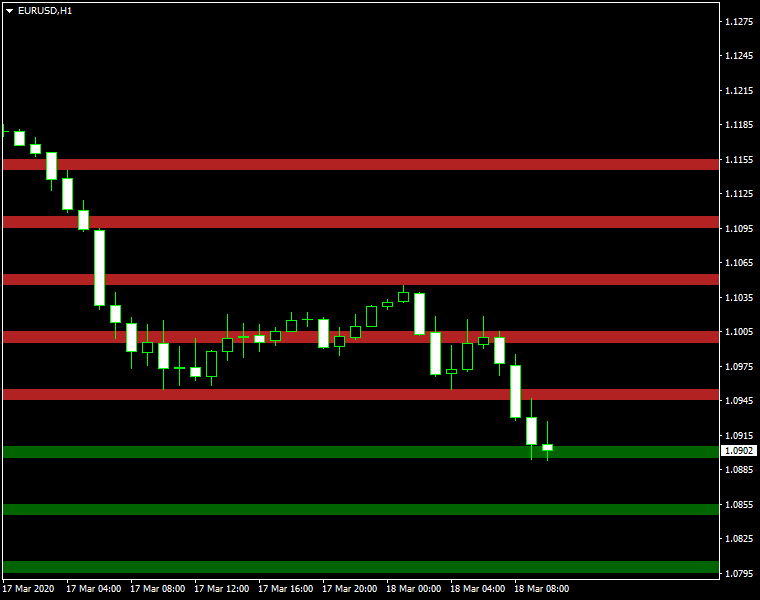
Round Levels indicator — an MT4/MT5/cTrader indicator that can display round levels and zones near them based on your configuration. It can be useful to trade off the natural psychological support and resistance zones. It can also issue alerts when the price is in either support or resistance zone.
Input parameters
Main
- Levels (default = 5) — the number of round levels to process in each direction (up and down).
- Interval (default = 0) — the interval in points between round levels. For example, the default value of 50 means that a level will be drawn each 50 points. Leave at zero for automatic values.
- ZoneWidth (default = 0) — the width of the zone in points. Leave at zero for automatic values.
- ObjectPrefix (default = "RoundLevels") — the prefix to add to the chart object names. Only change this if there are conflicts with some other indicators on the chart.
Visuals
- ColorUp (default = clrFireBrick) — the color of the round level zones that will be drawn above the current price.
- ColorDn (default = clrDarkGreen) — the color of the round level zones that will be drawn below the current price.
- InvertZones (default = false) — inverted zones are highlighted with the colors outside the zone boundaries vs. inside in non-inverted zones.
- ZonesAsBackground (default = true) — if true, round number zones will be drawn behind the chart plot (candlesticks, bars, or line).
- DrawLines (default = false) — if true, lines will be drawn at round levels in addition to zones.
- LineColor (default = clrDarkGray) — the color of the round level lines.
- LineWidth (default = 1) — the width of the round level lines.
- LineStyle (default = STYLE_DASHDOT) — the style of the round level lines.
- LinesAsBackground (default = false) — if true, round number zones will be drawn behind the chart plot (candlesticks, bars, or line).
- ShowLineLabels (default = false) — if true, a line label will be drawn to mark the price level of each line.
- LineLabelColor (default = clrWhite) — line labels' color.
- ButtonCorner (default = None) — the chart corner where the button to hide/show lines will appear.
Notifications
- EnableNotify (default = false) — if true, the indicator will issue notifications when the price (Bid) is in the zone.
- SendAlert (default = true) — if true and the notifications are enabled, the indicator will use built-in popup alerts.
- SendApp (default = false) — if true and the notifications are enabled, the indicator will use push-notification alerts. Notifications should be properly configured in MetaTrader via Tools->Options->Notifications.
- SendEmail (default = false) — if true and the notifications are enabled, the indicator will use email alerts. Email should be properly configured in MetaTrader via Tools->Options->Email.
- SendSound (default = false) — if true and the notifications are enabled, the indicator will use sound alerts.
- SoundFile (default = "alert.wav") — the sound file to use for sound alerts.
- AlertDelay (default = 5) — the delay in seconds between consecutive alerts.
Example
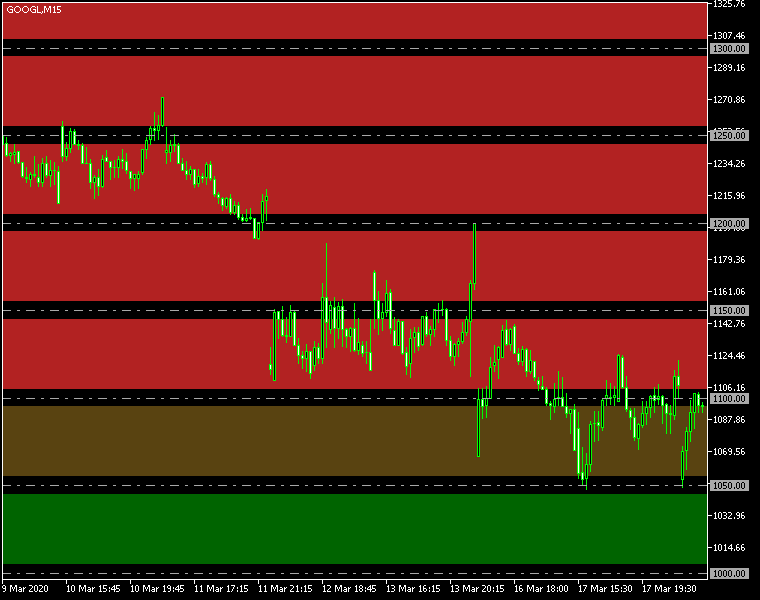
As you can see, the indicator is applicable not only to the Forex pairs but also to stock market CFDs. The image shows the Round Levels indicator with inverted zones and with DrawLines turned on. Psychological round levels of $50 each play crucial role in this share's market.
Download (ver. 1.04, 2026-04-20)
Round Levels for MetaTader 4 in .zip
Round Levels for MetaTader 4 in .mq4
Round Levels for MetaTader 5 in .zip
Round Levels for MetaTader 5 in .mq5
Round Levels for cTrader in .zip
Round Levels for cTrader in .cs
Round Levels indicator is also being developed via a dedicated GitHub repository. You are encouraged to actively participate in the improvement of this indicator by submitting your own features via pull-requests and reviewing existing suggestions, changes, fixes, and so on.
Discussion
Warning!
Please read the MetaTrader Indicators Tutorial to learn how to install this indicator.
Do you have any suggestions or questions regarding this indicator? You can always discuss Round Levels with other traders and coders on the forum about indicators.
Changelog
1.04 - 2026-04-20
- Added a button to quickly hide/show the round number levels and zones generated by this indicator.
- Added a cTrader version of Round Levels.
- Added an option for automatic values for interval and zone width. The respective input parameters need to be set to zero for automatic values based on the current chart.
- Added sound-only alerts.
- Added validation for some of the input parameters.
- Optimized the indicator.
- Fixed a bug that would result in no round number zones showing up on the monthly timeframe (MN1) in MT4.
1.03 - 2025-01-27
- Added alerts.
- Added optional price labels for round number lines.
1.02 - 2023-08-15
- Added ZonesAsBackground and LinesAsBackground input parameters to control where zones and lines should be located — either in front of the chart plot or behind it.
1.01 - 2020-07-15
- Removed some redundant code to improve performance.
- Fixed the zones to extend as far right as possible even if you scale out the chart.
- Improved some minor code issues.
1.00 - 2020-03-18
- Initial release.


