


Enhancing OTC Trading: The Power of the Pocket Option MT5 Connector
The Pocket Option MT5 Connector represents a major shift for traders looking to apply institutional-grade analysis to Over-The-Counter (OTC) synthetic markets. By seamlessly bridging real-time OTC price feeds directly into MetaTrader 5 (MT5), this tool allows market participants to leverage advanced charting capabilities while managing and executing trades on Pocket Option.
Elevating Pocket Option OTC Analysis via MT5
While Pocket Option’s 24/7 OTC markets offer continuous trading opportunities outside standard exchange hours, the platform’s native charting interface can feel restrictive for highly technical traders.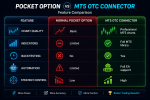
The MT5 Connector removes these analytical bottlenecks. By importing live OTC data into MetaTrader 5, traders unlock an expansive professional ecosystem, featuring:
- Comprehensive Multi-Timeframe Analysis: Monitor asset behavior across complex, layered time granularities.
- Advanced Technical Indicators: Deploy intricate, non-standard indicators and custom mathematical overlays.
- Custom Workspace Templates: Save personalized chart layouts, drawing configurations, and proprietary tools.
- Automated Algorithm Support: Run Expert Advisors (EAs) and custom scripts directly alongside OTC feeds.
- Rigorous Backtesting: Utilize the MT5 Strategy Tester to evaluate historical setups before risking capital.
System Requirements & Prerequisites
To successfully deploy the connector, ensure your setup meets the following criteria:- An active, verified Pocket Option account.
- A desktop installation of the MetaTrader 5 platform.
- Compliance with the financial regulations of your local jurisdiction.
⚠️ Important Security Note: The connector operates entirely independently of your trading balance and does not require API keys, account credentials, or password sharing.
Core Architecture: How It Works

The connector is engineered to be lightweight, secure, and non-intrusive, prioritizing data accuracy without compromising account safety.
1. Live Market Synchronization
The system mirrors Pocket Option’s OTC synthetic price movements instantaneously, populating MT5 with live, tick-for-tick candlestick charts that precisely match broker price action.
2. Unrestricted MT5 Integration
Once the feed is active, the OTC assets behave identically to traditional financial instruments within MT5. This opens up the full suite of automated charting, custom scripting, and technical overlays.
3. Native Signal Overlays
For enhanced decision-making, trading alerts from SignalBots can be displayed directly onto the MT5 workspace, highlighting potential CALL and PUT setups right next to your personal indicators.
4. Read-Only Security Protocol
The architecture is fundamentally restricted to outbound data streaming. It possesses zero capabilities to:- Access or alter your broker account settings.
- Place, modify, or execute trades.
- View, store, or transmit financial data or account balances.
Supported OTC Asset Classes
Because OTC markets operate algorithmically, they remain active 24/7. The connector streams a diverse range of synthetic instruments, including:
⚡ Key Strategic Advantages
- Isolated Data Feed: Enjoy peace of mind with a strict read-only architecture—no funds, logins, or private API bridges are exposed.
- Institutional-Grade Analytical Tools: Elevate your market perspective by moving away from basic web-trader charts and into a professional development environment.
- A Confluence-Driven Approach: Build a stronger trading system by combining automated SignalBots alerts with your own algorithmic or manual technical indicators.
The Verdict
The Pocket Option MT5 Connector is a powerful bridge for traders who refuse to compromise on their analytical depth when trading synthetic assets. By shifting the heavy lifting of market analysis over to MetaTrader 5, you gain the freedom to run deeper diagnostics, backtest strategies, and plan trades with institutional precision—all while maintaining execution on your preferred broker.To ensure optimal configuration, it is highly recommended to initially test the connector setup within a risk-free demo environment.