
If you are trying to understand how price moves between trending and ranging in Forex, one indicator that can help is the Bill Williams' Gator Oscillator. Adding this indicator to your charts can help visualize context for your trade setups.
What is the Gator Oscillator indicator?
The Gator Oscillator is an indicator developed by Bill Williams, to be used in conjunction with his Alligator indicator. In fact, it is derived from the Alligator indicator itself, and shows you how much the three moving averages of the Alligator indicator are converging or diverging. It is displayed as a histogram.
How is the Gator Oscillator calculated?
Here is the math to calculate the Gator Oscillator. The calculation is based on the Jaw, Teeth and Lips that are the moving averages from the Alligator indicator:
As you can see by the minus sign in the Lower Gator formula, it will always display below the zero line.
Even though the calculations above aren't too complex, you do not have to do them yourself. Your charting software will take care of them for you. So, you can plot the Gator Oscillator as well as the Alligator indicator in just a few clicks.
What does the Gator Oscillator indicator show us?
The Gator Oscillator helps us see when price is trending vs. ranging, and how it is transitioning between those two states. It does not show direction. Note that it does not measure price structure itself. It measures the separation between the moving averages of the Alligator indicator. That is what helps us to indirectly visualize ranging and trending conditions by looking at the Oscillator.
Since the Gator Oscillator is derived from the Alligator, we first need to understand what the Alligator shows us (SmMA = smoothed moving average):
- Alligator's jaw (blue line) = 13-period SmMA shifted 8 bars forward
- Alligator teeth (red line) = 8-period SmMA shifted 5 bars forward
- Alligator lips (green line) = 5-period SmMA shifted 3 bars forward
Williams came up with a set of metaphors to describe what price is doing based on what is happening with these moving averages.
- When the lines are intertwined and flat, the Alligator is "asleep." This is a ranging market.
- When the lines start to separate, the Alligator is "yawning."
- Clear separation of the lines trending upward or downward along with price is the "hunting" or "eating" phase.
- When the lines converge together again, the Alligator falls asleep. The trend ends, and the market returns to ranging.
So, what are we seeing in the Gator Oscillator displayed at the bottom of your chart?
- The top bars of the histogram are showing you the absolute difference between the blue jaw line and red teeth line from the Alligator indicator.
- The bottom bars of the histogram are showing the absolute difference between the red teeth line and the green lips line.
When a bar in the histogram is longer than the one before, it is green. When it is shorter than the one before, it is red. Please note that the green and the red do not say anything about whether the market is bullish or bearish.
Also note that the histogram has no minimum or maximum values. It is plotted on an absolute scale. The bar heights cannot be compared across symbols or timeframes.
You'll notice the histogram correlates with the four phases of the Alligator indicator:
- Red on the top and bottom of the histogram lines up with the sleeping Alligator.
- As one side turns green while the other is still red, that lines up with yawning.
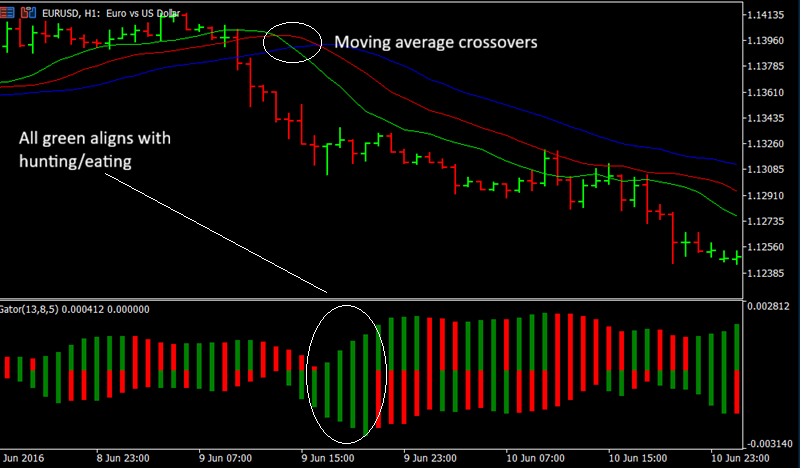
- Green on the top and bottom of the histogram aligns with hunting/eating.
- Following eating, one side of the histogram turning red may mean that the trend is losing force. This is referred to as the Alligator filling out.
Do you need to use both indicators together? Not necessarily. Many people do, but each can also be used as a standalone indicator. One advantage of using the Alligator alongside the Gator Oscillator is that unlike the Gator Oscillator, the original Alligator indicator does show price direction. Still, Gator can be useful when you get the direction information from another indicator but want a quick measure of the trend getting weaker or stronger.
How to plot the Gator Oscillator on your charts
Here are the steps to add the Gator Oscillator to your charts in MT5. The process is the same in MT4.
- In the top menu, navigate to Insert, Indicators, Bill Williams, then click on Gator Oscillator.
- You will see the following default settings:
- Jaws:
- Period: 13
- Shift: 8
- Teeth:
- Period: 8
- Shift: 5
- Lips:
- Period: 5
- Shift: 3
- Up: Green
- Down: Red
- Jaws:
Most traders will want to leave these settings as they are. But if you want, you can adjust them, or adjust the thickness of the bars. The applied price can be changed from Typical (H + L) / 2 to any other. The same goes for the moving average type. Once you are done, click OK. The histogram will appear on the bottom of your chart.
Keep in mind we have just plotted the Gator Oscillator, but not the Alligator. You can find the Alligator in the Bill Williams menu as well.
How to use the Gator Oscillator while you trade
You can use the Gator Oscillator to help you identify when trends are starting and stopping. You can do the same thing with the Alligator, and you can use them separately or together.
The idea is to try to enter a trade as a trend is beginning, and to exit it as it is coming to an end.
Here is an example. You can see that the moving average crossovers in the Alligator occurred shortly after price began dropping. At the same time, the Gator Oscillator was displaying red and green bars. You then see a section of all green bars, which lines up with the wide open moving averages. This is the hunting phase, and price is still falling.
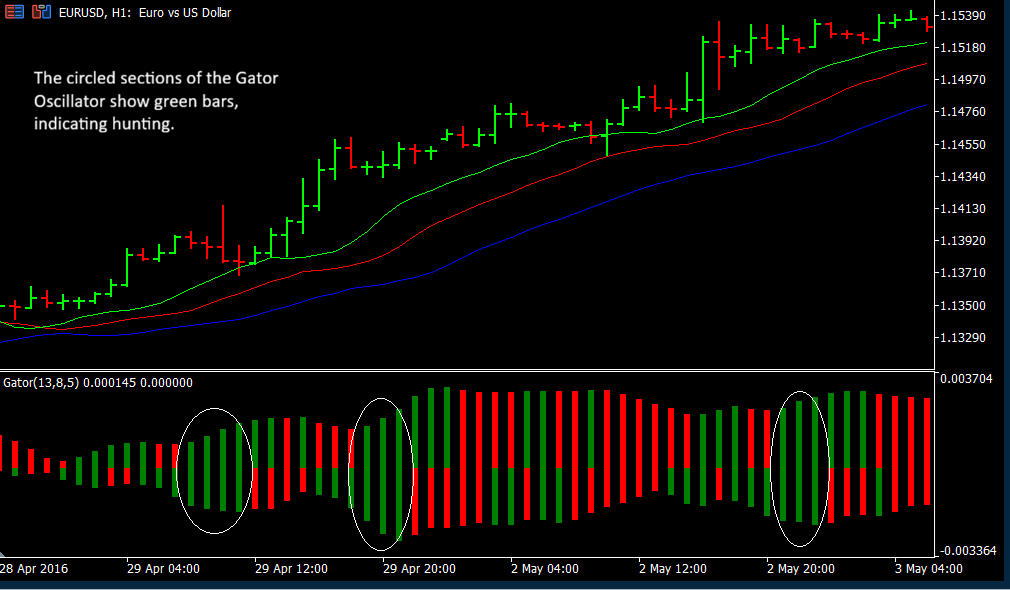
Below is an example where price is trending upwards. As the moving averages separate, there are some all green bars in the histogram. These are hunting phases.
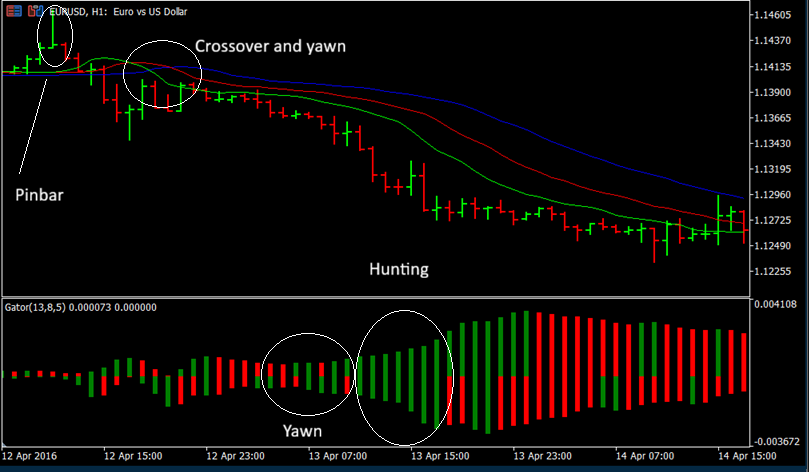
Here is one more example. A bearish pinbar signals a possible move downward. There is a bullish pinbar a few bars later, but resistance holds. Around the same time, moving averages cross over, and the histogram is featuring green and red together. There is some consolidation and hesitation before the Alligator really starts to yawn. But after that, hunting begins in earnest. Price drops, the moving averages fan out, and there is a series of green bars in the Gator Oscillator.
General tips for using the Gator Oscillator
- The Gator Oscillator tends to produce more reliable information when you are trading high liquidity assets. Avoid trying to use the oscillator in markets that are always choppy — it will just show you trends that aren't good enough for trading.
- Using an additional indicator and/or price action for confluence is a good idea when you are trading with the Gator Oscillator. You could also try marking areas of support and resistance, and use breaks of those as your confirmation.
- You can use the Gator Oscillator to try and establish when to exit a trade while trailing your stops. But you do not have to. If you prefer to get out earlier using different exit rules, that is fine.
- One limitation of the Gator Oscillator is that both it and the Alligator are lagging indicators. By the time you enter a trade, you may have already missed a large portion of the move. Price can start consolidating or reversing before the oscillator shows it. Just keep that in mind as you trade. On the bright side, the lagging nature of the oscillator may help protect you from false starts.
Conclusion: The Gator Oscillator can help you capitalize on trends
The Gator Oscillator is a simple, straightforward indicator you can add to your charts to help you visualize the convergence and divergence of the moving averages that form the Alligator indicator. By doing so, you can better understand ranging and trending markets, and look for opportunities to enter and exit Forex trades.


