
Popular results
Position Sizer
Calculate risk-based position size directly in your MetaTrader platform and execute a trade in one click or a press of a button.What Is Forex
Learn what Forex is and how it works from this simple explanation.Supertrend
Download the Supertrend indicator for MT4 and MT5 to detect trend changes based on the price action.Position Size Calculator
Calculate your position size based on risk, stop-loss, account size, and the currencies involved. A simple online calculator for quick results.CCI Arrows
CCI Arrows MetaTrader indicator — will show you where the CCI cross with the zero occur (marking it with the red or blue arrow) to help you decide whether to go short or long. It has a minimal lag and a relatively high accuracy. This simple indicator is a good choice for those traders that prefer to keep it simple and hate complex indicators. CCI Arrows supports all types of alerts. The indicator is available in MT4 and MT5 versions.
Input parameters
- CCI_Period (default = 14) — the period of the CCI that is used in this indicator. The higher is the value the more lags this indicator but less false signals occur.
- EnableNativeAlerts (default = false) — if true, MetaTrader's native pop-up alerts will be used when an arrow appears.
- EnableEmailAlerts (default = false) — if true, MetaTrader's email alerts will be sent when an arrow appears. Email should be properly configured in MetaTrader via Tools->Options->Email.
- EnablePushAlerts (default = false) — if true, MetaTrader's push notification alerts will be sent to your device when an arrow appears. Notifications should be properly configured in MetaTrader via Tools->Options->Notifications.
- TriggerCandle (default = Previous) — the candle to issue alerts on: Previous — the most recently closed candle or Current — the yet unfinished candle.
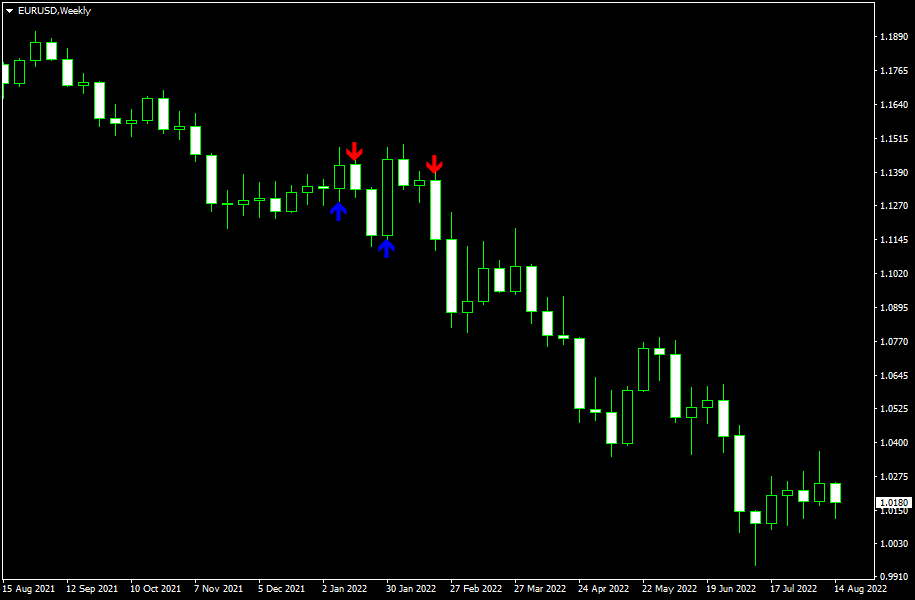
As you can see, this indicator gives direct signals for buy (blue arrow pointing up) and sell (red arrow pointing down). You should know that you should NOT enter the trade if the signal is contradicting the current general trend. If it is uptrend and you get a blue arrow — go long, if you get a red arrow — do nothing (just close your long position if you had one open); if it is downtrend and you get blue arrow — close short position but don't go long, if you get red arrow — go short; if chart goes sideways and you get blue or red arrow — feel free to go long or short respectively. I recommend setting your stop-loss directly at the level where the arrow is drawn (it is displayed if you point your mouse at it). I also recommend using trailing stop with this indicator.
Download (ver. 1.02, 2022-08-18)
CCI Arrows for MetaTrader 4 in .zip CCI Arrows for MetaTrader 4 in .mq4 CCI Arrows for MetaTrader 5 in .zip CCI Arrows for MetaTrader 5 in .mq5Discussion
Warning!
If you do not know how to install this indicator, please read the MetaTrader Indicators Tutorial.
Do you have any suggestions or questions regarding this indicator? You can always discuss CCI Arrows with the other traders and MQL programmers on the indicators forums.
Changelog
1.02 - 2022-08-18
- Added alerts.
- Added smart arrow distance calculation.
- Refactored source code.
1.01 - 2009-12-01
- MT5 version released.
1.00 - 2009-04-19
- First release of CCI Arrows on EarnForex.com.


