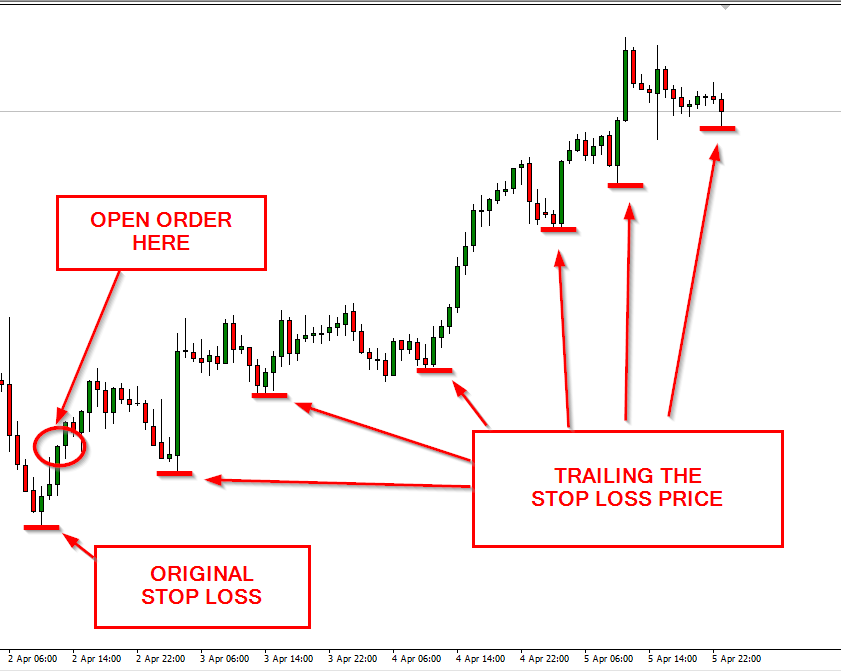
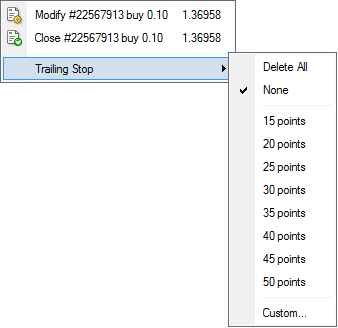
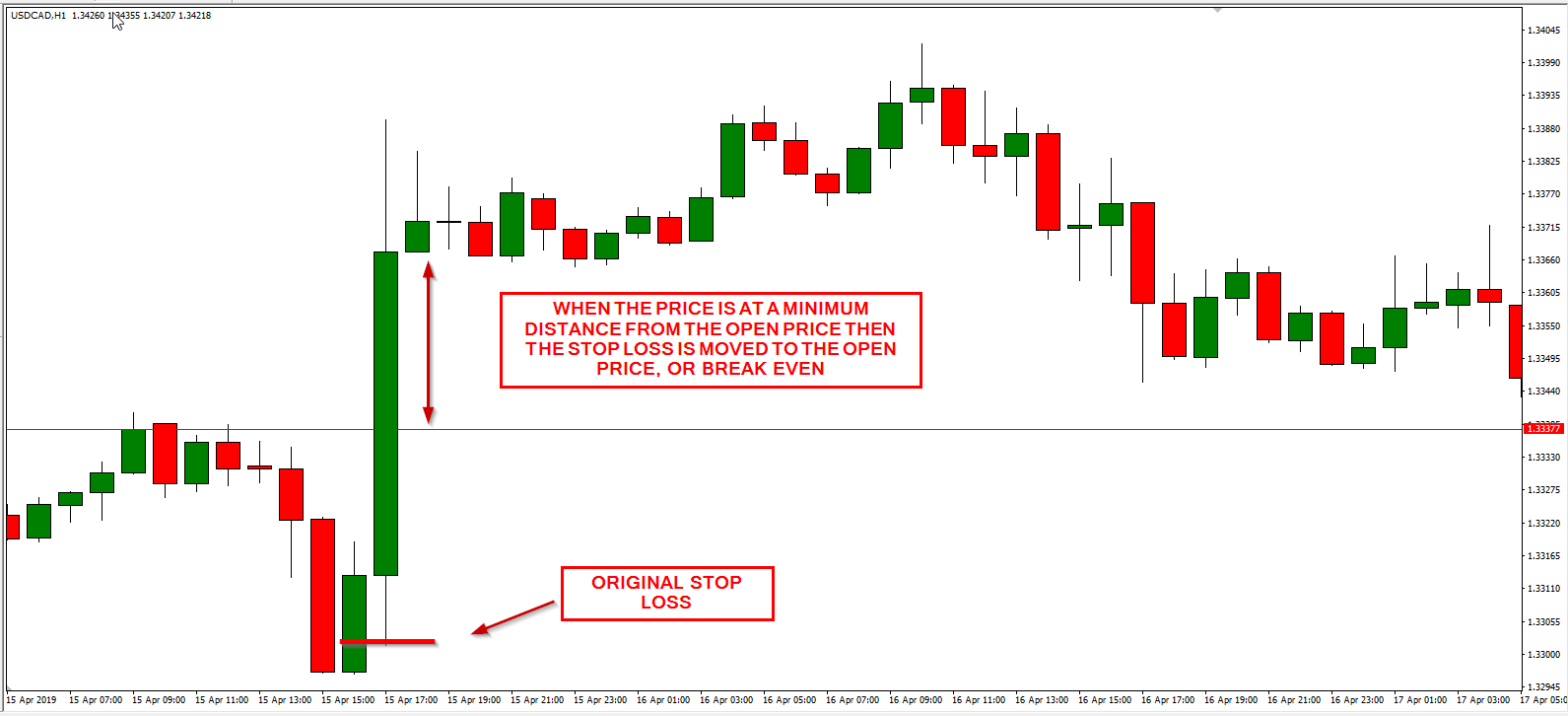
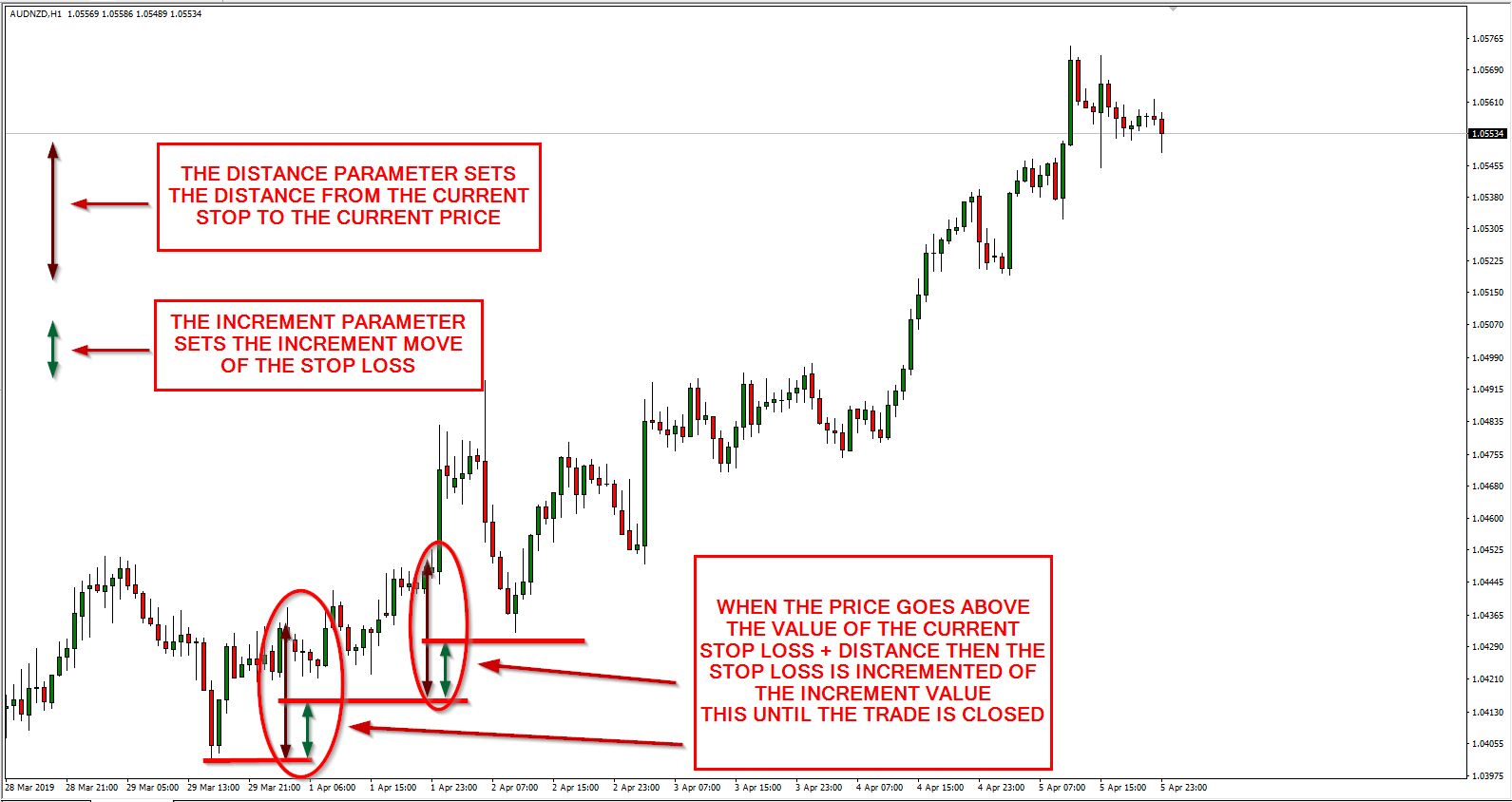
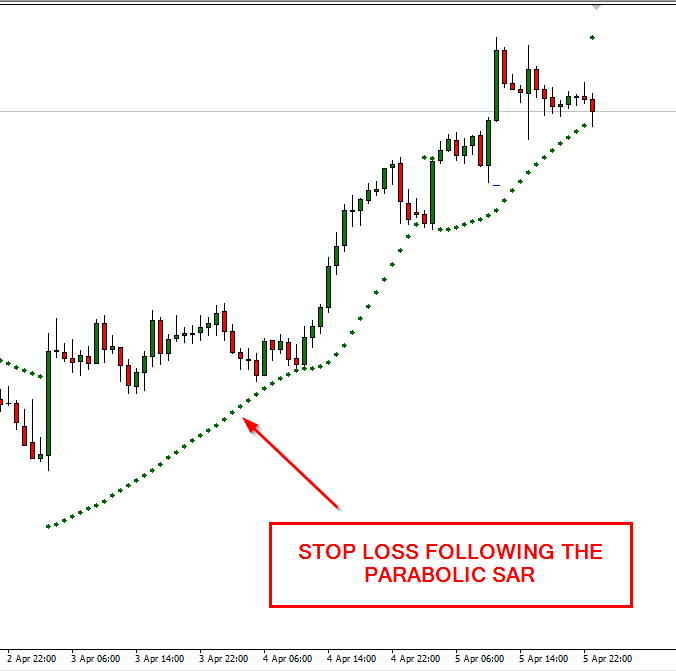
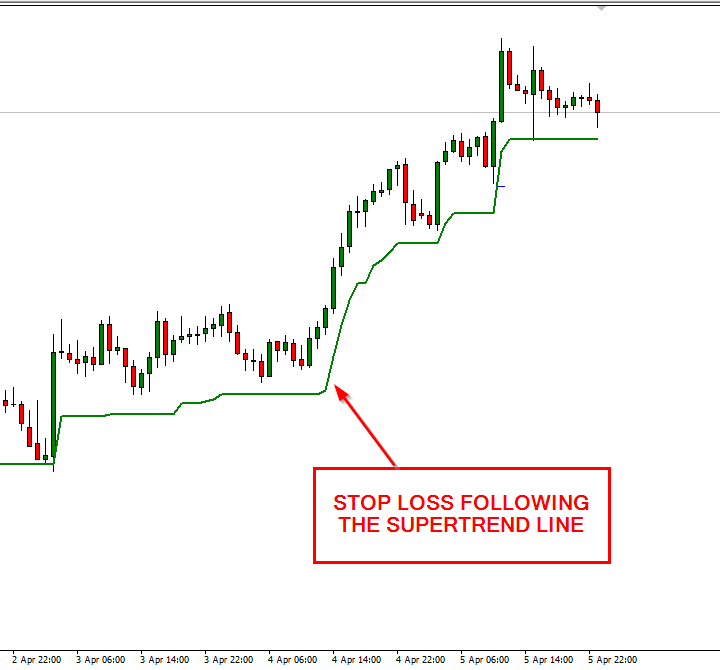
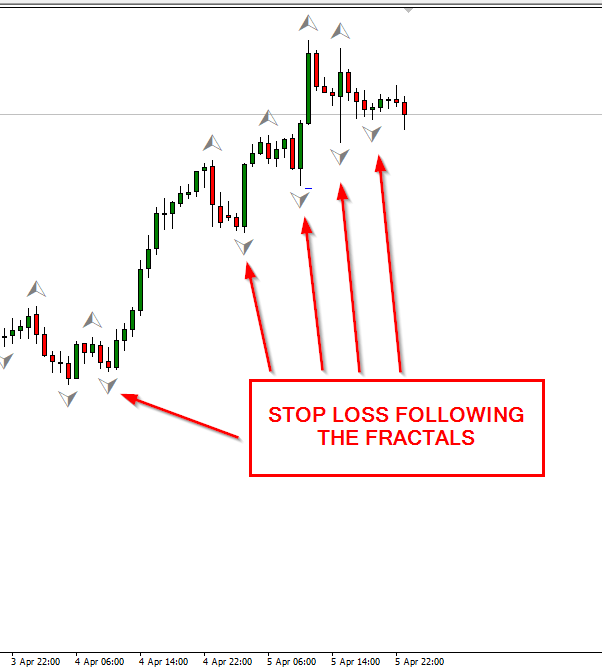
Trailing stop allows you to automatically protect the profits with your positions. It adjusts itself according to the current market rate and the amount of pips you give it to trail behind. Trailing stop is a great tool for the conservative and long term traders as it easily creates protective «airbag» for the trades. There are two basic ways to set the trailing stop in your MetaTrader 4 platform — use the
- It should go into the action only when the position is in profit (or at a break even point).
- It should apply itself only when the difference between the current
stop-loss and the current market price is greater than the trailing stop value. - Trailing stop should never «decrease» the
stop-loss level. - If used without the initial
stop-loss , trailing stop doesn’t protect your position from the excess losses; it only provides a goodprofit-following tool.
Here are the details on these two ways:
The most easy and convenient way to set the trailing

This way of setting your trailing
The second method is to add a special expert advisor to some chart in your MetaTrader 4 platform and it will follow all open orders trying to apply the trailing stop value you give it in the input parameter. This is a very simple expert advisor that doesn’t load up your system resources and can be turned on and off anytime. Here is its code:
#property copyright "Copyright © 2009-2013, EarnForex.com" #property link "http://www.earnforex.com" /* Kicks in when position reaches at least TrailingStop pips of profit. */ extern double TrailingStop = 5; // Set it to some value above 0 to activate stop-loss extern double StopLoss = 0; int init() { return(0); } int deinit() { return(0); } int start() { double PointValue; for (int i = 0; i < OrdersTotal(); i++) { OrderSelect(i, SELECT_BY_POS, MODE_TRADES); //Calculate the point value in case there are extra digits in the quotes if (MarketInfo(OrderSymbol(), MODE_POINT) == 0.00001) PointValue = 0.0001; else if (MarketInfo(OrderSymbol(), MODE_POINT) == 0.001) PointValue = 0.01; else PointValue = MarketInfo(OrderSymbol(), MODE_POINT); //Normalize trailing stop value to the point value double TSTP = TrailingStop * PointValue; if (OrderType() == OP_BUY) { if (Bid - OrderOpenPrice() > TSTP) { if (OrderStopLoss() < Bid - TSTP) { if (!OrderModify(OrderTicket(), OrderOpenPrice(), Bid - TSTP, OrderTakeProfit(), Red)) Print("Error setting Buy trailing stop: ", GetLastError()); } } else if ((OrderStopLoss() != Bid - StopLoss * PointValue) && (StopLoss != 0)) if (!OrderModify(OrderTicket(), OrderOpenPrice(), Bid - StopLoss * PointValue, OrderTakeProfit(), Red)) Print("Error setting Buy stop-loss: ", GetLastError()); } else if (OrderType() == OP_SELL) { if (OrderOpenPrice() - Ask > TSTP) { if ((OrderStopLoss() > Ask + TSTP) || (OrderStopLoss() == 0)) { if (!OrderModify(OrderTicket(), OrderOpenPrice(), Ask + TSTP, OrderTakeProfit(), Red)) Print("Error setting Sell trailing stop: ", GetLastError()); } } else if ((OrderStopLoss() != Ask + StopLoss * PointValue) && (StopLoss != 0)) if (!OrderModify(OrderTicket(), OrderOpenPrice(), Ask + StopLoss * PointValue, OrderTakeProfit(), Red)) Print("Error setting Sell stop-loss: ", GetLastError()); } } return(0); } |
As you see, the code is really simple. You can also download this trailing stop EA and use it freely with your orders. This version will start trailing
While it lacks the disadvantages of the first MetaTrader trailing stop method, unfortunately, it also has two of its own important disadvantages. First, it works for all currently open orders. So, if you want attach it to only one order and leave another one without a trailing stop this method is not for you (but, of course, you can alter this EA to work with some specific orders). Second, it utilizes the same trailing stop value for all orders, you can’t set 10 pips trailing stop for one position and 50 trailing stop for another one. In case you want to use different
Update: Added
Update 2013-02-28: Added two other versions of MT4 trailing stop. Please see the paragraph below the source code for more details. The original version has been also updated for some error reporting capability.
If you have some questions, suggestions or bug reports regarding the presented trailing stop code, please feel free to share them using the form below.


May 7th, 2009 at 6:15 pm
hi dear
how to use your trailling stop?
please send me more guidliine
thanks a lot
▼Reply
Andrei Reply:
May 7th, 2009 at 7:08 pm
Doesn’t this article explain exactly what you ask?
▼Reply
Alex Reply:
July 21st, 2010 at 4:07 am
This is exactly the same problem what I have too..
How to use this trailing stop…?
Where can I place this code?
Should it be in a single text file?
Where do I have to place the file?
What filetype should it be? I am sure if it is a .txt file, it will not work.
Alex
▼Reply
Andrei Reply:
July 21st, 2010 at 11:03 am
This code should be inserted into .mq4 file and compiled with MQL Editor and then attached to the chart where you trade. But if you don’t know that then this code will probably be of no use to you since it requires some modifications to work properly with your orders.
In your case I’d recommend sticking to MetaTrader’s built-in trailing stop solution.
▼Reply
razuki Reply:
October 8th, 2010 at 8:52 am
tell me how to use tsl,stop lose at 50pip or 100pip…or…..
▼Reply
September 23rd, 2009 at 11:17 am
Great info you got here. It’s really been helpful. Thanks!
▼Reply
April 19th, 2010 at 8:55 pm
Thank you so much. I am beginning to get confidence with the use of the indicators.
Once again, thanks.
▼Reply
Andrei Reply:
April 19th, 2010 at 9:16 pm
No problem. If you have any problems with trailing stop, just ask.
▼Reply
May 3rd, 2010 at 8:39 am
how do i edit the EA to the amount of pips i want my trailing stop to be?
▼Reply
Andrei Reply:
May 3rd, 2010 at 9:24 am
If your EA supports trailing stop, it’s usually configurable via the input parameters. If it doesn’t support trailing stop, you’ll have to either modify the EA’s code to add such support (which is quite difficult, especially if you don’t know how to code in MQL) or to manually set the trailing stop on the positions opened by this EA.
▼Reply
June 21st, 2010 at 6:50 am
Hey! Thank you so much for this code. I was wondering, if I wanted to take this trailing stop and make it a part of one of my robots, could you tell me which part of the code I need, and where to paste it in my robot’s code?
▼Reply
Andrei Reply:
June 21st, 2010 at 7:32 am
Everything in the start() function except “return(0);” line. Paste it anywhere in your EA’s start() function. But if you couldn’t figure that on your own you’ll probably have some problems with that.
▼Reply
August 27th, 2010 at 1:14 pm
[...] Andrei explains how to set a trailing stop in MetaTrader 4. [...]
September 23rd, 2010 at 3:41 pm
I am quite comfortable with the Trailing Stops article.
Thanks a lot.
But where and I do I place the code for the Trailing Stops.
Will appreciate your reply.
▼Reply
admin Reply:
September 24th, 2010 at 7:47 pm
In your EA, but if you aren’t a coder you don’t need it.
▼Reply
Clóvis Reply:
July 20th, 2012 at 4:16 pm
hello if possible would like your help,
I would like to make the trailing stop is activated for example 20 pips after being positive and to remain a margin of 5 pips if it returns in the opposite position, eg:
open order to buy EURUSD 1.21600
the order is rising and has reached the 1.2180 trailing stop starts and gets in 1.21750 stop if it will continue to rise increasing the stop of a 1 pip in the event of a downturn it gets 15pips.
thank you in advance.
excuse me but it was translated into English via google!
▼Reply
admin Reply:
July 20th, 2012 at 5:14 pm
It is very simple. In the code that I show in the post above change:
to:
and change:
to:
You can substitute 15 with some input parameter name to make it variable. But do not forget to declare the input parameter in the beginning of the EA.
▼Reply
Clóvis Reply:
July 23rd, 2012 at 6:56 pm
how do I make this change you suggested, what name should I put, I know nothing of programming.
“You can substitute 15 with some input parameter name to make it variable. But do not forget to declare the input parameter in the beginning of the EA.”
▼Reply
admin Reply:
July 23rd, 2012 at 7:08 pm
You can choose any name you want. For example, MinTrailingProfit. But don’t forget to declare it first as:
▼Reply
Clóvis Reply:
July 24th, 2012 at 6:04 pm
I tried to use the way you instructed but the trailing stop is varied for less, is what I need it to be fixed as above exemplifiquei when 20 pips higher than expected it hangs on the stop 15 pips cso continue to rise it rises to 01 01 pip if he goes back to at least 15 pips or as rose was increased from 01 to 01 pip, is it possible?
▼Reply
admin Reply:
July 24th, 2012 at 8:47 pm
I don’t quite understand what you are trying to suggest.
October 2nd, 2010 at 3:08 am
This is great…..!!
Would it be hard to do the same for stoploss and take profit.
I had not thought of a separate EA for Trailing Stop until I read your post….. and now I am wondering it could also be applied to the other two… ie would Metatrader allow same.
Thanks for your great resources in your site…….!
daveM
▼Reply
November 4th, 2010 at 8:09 pm
Thank you very much for your kind service. Wish you all to be success…..!
▼Reply
December 9th, 2010 at 3:53 pm
Thanks for the nice work around. I downloaded, edited and installed correctly. However, when I try to use the trailing stop indicator it did not show up in my chart. How do I know if it’s working?
▼Reply
admin Reply:
December 9th, 2010 at 4:26 pm
It should expert advisor, not indicator. If you attach it as an expert advisor you will see its name appearing in the top-right corner of the chart with either “X” or a “smiling face” symbol. Enable EAs to turn it on (it should show a “smiling face”).
▼Reply
Rick Reply:
December 14th, 2010 at 7:57 pm
Thank you. This EA works great. My question, The stop does not exist until the position is at least at breakeven, is this correct? In any event, I really like your trailing stop EA.
If you have a PayPal account I will send you five bucks as a token of my appreciation.
▼Reply
admin Reply:
December 14th, 2010 at 8:49 pm
Yes, the stop-loss isn’t added until that. You can add stop manually if you want it before the breakeven.
Thanks, but your appreciation is enough for me :). Just telling your friends about my site would be great.
▼Reply
December 15th, 2010 at 3:55 pm
If I add a stop manually, will it go away when the trailing stop EA kicks in?
I will tell my friends about your site.
▼Reply
admin Reply:
December 15th, 2010 at 4:11 pm
Yes, the trailing stop will change it.
▼Reply
December 29th, 2010 at 5:47 am
My broker told me that 15 points actually is 1.5 pips e.g. 10points= 1pip.
▼Reply
admin Reply:
December 29th, 2010 at 2:20 pm
Yes, some brokers use fractional pips, where 1 fractional pip = 0.1 normal pip.
▼Reply
January 13th, 2011 at 5:52 am
[...] http://www.earnforex.com/blog/2009/04/trailing-stop-in-metatrader-4 Posted in Articles [...]
January 13th, 2011 at 5:14 pm
Hello, I can not make my trailing stop EA work, although I installed and lunched it correctly, there are no any errors in MT4 experts or journal. I am testing various of values in property’s input now. If you have any other suggestions, tell me please.
▼Reply
admin Reply:
January 14th, 2011 at 5:10 pm
Do you have any open positions?
▼Reply
Giorgi Reply:
January 16th, 2011 at 4:15 pm
No, I don’t have opened positions now. And why are you interested? Do you have any suggestions?
▼Reply
admin Reply:
January 16th, 2011 at 4:17 pm
Then what do you expect from this EA? It only applies a trailing stop to the currently open positions, it won’t open them for you…
▼Reply
Giorgi Reply:
January 17th, 2011 at 1:28 pm
I know how EA works, when I told you that I can not make it work, I was meaning that I can not make it work on opened positions…. I am opening and closing many positions, the trailing stop EA is turned on, but it doesn’t apply any trailing stops.
Thank you for answers, I estimate your effort but I feel that you shall not be able to help me..
▼Reply
admin Reply:
January 17th, 2011 at 2:08 pm
If the EA is really working (the smiling face is displayed in the top-right corner of the chart) and the currently open positions qualify for stop-loss change and EA does nothing – then I really can’t help you, sorry…
▼Reply
January 22nd, 2011 at 5:35 pm
Hi,
I applied your trailing stop ea. I see its default setting is 5.0. Does that mean its set at 5 pips? Does the ea only kick in when the break even is reached? i.e If I open a long trade at 1.0020 with my stop loss at 1.0000–will the ea only kick when the trade hits 1.0040? And then if the trade turns down to 1.0035 will the trade then close with a profit of 15 pips (with the default setting of 5.0)?
What I’m looking for is a trailing stop ea that with the above scenario will move the stop loss up by 1 pip to 1.001 when the trade moves up by 1 pip to 1.0041 and so on–so if the trade turns down then I’ll make one pip.
Why I’m asking is because too many of my trades turn before they reach break even (say at 1.0032) then I don’t make any profit and get kicked out at 1.000 at -20 pips without the trailing stop ever coming into play. I want the ea to lock in any profit as soon as the trade moves up.
Could you tell me where I could find something like this?
Much obliged
▼Reply
admin Reply:
January 22nd, 2011 at 6:12 pm
The listed trailing stop EA comes to play only when the position has at least TrailingStop pips of profit. If you open a trade at 1.0020 with TrailingStop = 5, it will move your stop to 1.0021 (1 pip of profit), once the price reaches 1.0026.
▼Reply
Hussain Reply:
April 26th, 2013 at 3:43 pm
Ok but i want to ask here :
MT4 gives quotes of 5 digits lets say in the example above trade at 1.00205 ok ? I have MT4 with minimum 20 points and i have noticed it counts the last digits as points meaning when the price goes up 1.00215 it is 10 points and when 1.00225 it is 20 points and when 1.00235 it is 30 points whereby the trailing stop then sits at 1.00215 . This is great for scalping but manier times i have noticed with 1 lot 1 pip up is $ 10 ok and lets follow the above example the price went up to 1.00230 which is 25 points up and 25 $ up with 1 lot correct . So technically the trailing stop should move up by 5 points now that the profit is 25 points greater then the preset value of 20 so the take profit now should sit at 1.00210 if price returned and should give me a profit of 5$ expected BUT NO THE TRAILING STOP DOESNT SIT THERE AND IT HITS THE STOP LOSS THAT I SET 10 PIPS DOWN THE HARD STOP LOSS i dont understand sometimes it does and i get profits and bag much more BUT AT CERTAIN TIMES ID DOESNT WHY IS THAT I AM STILL USING DEMO FOR INFO , please answer if anybody can add some info . Thank you .
▼Reply
admin Reply:
April 26th, 2013 at 4:07 pm
It uses standard pips as input parameters. If you want it to work with fractional (5-digit) pips, just set the values divided by 10. So, it should 2 instead of 20 in your example.
▼Reply
April 13th, 2011 at 1:49 am
Thanks for that code, I will try it out.
IBFX have a realy neat adjustable EA that allows you to set a variety of fixed Stop Losses as the trade progresses into profit. For example you might set it to +1 PIP when the trade is 8 PIPS into profit, then increase the stop to 10 PIPs when it is 20 PIPS up. There are 4 stages available, and totally adjustable for each Trade (based on the ID number of the trade.)
The only problem I have found is that it will not work on any MT4 platform except IBFX! And that is a bit restrictive if you want to try other MT4 brokers for various reasons.
Is there anyone with a similar but ‘open’ EA?
▼Reply
admin Reply:
April 13th, 2011 at 7:20 am
Do they provide .mq4 file of the EA or just .ex4? In the second case, it won’t be possible to modify it to work with other brokers. But it’s probably not that difficult to code such EA. Can you describe its algorithm in details?
▼Reply
May 11th, 2011 at 7:45 am
Thank you very much for the useful information and the timely responses to peoples’ questions.
I had wanted to ask, is there a way of using this script to loosen/tighten trailing stops? Like for example once x pips have been reached in favour, increasing the amount that the stop trails by, and subsequently once y pips have been reached in favour, decreasing the amount that the stop trails by back to the original amount.
Do you know of any way or of any EAs that i can use to achieve this?
Thanks for your time
▼Reply
admin Reply:
May 11th, 2011 at 8:20 am
So, you basically need a varying trailing stop, right? By what rules should it vary? Can you offer an example?
▼Reply
May 12th, 2011 at 1:47 am
Hi,
Essentially yes I am looking for a trailing stop that I can vary the trailing distance once a specified amount of points are reached, and also want it to trail point for point (frequency of 1).
I am specifically talking about Gold Futures (GCM1) as the underlying instrument and I would like to achieve the following:
1. Entry price = X with hard stop loss order 200 points behind entry,
and set Trailing Stop of 100 points to newly opened position.
2. Once 200 points of profit reached, loosen Trailing Stop to 200 points (meaning BreakEven if it is triggered)
3. Once 300 points of profit reached, loosen Trailing Stop to 300 points.
4. Once 700 points of profit reached, tighten Trailing Stop back to 100 points and leave as it.
Any help with this is greatly appreciated, thanks.
▼Reply
admin Reply:
May 12th, 2011 at 7:36 am
But there will be a problem with steps 2 & 3:
Before reaching 200 points of profit you’ll have 100 points TSL, which will continue setting SL up after break even. When you’ll have 199 points of profit, it will set SL to BE + 99. But then, when you have 200 points of profit it will have to set back the SL back to BE. Isn’t that strange? The same will happen with step 3. At step 4, your SL will jump up steeply.
▼Reply
May 12th, 2011 at 8:22 am
Yes you are correct, this is the setup that I desire.
It is my intention to have a 300 point TSL ultimately, but in smaller increments allowing me to break even at any given point until this 300 point TSL is achieved.
Once the 100 point TSL is triggered I want to maintain breakeven status the entire time as each subsequent increment of increasing the trailing distance is achieved, which is why I want to allow
I want to allow the profit to actually reach 200 points BEFORE setting the 2nd TSL to 200 points, rather than setting it to 200 points once I have reached only 100 points of profit, which would actually result in a -100 point position (loss) if the TSL is triggered.
I hope this is clear, it may sound strange however was well thought through; essentially I want to be able to subsequently increase the trailing distance as certain profit levels are reached; can you please provide assistance with respect to script(s) or an EA for MT4.
Thanks
▼Reply
May 12th, 2011 at 8:23 am
The nature of Gold Futures is different from that of Forex Currency pairs which is why initially the setup may sound untraditional
▼Reply
May 12th, 2011 at 1:26 pm
Add the following lines just below “extern double TrailingStop = 5;”:
Add the following lines just before “if (OrderType() == OP_BUY)”:
As you can see it’s quite easy to modify it to add more levels of trailing stop-loss if you need it.
▼Reply
May 12th, 2011 at 5:40 pm
Thank you very much, I will try it out
▼Reply
May 31st, 2011 at 10:48 am
.
Ok, so I have tried out this EA multiple times over the last couple of weeks at different price points using both buy and sell orders, and it isn’t working correctly however I still believe it was well coded and you are extremely knowledgeable as a programmer.
The problem that I have is that even with this code, the trailing stop kicks in once I am only 5 points/pips in profit instead of the 100/200/300 point setup I would like as discussed above.
Is it possible that this is due to the OrderTakeProfit() part of the function in OrderModify? It looks like a small, simple fix however I am unable to figure it out.
Some assistance would be greatly appreciated
Thanks again
▼Reply
admin Reply:
May 31st, 2011 at 11:41 am
1. Don’t insert such huge pieces of code into comments. Share your file on some hosting and just post the link here next time.
2. From what you’ve posted, it looks like you didn’t follow my instructions to insert the additional code for your trailing stop loss levels. Please download the clean version again and insert the pieces of code as described in my previous comment.
▼Reply
August 8th, 2011 at 11:31 pm
I disagree that the trail should only activate when the position is in a profit. Don’t we also want to limit our loss? The point of a trailing stop?
▼Reply
admin Reply:
August 9th, 2011 at 7:08 am
Yeah, you are right, the classical trailing stop should be working from the start. I don’t want to modify the EA that’s in the post, but you can easily change it to work even without profit. Just remove the following conditions:
▼Reply
September 23rd, 2011 at 7:44 am
Hello,
please send the trailing stop that i can set to minimum of 3 pips after breaking even and can also work with ( 2nad 4 , also work with 3 and 5 after the decimal point )
to my e-mail box
and please explain how i will install it and use it. please i am waiting seriously and where i can place it for usage.
thanks
▼Reply
admin Reply:
September 23rd, 2011 at 2:18 pm
Sorry, but this post isn’t for EA coding requests. You can try asking on our Forex forum:
http://www.earnforex.com/forum/
▼Reply
November 30th, 2011 at 5:32 pm
Hi, thanks for this information. How would you modify the code to be a percentage of the profit?
extern double trailing_stop_percentage = 40 //—–40%
and also a starting pips amount – say 10 pips in profit.
and then in the start function could you do:
something along the lines of
stop loss = (current price -order open price) * trailing stop percentage.
Thanks
▼Reply
admin Reply:
November 30th, 2011 at 7:28 pm
You’ve almost got it right:
1. Declare the input parameter as you’ve wrote.
2. Find these lines:
Replace with these:
3. Find these lines:
Replace with these:
This way, you’ll be able to set percentage stop loss in your new input parameter, while the old TrailingStop input parameter is used to set the minimum value in pips for profit to use the percentage trailing stop. In your example, you’d have to set it to 10.
▼Reply
December 1st, 2011 at 4:40 am
Thanks for this. I tried so long to try and implement something like this in my EA. I was getting stuck on the (Bid – OrderOpenPrice() >= TSTP)) components. I have been learning coding from existing EAs and the order functions are alot difficult for me than bools and indicators.
Cheers
▼Reply
December 4th, 2011 at 2:43 am
This is the trailing stop % EA I got working.
▼Reply
December 4th, 2011 at 2:45 am
I’m going to try and program a percentage trailing stop with different trail stop levels.
Eg – 20% @ 10 pips
40% @ 30 pips
50% @ 60 pips
etc
▼Reply
December 5th, 2011 at 4:59 am
I prepared an EA on the idea I had above and based on the information you gave to ronnie k regarding different trailing stop levels. I believe this code works however it does give some funny information when its calculating the stop loss. the stop loss appears to be the same as the other currency pairs at times. However eventually it settles on the correct stop loss. The other thing is that if there is a starting stop loss then the trailing stop would calculate from this stop loss (eg 40 pips as below) rather than the price at the initial trade. I am not sure how to stop this. it would be good if you could verify the code as the stop loss seems to move backwards with the price at times as well.
▼Reply
December 7th, 2011 at 3:54 pm
Hi – I think the logic in the above post is right. The only problem is that the trailing stop will move backwards if price moves backwards. How can I stop the price moving backwards? I am trying a few variations with no luck. I won’t post any more code as it clutters the thread however I can send the EA when its finally working right to you to post on your site.
▼Reply
Charles Reply:
December 7th, 2011 at 3:54 pm
I meant how can i stop the trailing stop from moving backwards…
▼Reply
admin Reply:
December 7th, 2011 at 5:04 pm
To stop the trailing stop from moving backwards with the price, you have to check if the stop-loss you are trying to apply is higher (lower for short positions) than the existing one, and call OrderModify() only if it is.
To prevent cluttering the post with the code, you can either upload your EA to some file sharing site (like DropBox) and just post the links here, or switch to our EA forum and attach the .mq4 files to your posts directly.
▼Reply
January 18th, 2012 at 11:09 pm
Does this always keep the SL to the value I set StopLoss to when moving in the profit direction all the time? I have this implemented and it doesn’t look like it is. So if I set the S/L to 10 right when this script starts it does set 10 pips away from current price. But it doesn’t seem to be updating itself as the price moves in the profit direction. I’m looking for something that keep the S/L 10 pips at all times but only when moving in the profit direction. Am I missing something?
▼Reply
Rick Reply:
January 18th, 2012 at 11:11 pm
Note that I put your code in my own script that does an infinite loop in the start(). So not sure if something needs to be refreshed or something?
▼Reply
admin Reply:
January 19th, 2012 at 8:57 am
I really don’t know if running an infinite loop inside start() function is a good idea.
▼Reply
admin Reply:
January 19th, 2012 at 8:56 am
The input parameter “StopLoss” is used to set a fixed stop-loss only once. You should use the input parameter “TrailingStop” if you want it to trail your profit.
▼Reply
March 23rd, 2012 at 2:10 am
BID and ASK only bring the current chart Pair price. You should use MarketInfo(pariname, MODE_BID) for each pair price.
▼Reply
May 8th, 2012 at 8:50 pm
hi ..
I think that using trailing stops is something most traders especially new traders tend to ignore although i consider it as a security tool for my account .. the truth is that many traders don’t accept to get out of the market hoping for further profits however they will leave the trades till it become negative !
I just liked to share my opinion about trailing stops in real trading and hope the best for all
Thanks for the author of this post .. ☺
▼Reply
June 14th, 2012 at 1:32 pm
Am I right in thinking you can’t set 2 or more take profit levels in MT4?
I use the bullpips method with great results and have noticed that using take profit at 1:1 and second at 2:1 reward/risk ratios is even more profitable.
Unfortunately I have to do this manually at the moment as I can’t see how to set it up in MT4 other than open 2 separate trades. Any ideas?
▼Reply
admin Reply:
June 14th, 2012 at 3:27 pm
In MT4, you’ll have to use either 2 separate trades for that or opt to use an EA that would close positions partially.
In MT5, you can set as many TPs on a position as you wish.
▼Reply
June 27th, 2012 at 11:12 pm
This is exactly what I was looking for. I’m still new with FOREX and MT4 so thanks for the post. It has helped a lot.
▼Reply
August 28th, 2012 at 8:15 pm
Sir,
Please can trailing stop work when my computer is off.I mean after entering trades activate the trailing stop,let say i off my system.can the trailing stop be working while the system is off?
▼Reply
admin Reply:
August 28th, 2012 at 9:05 pm
No, you would have to use VPS for that.
▼Reply
September 15th, 2012 at 8:08 am
Thanks for this. I compiled it and added it to my custom list.
I assume until I actually place an order I will not see anything to show the trailing stop indicator will work correctly. For example, the smiling face only appears on your chart when there is an open trade, is that correct?
Also, when I make a trade, do I have the ability to set it as a trailing stop trade, or do I just set it as a stop loss trade and the indicator takes over from there.
Thanks again
▼Reply
admin Reply:
September 15th, 2012 at 8:31 am
You need to attach the EA to the chart for it to work. It should be showing the smiling face all the time, otherwise it is not active.
The EA applies trailing stop to all orders, irrespective of whether it has a preset SL or not.
▼Reply
Aaron Reply:
September 15th, 2012 at 8:41 am
Actually after I edited the stop I see it in the corner of my graph now :)
▼Reply
September 17th, 2012 at 4:55 pm
Now I am pretty much cleared about the trailing stops. Thanks for this informative post.
▼Reply
January 25th, 2013 at 8:55 pm
The code for this trailing stop is (because of the two disadvantages) INCOMPLETE!
Why didn’t the individual correct these flagrant deficiencies?
▼Reply
admin Reply:
January 25th, 2013 at 10:47 pm
What disadvantages do you mean?
▼Reply
February 16th, 2013 at 1:38 pm
Hi!
I wanna ask you that when we apply this EA to the chart having already running trades with positive as negative points, lets say +96 or with some loss as -66, in that case how this EA will work.
▼Reply
admin Reply:
February 16th, 2013 at 2:17 pm
It won’t do anything with a losing trade. It will apply trailing stop to the profitable one – it well set stop-loss to (Current Price – Trailing Stop) value.
▼Reply
February 22nd, 2013 at 9:05 am
Hello!
Enquiry: how come you are monitoring Bid for running Buy order and not Ask,
and Ask for running Sell order and not Bid? Shouldn’t it be the other way round?
▼Reply
admin Reply:
February 22nd, 2013 at 9:44 am
You are right, but Buy is closed at Bid, so if we set TrailingStop to 20 pips and expect to get at least 20 pips of profit when it is activated, we have to wait for Bid – OpenPrice to be >= 20 pips. If we would monitor Ask – OpenPrice, the resulting profit would be Spread size less than 20 pips. The same is true for Sell orders.
▼Reply
February 26th, 2013 at 11:28 am
Hello, or and how to download it? Thank you.
▼Reply
admin Reply:
February 26th, 2013 at 12:36 pm
There is a download link in the post – just below the source code.
▼Reply
February 27th, 2013 at 12:14 pm
hi, to change the trailing stop value, I should change the ’5′ at the very beginning of the code to the amount of pips I want? is that all thats required for this? thanks
▼Reply
admin Reply:
February 27th, 2013 at 1:10 pm
Yes, that and re-compile the file in MQL Editor.
▼Reply
Jon Reply:
February 27th, 2013 at 1:47 pm
Great, thanks! this one’s handy!
▼Reply
March 16th, 2013 at 8:54 pm
please what is the meaning of pip adjust in an EA
▼Reply
admin Reply:
March 16th, 2013 at 9:08 pm
Where did you find that “pip adjust”?
▼Reply
March 16th, 2013 at 8:56 pm
WHAT is the meaning of slippage
▼Reply
admin Reply:
March 16th, 2013 at 9:07 pm
Slippage is the difference between the request order execution price and the actual order execution price. For example, you sent a trading order to buy EUR/USD at 1.3072, but it got executed at 1.3074 – that is 2 pips slippage.
You can find more Forex terms definitions in our glossary:
http://www.earnforex.com/forex-glossary
▼Reply
March 20th, 2013 at 6:21 am
I want to write an EA so that it reopens a buying order when the price is 10 pip less than the previous closed buying order price and to reopen a selling order when the price is 10 pip more than the previous closed selling order price
▼Reply
admin Reply:
March 20th, 2013 at 7:23 am
Good for you!
▼Reply
Saeed Reply:
March 20th, 2013 at 12:38 pm
I was hoping you would help me with it.
▼Reply
admin Reply:
March 20th, 2013 at 1:39 pm
Then you would do better by asking me to help you with something specific. Moreover, what does it have to do with “Trailing Stop in MetaTrader 4”?
▼Reply
Saeed Reply:
March 20th, 2013 at 2:00 pm
I didn’t know where esle I can put. Is there a specific thread where I can put my queries??
▼Reply
admin Reply:
March 20th, 2013 at 2:18 pm
There is a whole forum: http://www.earnforex.com/forum/f13/
▼Reply
March 25th, 2013 at 12:37 pm
bundle of thanks,,i appreciate your work and am looking forward for some other useful EA’s
▼Reply