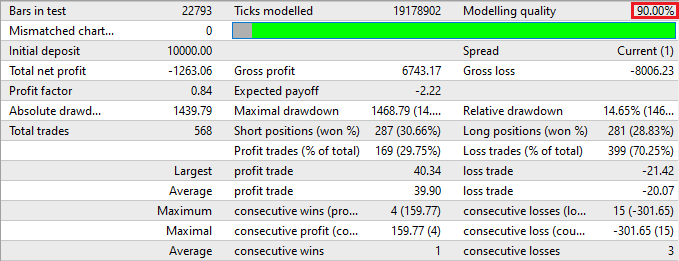


Backtesting MetaTrader expert advisors on historical data is a good way to test a strategy. But testing on the limited data supplied with MT4 installation gives a very poor quality of testing (usually below 50%). So, how to achieve a 90% quality in backtesting of MT4 expert advisors? It’s not that hard really, just follow this simple tutorial and you will able to test any MetaTrader EA.
1. Download a new MetaTrader 4 installation and install it to a separate folder. Be advised that a good MetaTrader historical data take up a lot of disk space, so install it to a drive with at least 1–2 Gbytes of free space. For download MT4 installation I recommend official MetaQuotes site.
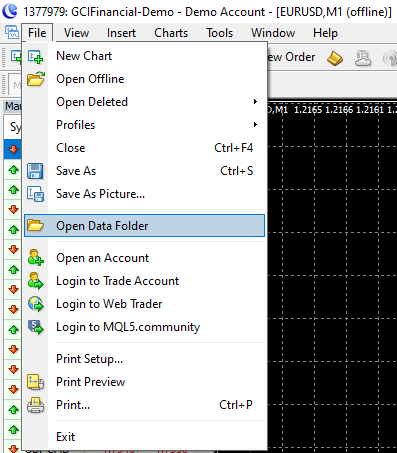
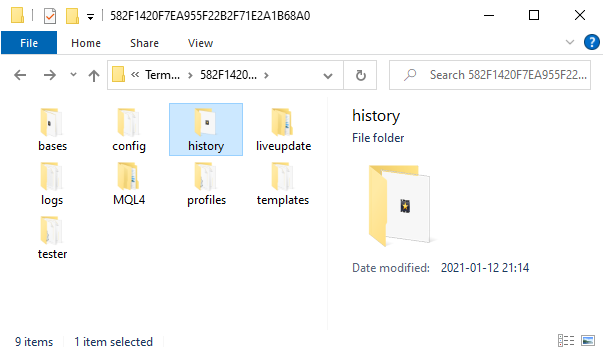
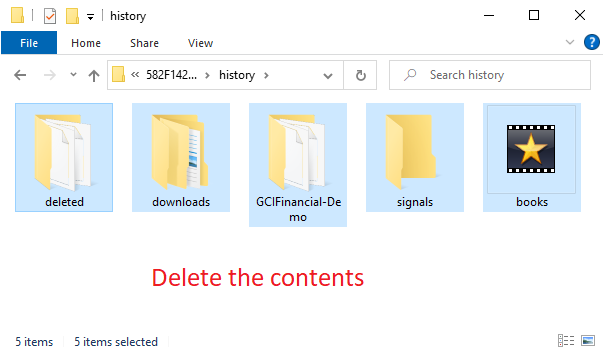
2. After you install your MT4, don’t run it yet. Go to the folder you have installed it to. Go the ’history’ folder there and delete all folders there (the actual folders names inside the ’history’ folder may be different from those on these pictures):
3. Run the newly installed MetaTrader and open a free demo account with whatever broker it will be offering to you (official MetaQuotes installation offers random brokers for demo account opening in its MT4). Login to your account and close all open charts (if any).
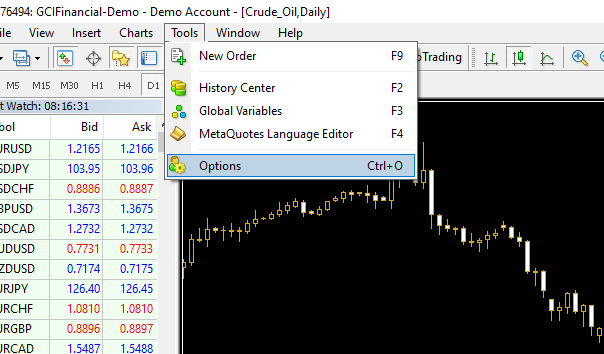
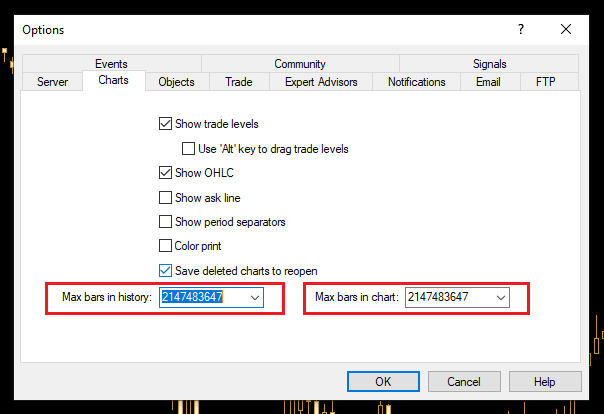
4. Adjust the MetaTrader options to allow larger charts (more bars in history):
Then close your MetaTrader.
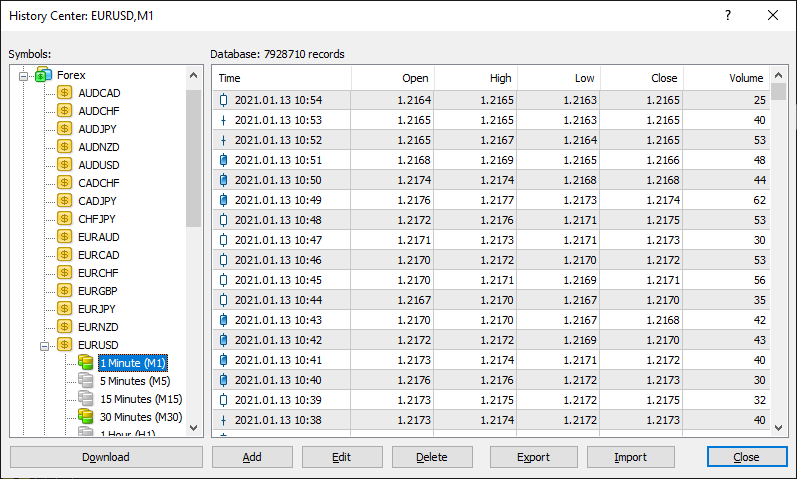
5. Download a quality historical data for every currency pair you want to test your expert advisor on. I recommend Alpari History Center for this — download M1 data for each of the currency pairs you need. You’ll probably won’t need to follow the next steps listed here. Just follow the instructions listed on the Alpari’s historic data page and proceed to step 13 here.
6. Unzip the archive with M1 historical data somewhere. Rename it to comply with MT4 standard naming — i.e. EUR/USD M1 chart should be named EURUSD1.hst, GBP/USD M1 should be renamed to GBPUSD1.hst, etc.
7. Copy the renamed history file to your MetaTrader’s ‘history’ folder into your broker’s folder (overwrite if prompted):
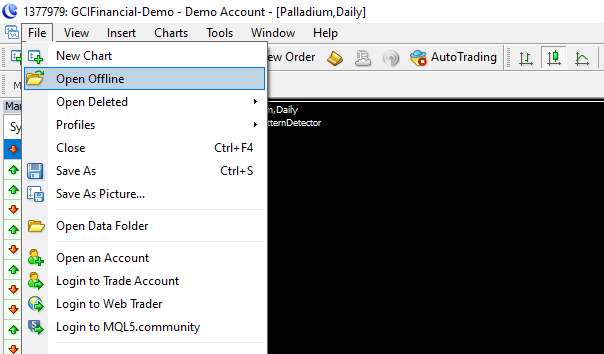
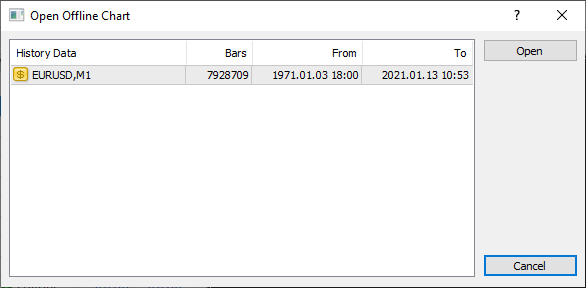
8. Launch MetaTrader 4 again. Don’t open any charts
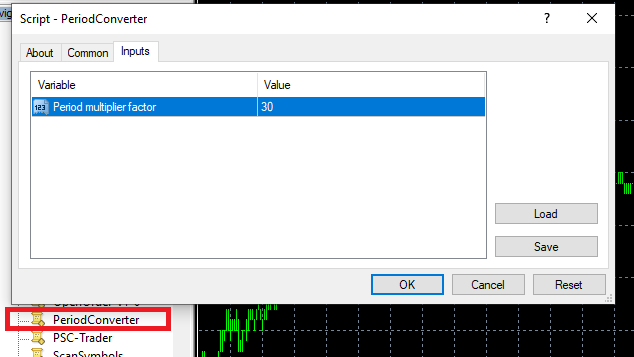
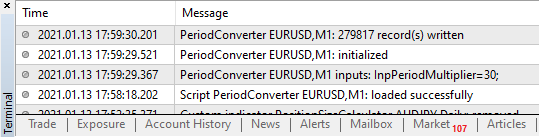
9. It might take some time for the actual chart to load, but it’s OK. Now you need to convert M1 history to every timeframe you will need. For this you need to use a period_converter script which is a standard feature of all MT4 platforms. Run it from the Scripts tab and set its ExtPeriodMultiplier input parameter to the number of minutes in the desired output timeframe. For M5 enter 5, for M15 enter 15, for M30 enter 30, for H1 enter 60, for H4 enter 240, for D1 enter 1440, for W1 enter 10080, MN isn’t convertible as there is no fixed amount of minutes in one month:
10. Wait for the script to finish its work (may take up some time; it’s more than 2 years of data after all):
11. Repeat steps 8–10 for all timeframes you want to get.
12. Repeat steps 5–11 for all currency pairs you want to test your MT4 EAs on.
13. Voilà! Now you can enjoy a 90% quality backtesting and test every expert advisor you want on the time periods of more than 2 years. Good luck with your trading!

January 5th, 2008 at 1:52 pm
very good manual! I have a queston.When I converted the 1H timeframe to 2H timeframe.How to choice 2H timeframe in strategy tester?I can select m1,m5,m15,m30,H1,4 daily but the 2H timeframe is not present in startegy tester,but i converted it and i see when i opening chart offline.
Sorry for my english .
Thanks
▼Reply
January 5th, 2008 at 2:12 pm
First, thanks for using this tutorial. Second, it’s better create all timeframes from M1 timeframe. Third, unfortunately, there is no H2 timeframe in MT4, so you must use one of the standard timeframes…
▼Reply
Carl Reply:
February 14th, 2011 at 2:50 am
Yes, I would like to thank for posting this tutorial, its very detailed, informative and reliable
▼Reply
January 5th, 2008 at 2:27 pm
Thanks for your answer.
I interesing the visual mode in strategy tester ,while i see what happening on every each tick .When i runing expert advisor on 1H timeframe i dont see what happening in my custom timeframe.Have you any idea what can i do ,to fix this problem?
Thanks
▼Reply
January 5th, 2008 at 3:09 pm
Sorry, I don’t use the visualization in strategy tester. Maybe there are no orders to draw?
▼Reply
January 5th, 2008 at 3:33 pm
When i using the strategy tester i must select a timeframe(I can not select my custom timeframe)
I think so ,the only way that i see redrawing the chartis the visual mode.
▼Reply
January 5th, 2008 at 5:07 pm
I have a new problem:) I try to open the 1M history date but in chart windows write me with big font WAIT,and not happening anything .I make all as your manual .
What i do wrong?
▼Reply
January 5th, 2008 at 5:25 pm
Did you rename it as mentioned in the tutorial? Did you copy it to the proper history folder?
▼Reply
February 20th, 2008 at 12:06 pm
how can i put take profit in my software. pls
▼Reply
February 20th, 2008 at 12:32 pm
kingsley, What software are you using?
▼Reply
May 20th, 2008 at 7:16 am
databank.alpari.org is down at the present
▼Reply
May 20th, 2008 at 8:24 am
William, I hope it will get back up soon.
▼Reply
June 18th, 2008 at 11:45 am
thanks a lot for this tutorial :o)
last version of metatrader propose wti chart! also brent chart. unfortunatly, the fistory for these new charts (and other new charts) is very poor. i’m looking on the web where i could find a web site, as Alpari History Center who provide these datas. if i find one out i will post it here ;)
thanks again
▼Reply
August 17th, 2008 at 4:03 pm
has some one been able to find another history center? alpari databank is still down, pls HELP !
▼Reply
August 20th, 2008 at 8:15 pm
Yo! I tried Alpari 1-Min data, it’s real bad, too much missing 1-min bars!!!
jb
▼Reply
September 7th, 2008 at 8:46 am
Great! These info are what I need! Thanks. However, I believe alpari databank is still down.
▼Reply
babnz48 Reply:
June 19th, 2011 at 1:35 am
http://www.forextester.com/data/datasources.html
▼Reply
September 19th, 2008 at 5:36 pm
Alpari databank is up now…enjoy!!
▼Reply
November 16th, 2008 at 9:20 pm
Thanks for the great and detailed info. However, I am unable to download the history zip file from Alpari download center. I can\’ download any of them. Does anybody know an alternative download site? Also, does anybody notice that when testing with Meta quotes history that the longer back you go to test an EA the more losing trades the tester says are made? When testing for only a month back you get more accurate results. Two months back it gives you less accurate results, 3 months back even less accurate,etc….. And the farther back you do the testing the bigger the time gaps are that the EA doesn’t trade! Any help will be appreciated. Thanks!
▼Reply
November 26th, 2008 at 2:27 am
This info is very useful, but I can’t download history data from alpari data center, it’s looks like they are down or there is a reason that the data is only for members ?
I get the word “Forbidden”, any other history data center ?
Thanks…
▼Reply
January 6th, 2009 at 8:20 am
How long should backtesting take? I’m running my first try at it now. Trying to run on data from 1/1/2008 thru 12/31/2006 on M30. It’s been running for 14 hours and appears to be only about 3/4 done. Running on Windows XP, Pentium 4, 2.20 GHz, 1 GB of RAM. If it runs this slowly, on 1 test, can’t imagine how long an optimisation would take.
▼Reply
Andrei Reply:
January 6th, 2009 at 10:16 am
That depends on the EA you are testing and the amount of output it produces to the Experts log. Usually, it takes so long only if there are many error messages are generated.
▼Reply
March 30th, 2009 at 5:28 am
Thanks for a great tutorial. I’ve been spending so much time recently to setup MT4 with good testing data and your guide helped me to understand this better. However, after following all steps I’m getting 82.79% modelling quality, and there are numerous “unmatched data eror” messages when starting the test. Why so? I downloaded M1 data from Alpari and converted all timeframes. Is this because Alpari data is not of high qualifty? My EA works on a daily timeframe. It is really flustrating to setup all of this properly. I have an impression that MetaQuotes is not interested in improving this aspect of their software. Thanks.
▼Reply
March 30th, 2009 at 8:17 am
Lukasz,
“Unmatched data” errors happen because of the errors in the initial M1 data. Try using some other period or just don’t mind those errors if there are not many of them they won’t influence the results much.
▼Reply
April 1st, 2009 at 12:15 am
Andrei, but I’m getting the same error even if the M1 data is correct. I explained this in more detail on MQL4 Forum:
http://forum.mql4.com/20934#154236
▼Reply
Andrei Reply:
April 1st, 2009 at 9:13 am
Lukasz,
On what timeframe do you receive these “mismatched” errors? If it’s not M1, where did you get your data for the higher timeframes? Also, which Model for testing do you use?
▼Reply
April 1st, 2009 at 3:58 am
Please see this also:
http://forum.mql4.com/20973#154246
▼Reply
April 2nd, 2009 at 12:40 am
Andrei,
I’m testing my EA on a D1 time frame (every tick model). I found out that there is a bigger issue (checked build 222 and most recent 223) – the modeling quality is not constant for the same test. It is not repeatable. Please see my recent post:
http://forum.mql4.com/20973
▼Reply
April 2nd, 2009 at 7:19 am
Lukasz,
Actually, when you run the tester, it tries to download some data. I am not sure when it does and when it doesn’t but in my experience if I have all M1 data for the period and the higher timeframes are converted from this M1 data there is no difference in the subsequent runs if I explicitly set a period.
▼Reply
April 3rd, 2009 at 1:15 am
Andrei,
I’n my subsequent tests I verified that even though the data is complete for the tested period, I’m still getting “n/a” for the modeling quality. Can you tell me which build of MT4 are you using and where you obtained the data? If you’re using Alpari, can you please try running a test from 2001.01.01 till 2009.01.01 on EUR/USD (very tick, D1 time frame)? I’m thinking about getting data from MetaStock. Thanks.
▼Reply
April 3rd, 2009 at 4:28 am
Andrei,
I found out that tester downloads EURUSD1.hst file again from the broker (this is one of the two files that got updated under the MT4_HOME/history/.) EURUSD1440.hst got also updated but the file size is the same. I even narrowed the testing period to 2003.01.01 – 2008.01.01. This is the problem. I guess this happens when testing period is D1.
▼Reply
April 3rd, 2009 at 4:44 am
I explained here how to reproduce:
http://forum.mql4.com/21059
▼Reply
April 3rd, 2009 at 5:33 am
Andrei,
I finally solved this mistery. Please see my followup to the above initial post. Basically, every icon in the history center must be double clicked on to get these higher timeframes recalculated properly. What a relief.
▼Reply
April 3rd, 2009 at 2:29 pm
Actually, I take this back. The tester still downloads data from the broker which causes mismatched data errors. I will try to download, then delete broker’s account to see if this prevents downloading any data.
▼Reply
April 30th, 2009 at 7:19 pm
How do I convert Daily data to get Monthly data?
▼Reply
Andrei Reply:
April 30th, 2009 at 7:22 pm
You should convert Minute data to get Monthly. But I think using 30 as multiplier for the script will convert daily to monthly.
▼Reply
May 14th, 2009 at 3:12 am
Has anyone found a site for EURUSD data as Alapri seems to be down?
▼Reply
May 17th, 2009 at 9:28 pm
Hello,
Alpari datacenter doen not work for me.
I´ve found other sites to download historyc data, but I don´t know how to setup the download settings.
Also I don´t know how to transform .csv or .txt files into .hst files.
I tried to put the link to the 2 sites but the blog system does not allw me to put their urls.
Best Regards
▼Reply
jc Reply:
September 29th, 2010 at 1:06 pm
please send me the link to the historical data provider!?
▼Reply
admin Reply:
September 30th, 2010 at 9:01 am
MetaTrader 5 now has built-in quality historical data.
▼Reply
May 17th, 2009 at 9:52 pm
www fin-rus com / analysis / export / default.asp
www dukascopy net / english / ddf_main / rdata / ExportCSV /
These are the urls of my previous post.
Can anyone help me with this?.
how to configure to correctly download the historic data in order to use it with mt4?
also, how to transform csv or txt files into .hst files?
Thanks in advance.
▼Reply
May 27th, 2009 at 8:38 am
Here is another source for MT4 historical data:
http://www.onecorpfx.com/historical_data.php
▼Reply
Charles J Reply:
August 6th, 2010 at 1:01 am
This link does not work – Do you know of any other sites that I can download historical data for EURUSD and it will work with METATRADER 4?
▼Reply
Andrei Reply:
August 6th, 2010 at 7:45 am
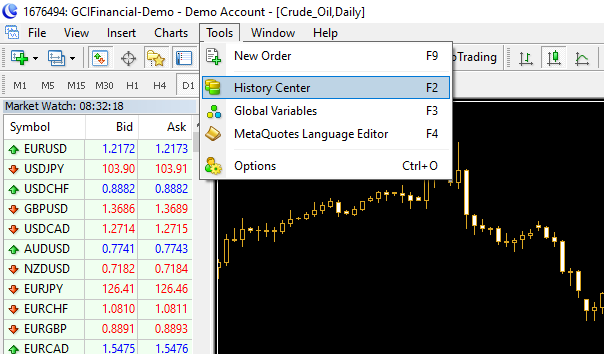
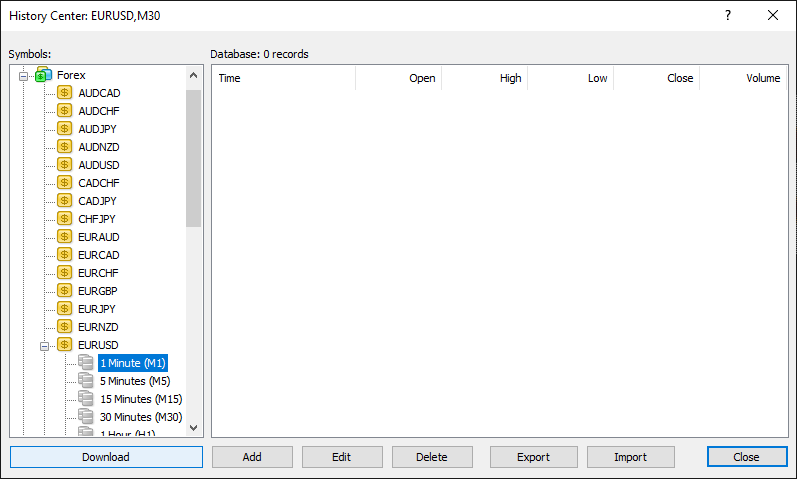
Try getting the data via the MT4 History Center (Tools→History Center)
▼Reply
July 31st, 2009 at 2:17 am
Awesome! I am going to give this a try. I’ve been looking for a way to get historical data imported. I’m sure it will work. Thanks.
▼Reply
August 28th, 2009 at 11:02 am
Hi!
Does anybody knows about other websites with history for CFDs?
I’ve tried dukascopy and fin-rus but many bars are missing on different periods, it depends on the instrument.
Thanks!
▼Reply
January 2nd, 2010 at 5:36 pm
I have been using MT4 from Alpari UK Demo forover six months, would you recommend I do a clean install?
Thanks for the excllent tutorial!
▼Reply
Andrei Reply:
January 2nd, 2010 at 6:14 pm
What for?
▼Reply
August 19th, 2010 at 9:07 pm
Great Tutorial. This seems the best way to backtest a system.
▼Reply
August 24th, 2010 at 3:43 pm
hi. thanks for everything. i have a question. i made all from alpari. but june datas missing for gbpusd. please help. thx.
▼Reply
Andrei Reply:
August 24th, 2010 at 4:30 pm
Try contacting Alpari. Or try redownloading and recompiling the data once again.
▼Reply
September 29th, 2010 at 1:14 pm
hi,
where do i get the best historical data? Or where can i buy it for a low price?
▼Reply
November 27th, 2010 at 12:22 am
you can get free data from here, hourly and daily… http://www.fxhistoricaldata.com
▼Reply
January 8th, 2011 at 5:53 pm
is it possible to import h1 datas only.i want to import from excel to meta.after preparing manually h1 datas in excel
▼Reply
admin Reply:
January 8th, 2011 at 6:28 pm
Sorry but I don’t think so.
▼Reply
June 18th, 2011 at 5:12 pm
TKS your tutorial.I met a problem when practise this download process.I did the very well till step 8,I rename the datafile as EURUSD1.hst,but when I have tried to open offline chart,it didn’t run correctly.The “Open Offline Chart” shows the eurusd’s data with a strange name like”SD,20010102,M825242418″ and the offline chart will always show “UPdate Waiting”.Appreciating for you help!
▼Reply
admin Reply:
June 19th, 2011 at 4:53 pm
Try downloading the data using Tools->History Center.
▼Reply
July 12th, 2011 at 4:24 pm
Seems that Alpari don’t offer anymore the download link for historical data.
And from my MT4 i cannot download history from several years ago… any website where i can download historical data??? thank you
▼Reply
admin Reply:
July 12th, 2011 at 5:43 pm
Try installing MT4 from some other provider and downloading history from there.
▼Reply
July 16th, 2011 at 7:58 pm
FYI- I downloaded the MT4 client from MB Trading. It appears to have the historical information already in the client.
▼Reply
August 3rd, 2011 at 4:56 am
Thanks for the incredibly helpful tutorial!! Question; I can’t get good historical data from the link above, any other good sites for this? Thanks!
▼Reply
admin Reply:
August 3rd, 2011 at 6:59 am
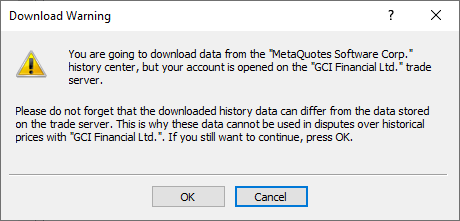
It’s no longer required to download the history data manually. You can download it within the history center of your MetaTrader 4 platform.
▼Reply
September 14th, 2011 at 8:32 am
To get already dowload tick data from DucasCopy read this http://translate.google.ru/translate?hl=ru&sl=ru&tl=en&u=http%3A%2F%2Fforum.tradelikeapro.ru%2Findex.php%3Ftopic%3D843.0
Glad to help you.
▼Reply
September 14th, 2011 at 8:26 pm
[...] – YouTube MT4 Backtesting Threads @ Forex Factory MT4 Backtesting | Alan's Forex Blog MetaTrader History Data Importing and Converting Tutorial for Quality Backtesting Personally I have moved to Forex Tester (Forex Tester – professional forex training software, [...]
October 2nd, 2011 at 10:31 am
[...] for M30, H1 … up tp D1 That's it GIVE UP export is easy import or make HST data is hard MetaTrader History Data Importing and Converting Tutorial for Quality Backtesting got the reason why strategy tester for EA that does not work too I only do manual entry I wanna [...]
December 14th, 2011 at 4:04 am
[...] yet to find. Please address me this source, thank you Hello jamsky! This link might help you MetaTrader History Data Importing and Converting Tutorial for Quality Backtesting If it doesn't please PM me and I will explain you everything in details. Best regards, [...]
December 26th, 2011 at 9:35 pm
hi
i saved “Dukascopy 99% correct” Eur/Usd tick data in CVS file after highly compressed 637-MB ,now upload it on a FileFactory!,,,,so if further any one need data from “Dukascopy” no need again &
again download it from dukascopy and then convert in to CVS file . get it from those links
1) Download all 4 files ,it makes 637 MB ,one file does not work need all 4 zip files.
2) At extraction time It creates 5.5 GB of all 4-5 years at extraction time
else u can download directly 5.6 GB data from ‘Dukascopy’ but its takes too much time.
main link for 4 links.
http://www.filefactory.com/f/489c514649b30933/
▼Reply
admin Reply:
December 26th, 2011 at 10:31 pm
Thank you!
▼Reply
Rajandran Reply:
August 6th, 2012 at 5:52 pm
Thanks Rajiv that could be more helpful. But the problem is because of huge data size.
▼Reply
rajiv Reply:
August 7th, 2012 at 3:00 pm
637MB is not big its compressed form of 5.5 gb
i create a post for that data here
▼Reply
rajiv Reply:
August 7th, 2012 at 3:01 pm
http://oyeforex.wordpress.com/2012/01/08/dukascopy-tick-data/
▼Reply
Rajandran R Reply:
August 8th, 2012 at 1:31 am
Thanks rajiv. It is so helpful to do accurate backtesting
▼Reply
December 27th, 2011 at 7:19 pm
Thanks for great article and for comments too, especially Ducascopy tutorials. By the way I was wondering what do you think about Metatrader 5?
▼Reply
February 11th, 2012 at 1:03 am
Hi,
Check here for historical data:
http://www.histdata.com
See ya!!
▼Reply
May 19th, 2012 at 11:58 am
It is described on Alpari site.
But this procedure killed my MT. After downloading of historical data MT did not start more. A lot of time MT tried to do something “inside’, no any messages or warnings.. Looking like, softwatre tries to unpack or process data, but so long..Very bad/
▼Reply
July 17th, 2012 at 2:47 am
Obviously times have changed since this original post. Alpari doesn’t share their databank anymore except through the MT4 platform. Currently, I download via Dukascopy’s JForex terminal and convert the data – that gets 99% quality, but MT4 history centre download would be more convenient, even if worth 9% less. Via the history centre, is it only 1min and not tick data?
▼Reply
November 16th, 2012 at 9:29 pm
Hello, how I can convert bar OHLC 1min data ho higher time frame ?
Thankx
▼Reply
admin Reply:
November 16th, 2012 at 10:28 pm
You can use period_converter script for that. It is standard in MetaTrader 4. See step 9 in the tutorial above.
▼Reply
December 17th, 2012 at 5:50 pm
Thanks for the article. Was searching online for why period converter seems to convert M1 to MN wrongly. I thought using 43200 will work, obviously I’m wrong. Do u have any idea where to get MN data?
▼Reply
admin Reply:
December 17th, 2012 at 6:22 pm
As far as I know, it is not possible to produce MN data from M1 timeframe using that period converter script.
▼Reply
May 3rd, 2013 at 11:10 am
Very good…
▼Reply