




Popular results
Position Sizer
Calculate risk-based position size directly in your MetaTrader platform and execute a trade in one click or a press of a button.What Is Forex
Learn what Forex is and how it works from this simple explanation.Supertrend
Download the Supertrend indicator for MT4 and MT5 to detect trend changes based on the price action.Position Size Calculator
Calculate your position size based on risk, stop-loss, account size, and the currencies involved. A simple online calculator for quick results.TzPivots
TzPivots MetaTrader indicator — should be attached to the H1 or lower timeframe chart. This indicator will display the pivot points and support and resistance lines for the intraday trading. It calculates them using its own formula based on the previous trading session. You can use the resulting lines as entry and exit points. TzPivots is available for MT4 and MT5.
The indicator can display the following levels in addition to plain pivot points:
- Previous session's High and Low, today's Open.
- Sweet spots.
- Fibonacci levels.
- Camarilla pivots.
- Midpoint pivots.
Input parameters
- LocalTimeZone (default = 0) — the timezone of your MT4 or MT5 server. For example, if your server is in New York you should set this parameter to -5.
- DestTimeZone (default = 0) — the timezone of the trading session you are using to trade in. For example if you trade in London set this parameter to 0.
- LineStyle (default = STYLE_DOT) — the main line style.
- LineThickness (default = 1) — the main line width.
- ShowPivots (default = true) — if true, then plain pivot points are calculated and displayed by the indicator.
- PivotColor (default = clrMagenta) — the pivot point color.
- SupportColor (default = clrBlue) — the support line color.
- ResistanceColor (default = clrRed) — the resistance line color.
- ShowMidPivot (default = true) — if true, then midpoint pivots are calculated and displayed by the indicator.
- MidPivotColor (default = clrLightGray) — the mid-pivot line color.
- LineStyleMidP (default = STYLE_DOT) — the mid-pivot line style.
- LineThicknessMidP (default = 1) — the mid-pivot line width.
- LabelColor (default = clrGray) — the color for text labels.
- ShowComment (default = false) — if true, then yesterday's and today's range, high, low, and yesterday's close are displayed by the indicator in a selected chart corner.
- CommentaryCorner (default = CORNER_LEFT_UPPER) — the chart corner to display the commentary with trading sessions' details.
- ShowHighLowOpen (default = false) — if true, then High, Low, and Open levels are marked with lines.
- HighLowOpenColor (default = clrOrange) — the color for High, Low, and Open lines.
- ShowSweetSpots (default = false) — if true, then "sweet spots" are calculated and displayed by the indicator.
- SweetSpotsColor (default = clrDeepSkyBlue) — the color for "sweet spots".
- ShowFibos (default = false) — if true, then Fibonacci levels are calculated and displayed by the indicator.
- FibosColor (default = clrGoldenrod) — the color for Fibonacci levels.
- ShowCamarilla (default = false) — if true, then Camarilla levels are calculated and displayed by the indicator.
- CamarillaColor (default = clrDimGray) — the color for Camarilla levels.
- ShowLevelPrices (default = true) — if true, then relevant price levels are displayed next to the level names.
- DaySeparator (default = clrDarkGray) — the color for vertical separator lines.
- DayLabel (default = clrDarkGray) — the color for day labels.
- BarForLabels (default = 10) — the number of bars to offset to place line name labels.
- DebugLogger (default = false) — if true, various debug information will be printed in the Experts tab of the Terminal subwindow. This might be useful when you are making your own changes to the indicator's code or when you are reporting a bug.
- TradingHoursFrom (default = 0) — you can define your own trading session. This is the starting hour.
- TradingHoursTo (default = 24) — you can define your own trading session. This is the end hour. For example, if you set "12" here, the session will end on "11:59:59" and the bar starting on "12:00" will not be used in calculations.
- ShiftDays (default = 0) — how many trading sessions to shift back to calculate the levels.
- ObjectPrefix (default = "PIVOT-") — prefix for chart objects for compatibility with other indicators.
Example and strategy
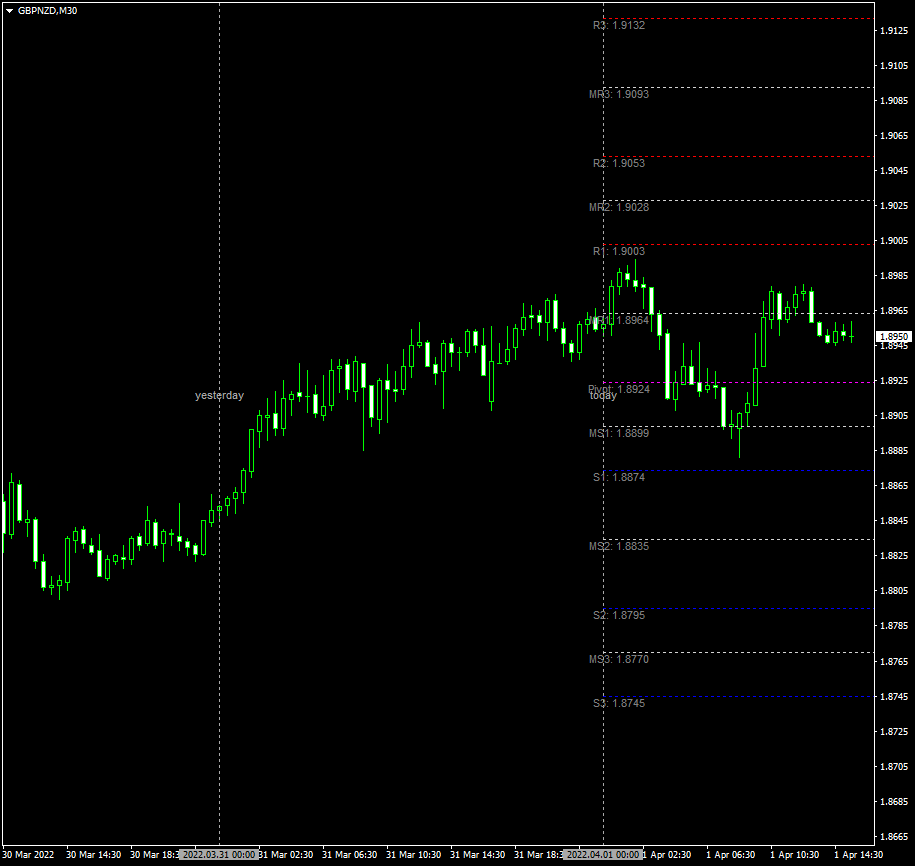
If you are familiar with the pivot points and support and resistance lines, using this indicator will be easy for you. The central pivot line bears a very high chance of reversal. The support and resistance lines become less strong the farther they are from the central pivot line. The weaker is the line, the easier it is to break.
Download (ver. 1.01, 2022-04-03)
TzPivots for MetaTrader 4 in .zip TzPivots for MetaTrader 4 in .mq4 TzPivots for MetaTrader 5 in .zip TzPivots for MetaTrader 5 in .mq5Discussion
Warning!
If you do not know how to install this indicator, please read the MetaTrader Indicators Tutorial.
Do you have any suggestions or questions regarding this indicator? You can always discuss TzPivots with the other traders and MQL programmers on the indicators forums.
Changelog
1.01 - 2022-04-03
- Added support for custom trading session hours.
- Added support for a shift in days.
- Added an option to choose the chart corner for the commentary label placement.
- Added chart object name prefix for better compatibility with other indicators.
- Removed terminal global variables from the code. Other indicators and EAs can use chart objects to get level values.
- Refactored the source code, simplifying many calculations.


