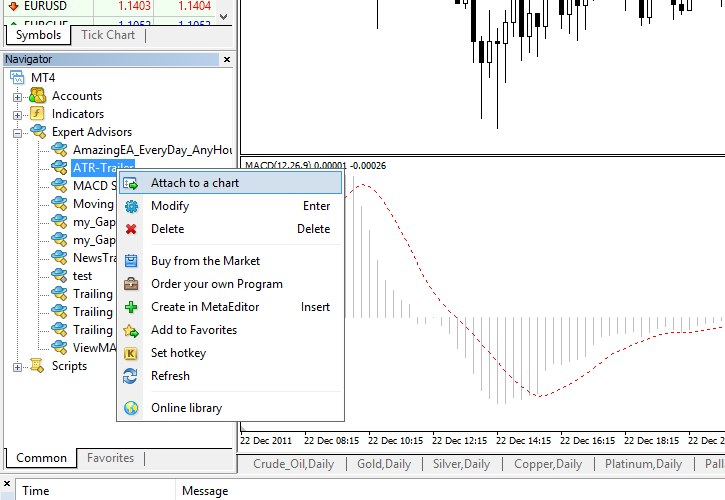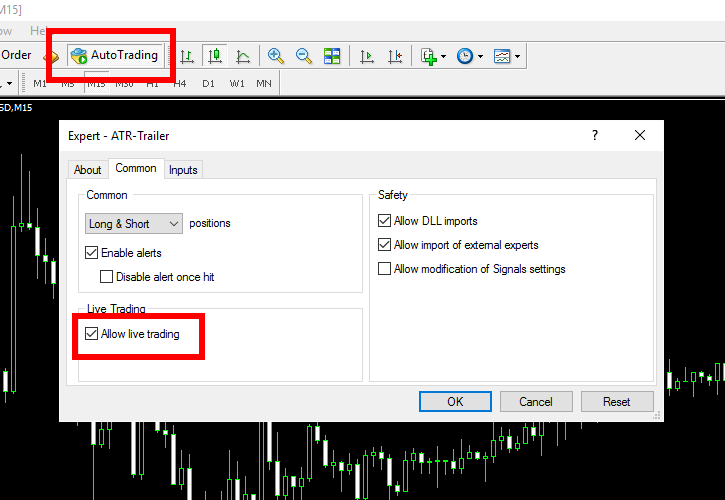


Using Metatrader expert advisors is simple, but sometimes people get confused with it and after downloading a file with the expert advisor a user might get stuck with it without knowing what to do next. This a simple tutorial on how to attach an expert advisor to Metatrader 4 char and activate it.
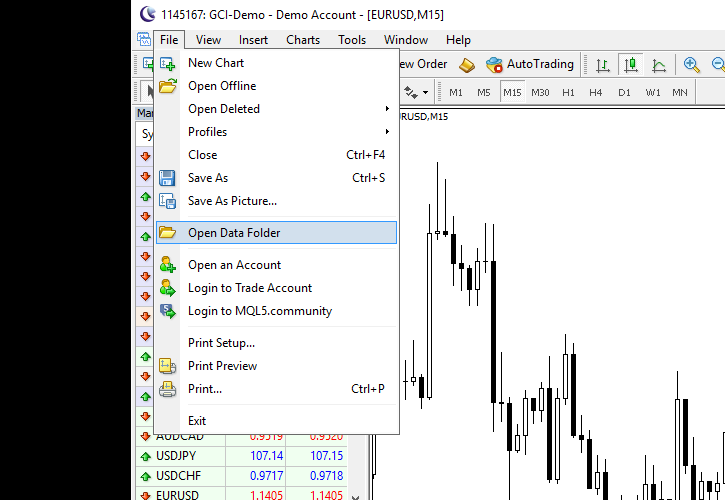
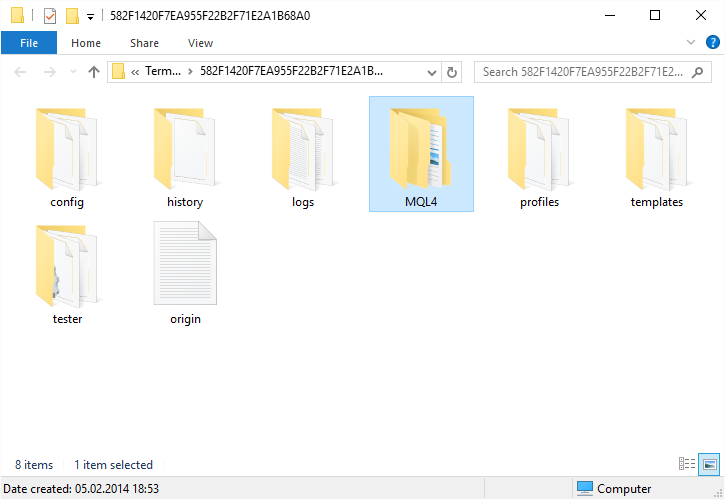
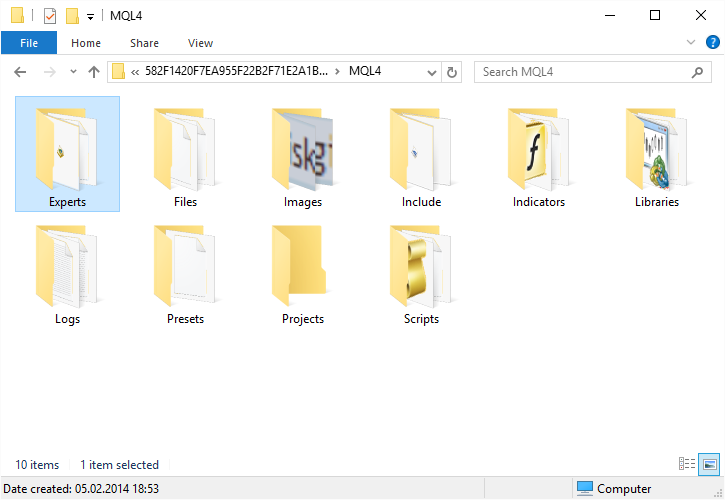
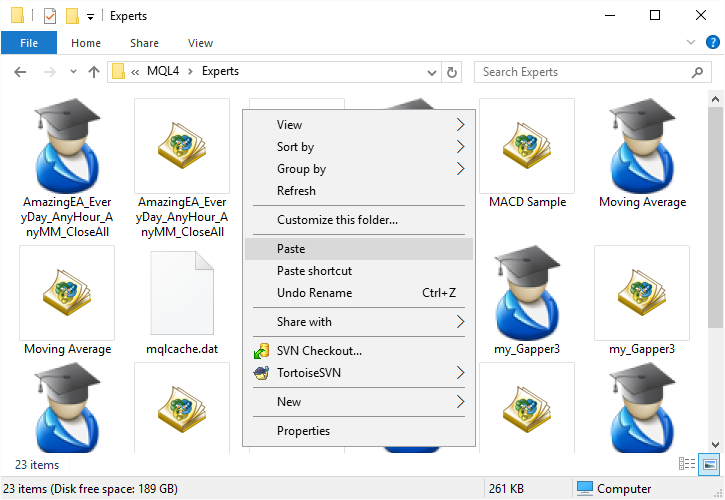
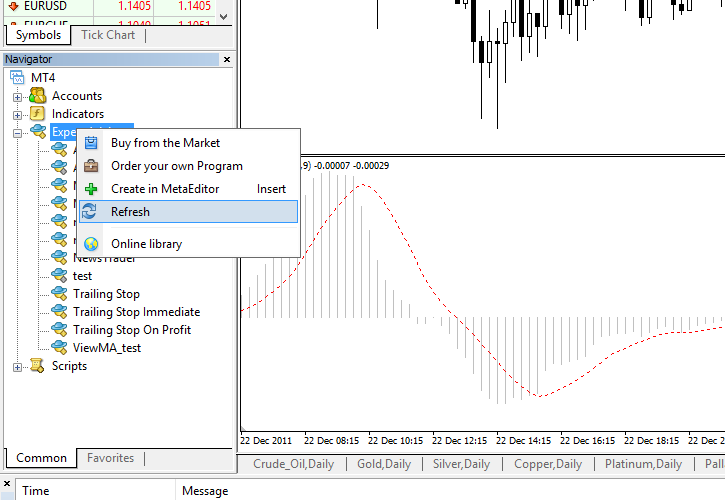
1. Download your MT4 expert advisor or copy it and save it to your MetaTrader’s ‘experts’ folder:
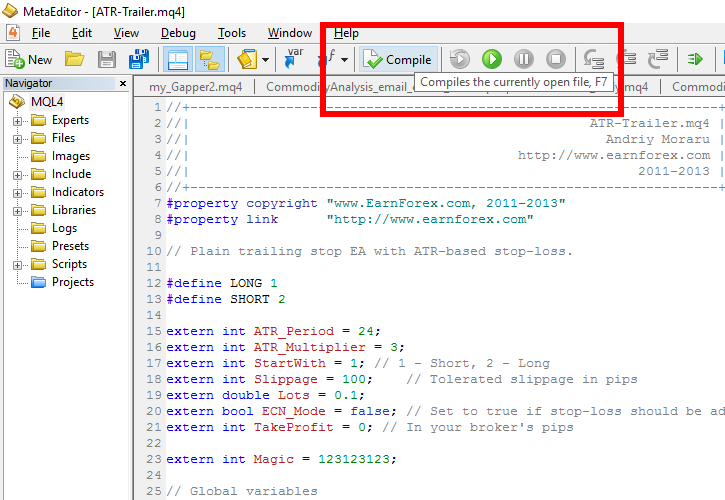
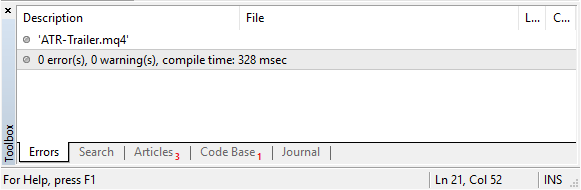
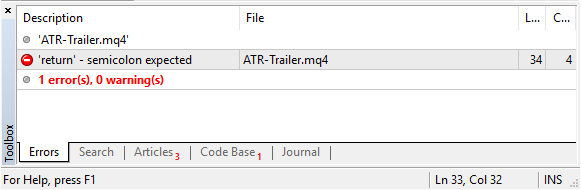
2. Double click it with your mouse and it will be opened in MQL editor (this editor comes with MT4). There will be a button ‘Compile’ at the center top of the window. Click it and your expert advisor will be compiled and ready to use. There might be some errors or warnings during the compilation, but in most cases there shouldn’t be any. You can try and fix those errors, but it takes time and some programming skills, usually.
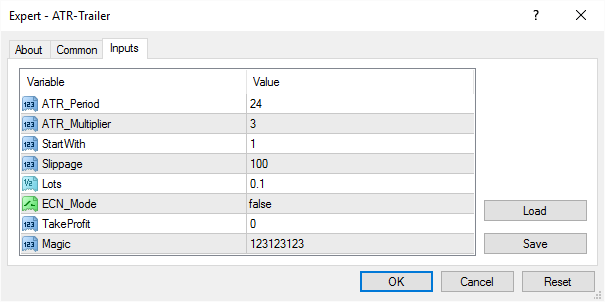
3. Now, all you need to do is add your expert advisor to the preferred chart and activate it. You can also change some input parameters for the advisor in the Inputs tab:
That’s it! Now you can enjoy your expert advisor — its signals or its trading (if it is designed to perform trading). Good luck with them!
March 15th, 2008 at 2:44 pm
Thank you so much for the EA installation tutorial. I find it usefull, I can now intall any EA to my MetaTrader Platform.
May God continue to bless you amen.
Please, I downloaded BINARIO EA, and you said it is only good for Manual Trading, my question now is, how can I trade with the Binario EA or any EA manually?
Secondly, do you host EA for clients?
I am waiting for your response to both questions.
Thanks.
Isiaka from Nigeria.
▼Reply
Carl Reply:
February 14th, 2011 at 2:37 am
This is a reliable and helpful tutorial. Thanks for sharing!
▼Reply
March 15th, 2008 at 3:41 pm
If you don’t allow EA to trade when attaching it, it will not perform any trading, but will signal for a trade.
As for the second question – no, I don’t host EAs for clients yet.
▼Reply
April 4th, 2008 at 10:17 am
Thank you very much. Please, how do we set stop loss, trailing stop and take profit in using an EA like Moving Average and MACD? Thanks
▼Reply
April 4th, 2008 at 12:01 pm
Hassan, if EAs have input paramters that correspond to stop-loss, take-profit or trailing stop-loss then you can set them via these parameters (when you attach EA, or opening EA’s properties when it’s already attached). If it has no such parameters then you’ll need to modify EA’s code – and that’s different for each EA.
▼Reply
Kamoru Reply:
June 12th, 2011 at 8:29 am
Andrei,
Where do I get EA’s propeties after I have attached it?
▼Reply
admin Reply:
June 12th, 2011 at 8:46 am
When you attach an EA there’s a prompt window. There’s an Inputs tab in this window.
If you’ve already attached the EA and want to change the input parameters, you can right-click the chart, then choose Expert Advisors, then Properties.
▼Reply
April 4th, 2008 at 3:55 pm
Thanks, I attached Moving average to GBP USD H1. It gave me profit of 50 pips.(It executed ‘buy’ when MA cross upward), but when there was a reversal) downward, the long position was not closed to execute a short position. I realised that I would have to close the trade myself.
But on the properties I saw lots, maximum risk, decrease factor, etc, but did not know which one to alter. Does it mean that the MA of metatrader 4 did not come with stops.
▼Reply
April 4th, 2008 at 4:22 pm
Hassan, yes that means that there is no way to add a stop-loss without modifying the code of this EA.
▼Reply
April 7th, 2008 at 1:18 pm
Please, I am a novice trader who is emotionally inclined. I want to know if I should depend on Expert advisor to trade on my behalf rather than consistently making loss from my manual trading. i.e is the probability of my making positive returns from expert advisor higher than manual trading?
Regards
▼Reply
April 7th, 2008 at 2:19 pm
lucky, trading with EA makes your results almost completely independent of yourself. So, if you are constantly losing from manual trading and can’t find a way to improve your skills, I’d recommend using the automated expert advisors.
▼Reply
April 9th, 2008 at 10:20 am
Hello, Mr Andrei,
Why are my Expert advisors not executing trades? Is it because I shut down my computer system before they execute trades, despite that i allowed trading and enabled them.
If experts are more than one can’t trade be executed?
▼Reply
April 9th, 2008 at 12:15 pm
lucky, some expert advisors trade very rarely. Maybe they didn’t met any position entry conditions yet.
▼Reply
May 27th, 2008 at 6:12 pm
Hello. I have noticed the option for expert advisors on my platform, but Im not sure how to activate it?? Also, I was wondering if this is something you have to apply to each time frame and pair? Im confused. Would someone help me please? Thank you so much for your time.
▼Reply
May 27th, 2008 at 6:49 pm
Marie, if your platform is MetaTrader 4, then reread the whole tutorial. It describes in details how to activate expert advisors.
Expert advisor is added to a chart. Each chart has only one currency pair and timeframe associated with it. So if you want to use EA on another pair/timeframe open another chart and add EA to it.
▼Reply
August 10th, 2008 at 10:26 am
hi, i am jatin . i just download ur all EA’s and put them into expert folders. but whenever i double click on it it shows a error of unknown file extension. how can i open EA with MQL to proceed to next step of compiling?
thanx in advance
▼Reply
August 10th, 2008 at 10:56 am
jatin, do you have MT4 properly installed? Your MQL Editor should automatically recognize .mq4 files and open them on double click. Alternatively, you can open Editor manually from MT4 (a yellow rhombus sign under the main menu) and then open your EAs from the Editor.
▼Reply
September 7th, 2008 at 8:36 am
Thank for sharing, this is very helpful for a novice like me!
▼Reply
September 12th, 2008 at 11:59 pm
Hi I am trying to code some indicators for my own use, but cannot find any guidance on the MT4 parameters required or how to access another time frame; can you help?
▼Reply
September 13th, 2008 at 9:12 am
Ray, I can help, but you can also look into some other indicator’s .mq4 files and learn from the examples.
▼Reply
September 15th, 2008 at 11:21 pm
how can i code an EA so that it works in live a/c
▼Reply
September 16th, 2008 at 9:19 am
Peter, any EA can work with live account.
▼Reply
October 4th, 2008 at 10:57 am
Thanks for your effort, I am having a little problem, with the AMAZING EA that I downloaded, this news trading software requires that I input the exact hour of the news trading, I don’t know how to go about it, manually I use to change the forexfactory time to suit my Nigerian local time which is GMT+1, now how do I get the time of the news or do I will my manual method still of time still work, secondly what is one standard lot, 1.0, 0.1 or 0.01, how do I remove the EA from the chart if am done with the trading.
Thanks
Onyeka from Nigeria
▼Reply
October 4th, 2008 at 11:45 am
Onyeka:
1. You need to set the time depending on the news’ time and your MT4 server’s time. E.g. if the news come outs at 15:00 GMT and your server time is GMT+3, you have to set Hour to 18. It doesn’t matter what’s your local time is, only your MetaTrader server’s time matters.
2. One standard lot (1 lot) is 100,000 units of trading volume (you have to use $1,000 margin to trade 1 standard lot with 1:100 leverage). 0.1 standard lot is 10,000 units of trading volume or mini lot – it requires $100 margin on 1:100 leverage. 0.01 is 1,000 units of trading volume or micro lot – it requires $10 margin on 1:100 leverage.
3. To remove an expert advisor from a chart you have three options:
a) Right click on the chart, select Advisors->Remove. It will remove your EA from the chart.
b) Right click on the chart, select Advisors->Properties, General tab and remove the mark from “Allow advisor to trade”. It will disable trading for this EA.
c) Click the Advisors icon button under the main menu. It will turn red and it will disable all advisors in the MetaTrader platform.
▼Reply
gerhard Reply:
August 13th, 2010 at 1:42 pm
Hi Andrei.
how do i install this MACD samle EA in to my remote server? i am unable to bring the EA over ? what must i do ???
best regards. Gerhard
▼Reply
Andrei Reply:
August 13th, 2010 at 2:05 pm
Do you mean VPS server or what? Just copy it to
“experts” folder of your MetaTrader installation.
▼Reply
October 6th, 2008 at 2:05 am
Thank you very much. Please, how can add this Neural Networks to Moving Average
http://www.arabictrader.com/vb/attachments/forum4/154889d1222450782-svm.zip
▼Reply
October 6th, 2008 at 8:26 am
Louay, You want to add a Neutral Network to the Moving Average? I don’t know how’s that. Sounds really stupid to me.
▼Reply
October 9th, 2008 at 2:52 pm
sir, the Amazing EA refused to perform any action on the trade I attached it to, even after it showed me some figures on the chart like stop loss and take profit, which indicates that the EA is on, my brokers server time is G.M.T+ 2, and the news was to come out at 12.30 G.M.T, so I used the time 14.30, so what could have been wrong
Onyeka from Nigeria
▼Reply
October 9th, 2008 at 3:17 pm
Onyeka, What did it output to Experts and Log tabs of your MT4? This post is not about AmazingEA, so, please, reply via http://www.earnforex.com/contact.php
▼Reply
November 8th, 2008 at 4:44 am
Hello,
I placed my EA (mql4 file) into the experts folder, compiled it and it said 0 errors, but the executable file was not created, so I cannot run it.
The same thing is happening when I try to run the period_converter for the M1 historical data. It says that it cannot open the period_converter.ex4… I checked the folder and that file does not exist, only the period_converter.mql4 exists and when I compile it it does not create the executable. Can you help me?
▼Reply
November 8th, 2008 at 9:31 am
Michel,
If you have more than one MT4 platform installed then it’s possible that you compile the files with the one, but try to run them with another MT4 instance.
▼Reply
November 27th, 2008 at 10:22 am
Dear Expert advisor,
I’ve installed my MA3 dan MA12 into my chart and i’ve also installed ma expert advisor. The system did take position automatically but it can’t close automatically when the price cross my MA3. Can you help me how to add into the program to make my position close when it cross my MA3.
Thanks a lot bro.
▼Reply
November 27th, 2008 at 11:41 am
Zulkifkli,
That depends on what EA are you using.
▼Reply
November 27th, 2008 at 1:33 pm
Dear Andrei,
I’m using MA expert advisors and it’s really open position automatically, but it can’t close position when the price were at the cross between 2 ma’s. How can it be done?
Thanks
▼Reply
Desmond Reply:
June 24th, 2012 at 5:46 am
Another way to see error messages is to look at the “experts” tab in the trading terminal.
look at : https://sites.google.com/site/dmweadev/file-cabinet/home/ea-s-info-1
for more info.
▼Reply
November 27th, 2008 at 3:23 pm
Zulkifli,
I didn’t see this EA, but I guess you have to edit its code to make it close the positions when you want.
▼Reply
December 12th, 2008 at 1:10 pm
hi,pls i need to know how to install expert advisors & where can i get a reliable expert advisor.your assistance will be appreciated.am a complete novice about forex.
▼Reply
January 2nd, 2009 at 2:10 pm
Hi,
Where can i get a reliable EA for GBP/USD and USD/CAD
▼Reply
January 6th, 2009 at 7:57 am
Thanks for sharing all of this, your EA are very good 1, better than others,
Recommended for every 1.
Very good..
▼Reply
January 6th, 2009 at 7:59 am
I can say, that’s your EA are perfect.
▼Reply
February 19th, 2009 at 10:40 pm
i want to set ea on my setting where can i learn how to set ea setting to my parameter. which books or website do you recommend.qqq thanks
▼Reply
April 2nd, 2009 at 11:30 pm
Please advise – how do you load the saved EA file into the MT4 platform?
▼Reply
Andrei Reply:
April 2nd, 2009 at 11:59 pm
Isn’t the blog post you are commenting explaining that?
▼Reply
May 13th, 2009 at 11:06 am
Hi Andrei,
I’ve just started to test the following two EAs.
Have you any answers for the following questions.
1) I’m testing Framework on GBPJPY on the 15 minute chart.
Do you need to copy the indicators onto the chart to ensure
the EA performs correctly. for example, does the CCI need
to be on the chart, and are there any indicators which need
to be on the Phoenix chart I am testing on GBPUSD.
2) Does the EA place trades based on the timeframe you are
using. For example I have framework running on the 15 minute
and when I switch the chart over to the 1 minute, it executes
multiple trades repeatedly, although now that I am running it on
the 15 minute it has executed 3 trades. Is this correct.
Thanks
Jeff
Phoenix and Framwork
▼Reply
Andrei Reply:
May 13th, 2009 at 1:09 pm
1) No, you don’t have to add any indicators to the chart for the EAs to work properly they use all needed indicators internally.
2) Yes, most EAs trade based on the timeframe to which they are attached.
▼Reply
May 19th, 2009 at 4:35 pm
Hi Andrei,
I see very good results from GBPUSD, however the others such as USDJPY, USDCHF and EURJPY don’t seem to have the same precison. I have found some settings on the web which I have changed for those pairs. I will let you know the results. I’ve found GBPUSD to be very precise on the 15 minute chart.
Thanks
Jeff
▼Reply
May 19th, 2009 at 4:49 pm
FrameWork,
Hi Andrei, I’m testing Framework on GBPJPY at the moment. It executes the trades very well and always has a good run or closes the positions quickly if the signals change. Where I see it can cause a problem though is with the code itv++ where it adds to the position during a trend. I had it running last night and today. It had an excellent entry, but added 20 lots to the position from the bottom of the trend before the move. Then at the top of the move it added another 20 positions which were all closed automatically when the market and CCI indicators turned. Do you know of any method by which you can change the settings to ensure that the position isn’t added to as the market trends and a selection of how many positions can be opened on the initial signals. I would like to try and stop it from opening positions when the trade has already initiated, and also stop it from opening positions 200 points into a move.
Thanks
Jeff
▼Reply
Andrei Reply:
May 19th, 2009 at 7:38 pm
You can increase the Interval input parameter to reduce the frequency of pyramiding the lots. Other things would require a dramatic code change.
▼Reply
June 17th, 2009 at 5:20 pm
Hello there,
Can I get an expert advisor that will always alert me whenever RSI crosses its 50/50 line up or down?
And I pray it works with all periods and all time frames.
▼Reply
Andrei Reply:
June 17th, 2009 at 5:29 pm
You can create a thread asking for this favor at the forum:
http://www.earnforex.com/forum/f12/
▼Reply
June 25th, 2009 at 6:40 pm
Hi, Andrei, I am using Framework EA, I just want the EA to make a trade max of not more than 3 trades, how can I change the setting? because the EA keep enter the trade and seem to be no ending…. Is this EA is Hedging? Thanks a lot
▼Reply
June 25th, 2009 at 11:01 pm
Pyan, please, discuss Framework EA at this forum:
http://www.earnforex.com/forum/f13/framework-17/
▼Reply
July 13th, 2009 at 8:09 pm
Hi, Andrei,
I tested Framework. It produced profits quite well. However, when the profits reached the peak, I got a lot of “close at stop”, which closed out all open positions at huge losses. Why was that happening? I noticed that some open position should have been closed out by “TP”, but it didn’t happen. Please help!
▼Reply
July 13th, 2009 at 9:08 pm
Ron, please ask all Framework related questions in its separate forum thread here:
http://www.earnforex.com/forum/f13/framework-17/
▼Reply
October 28th, 2009 at 7:46 pm
chiedo scusa, ma questi EA scaricabili, aprono e chiudo le posizioni da soli? o bisogna farlo manualmente??grazie..!
▼Reply
November 19th, 2009 at 2:38 pm
HI All,
Can some one help me in getting the EA
▼Reply
Andrei Reply:
November 19th, 2009 at 4:43 pm
Sridhar, and what’s the problem?
▼Reply
April 18th, 2010 at 8:55 pm
Dear Mr.Andrei,
Thanks a lot for great EA, especially for Adjustable_MA… I’m a novice in FX market, and got frustration with manually trading.. hope EA can be changed my trading way..
▼Reply
Andrei Reply:
April 18th, 2010 at 11:05 pm
I am glad to be of help. Please, ask if you need some more info about the MT4 EAs.
▼Reply
Bayu, Indonesia Reply:
April 19th, 2010 at 7:26 am
Dear Mr.Andrei,
I already try EA Adjustable_MA in demo account.
I have problem, why for 1 pairs, it’s open 2 position (long and short) at same time within 1 minutes?
and, what the meaning of “extern int Slippage = 3″ in Adjustable_MA script?
I use this EA for pairs of USD/CHF and EUR/JPY, they have spread 3 pips. Does it correlate with “extern int Slippage = 3″ that cause the problem?
Thanks for your help.
▼Reply
Andrei Reply:
April 19th, 2010 at 9:24 am
I really don’t know why it would open 2 positions in different directions for one pair… “extern int Slippage = 3″ is the input parameter for a price slippage. Value of 3 means that the buy/sell orders will be considered good even if they are executed at a price worse than the given by up to 3.
▼Reply
June 17th, 2010 at 9:54 am
Please,i am new into coding,i just coded an EA but i am having 1 error saying double quotes needed,could you help me to solve this problem,i have really looked into it and it is giving me headache to locate it may be because i dont know much about coding b4,i am a medic.
please help me to remove this error,let me have your email so that i can send you the ea.
Thanks
Loyez
BURLOG
▼Reply
June 28th, 2010 at 3:40 pm
Dear Mr.Andrei,
Can you tell me, where I can get EA using stochastic oscillator indicator?
▼Reply
July 13th, 2010 at 12:36 am
I did install the EA with MACD for last 2 days
but until now, it never work
i still keep the original setting
anyone with this problem before ?
Thanks
▼Reply
July 20th, 2010 at 2:32 am
I have created an EA with RSI (buy when RSI>50 and sell when RSI<50). This EA works well in Strategy Tester but it does not work when I attach it in the live chart (no trade is opened). In addition, I cannot open the RSI file from the folder EA as the tutorial but from the MetaEditor. Can someone help me to solve these two problems.
Thank you very much in advance
▼Reply
Andrei Reply:
July 20th, 2010 at 8:23 am
Please, use our forum for such questions.
▼Reply
August 18th, 2010 at 12:23 am
Hi, I have just started dabbling in Forex with a practice account and I just opened a Live account. I’m interested in your Downloadable EA’s – can you recommend the one that’s likely to help me the most as a beginner? Thanks.
▼Reply
Andrei Reply:
August 18th, 2010 at 8:03 am
How can an EA help you as a beginner? It will trade for you but it won’t help you learn anything. Try Adjustable MA.
▼Reply
August 18th, 2010 at 1:29 am
To follow up on the last message, one that would trade if that’s possible?
▼Reply
October 30th, 2010 at 8:19 am
hi
i’m the beginner in this field. i was applied Phoenix ea into my gpb/usd chart and the smile was appear. but the problem is my ea did’t do any trade after i leave it for a whole day.
what should i do to make it handle for my trade and i will go to work. or i was missing any step during applied it into my chart.. tq..
▼Reply
admin Reply:
October 30th, 2010 at 8:40 am
1. What timeframe do you use?
2. Were there any errors in the Journal or Experts logs?
▼Reply
December 15th, 2010 at 9:51 pm
hi,am a newbie and had installed the phoenix EA on MT4 with 15mnts time frame and a smiling face but it could not execute any trade,what could be the problem?
Thank you.
▼Reply
admin Reply:
December 17th, 2010 at 1:30 pm
Either you didn’t wait long enough for it to place a trade or there are some errors in execution. In the last case, please, check for errors in the Experts and Journal logs of your platform.
▼Reply
December 31st, 2010 at 8:52 am
Hello
I heard FxDialogue has the only excel plug for MT4. You dontany need any programing knowledge or to do macros or ask someone for help
▼Reply
January 6th, 2011 at 9:43 am
i facing 1 problem..i can’t attach my own EA in my chart..any idea why this happen..but other EA(free from internet) can
▼Reply
admin Reply:
January 6th, 2011 at 10:29 am
You know, it’s really hard for me to suggest anything with no details about your problem…
▼Reply
January 6th, 2011 at 10:48 am
anyway thank f y time…the situation like this…
1.i already paste external EA in c:program file\ meta trader\ expert
2. After that i open MT and i saw my external EA in expert advisor..so i want open/drag to chart but it can’t work…nothing happen at chart
▼Reply
admin Reply:
January 6th, 2011 at 11:04 am
It should output some message in the Experts or Journal tabs of the Terminal window of your MT4. Try again and look there. Then you’ll be able to tell me if there are any errors/messages and what are they.
▼Reply
January 7th, 2011 at 5:59 am
1. no mesage box comeout after click modify in expert advisor
2.no message box comeout or dsiplay after drag to chart
▼Reply
admin Reply:
January 7th, 2011 at 10:34 am
There won’t be any message boxes. The errors will be displayed in the Experts or Journal tabs of the Terminal window of your MT4.
▼Reply
January 10th, 2011 at 7:48 am
hai..so far no error in log or journal or expert tab…..i no idea why this can’t run…
▼Reply
admin Reply:
January 10th, 2011 at 12:00 pm
Share it on some file hosting (like rapidshare) and give me a link. I’ll have a look at your EA.
▼Reply
January 11th, 2011 at 12:30 am
I am new to FX. I have downloaded a few EA to my mt4, after compiling each of them there would be no error message but if i back test it to sea the performance, it would give ( unmatched data error volume limit exceeded. What could be the problem with all the EA i have downloaded.
▼Reply
admin Reply:
January 11th, 2011 at 4:32 pm
Unmatched data error is an error of the data stored in the MetaTrader platform, not the error of the EA. You could try removing your MetaTrader installation completely and then installing it anew.
▼Reply
January 27th, 2011 at 1:14 am
Ea works very nicely on my demo account,but when i try to load it onto my real account ,i get x ( no smiling face )….it’s not working.The only thing that i see in the experts tab it’s a message that says uninit reason 1.what am i doing wrong?
▼Reply
admin Reply:
January 27th, 2011 at 2:22 pm
Did you try setting “Allow live trading” to ON when adding the EA?
▼Reply
January 29th, 2011 at 11:53 am
i am using MT4 with inbuilt EA. As explained by the company, i have set EA and enabled and activated auto trade. I have set required LOT size and TP/Stop Loss everything. But it never does any trade. On the chart, logo of EA (smiling face) shown and says its activated, but still something is missing i think. Help.
▼Reply
admin Reply:
January 29th, 2011 at 12:02 pm
For how long was turned on without any trade? Is there any output in the Journal or Experts tabs of the terminal window?
▼Reply
January 29th, 2011 at 2:03 pm
admin: For how long was turned on without any trade? Is there any output in the Journal or Experts tabs of the terminal window?
i turned it on wholeday but no trade conducted. In journal tab window, it mentioned some technical language but there were also not any trade journal.
▼Reply
admin Reply:
January 29th, 2011 at 2:54 pm
It would be better if you made the screenshot of the Journal and Experts tabs of your MetaTrader when the EA is attached and posted the links to them here.
▼Reply
April 2nd, 2011 at 3:44 pm
I am just wondering if we need to pay for the EA when we use it in live account or it is still free? (I am currently using it in demo account)
Thanks.
▼Reply
admin Reply:
April 2nd, 2011 at 6:01 pm
It depends on the EA. All the EAs presented on EarnForex.com are the free ones. Where did you get yours?
▼Reply
April 3rd, 2011 at 5:09 am
I got it from EarnForex.
Anyway, can i know how to attach EA to just a specific time frame? Lets say i want it to perform on H1 graph, i just have to drag it to that chart and activate it right? But when i turn to other time frames(same currency pair), the EA is also there and so i have no idea it trades on which time frame… I am sorry but i am new to this.
▼Reply
admin Reply:
April 3rd, 2011 at 8:20 am
When you change the timeframe of the chart with an attached EA, the EA reloads to that new timeframe automatically. It’s not recommended to change the timeframe of a chart with an active EA if you don’t want to mess with its work. It’s better to open a new chart if you want to analyze it on different timeframes.
▼Reply
April 14th, 2011 at 6:19 am
Thanks for all you helps with free EAs but I thought understanding how each EAS works is the only secret so one can as well change the imput parameters. I am having problem with binario, due to the fact that it opens buy and sell trades at the same time with both been hit and thus closing at a loss all the time. Thanks for your anticipated response
▼Reply
admin Reply:
April 14th, 2011 at 6:22 am
You can ask questions related to Binario EA at its dedicated forum thread:
http://www.earnforex.com/forum/f13/binario-23/
▼Reply
April 24th, 2011 at 1:13 pm
can you send me free EA dawonload
▼Reply
admin Reply:
April 24th, 2011 at 2:20 pm
You can find free EAs here:
http://www.earnforex.com/metatrader-expert-advisors/
▼Reply
May 3rd, 2011 at 2:25 pm
followed all instruction in downloading and installing Phoenix EA and it shows up in the EA drop down box. It is shaded though and will not drag and drop to the chart. The other EAs that came with metatrader 4 all work. How do I get it to work?
▼Reply
admin Reply:
May 3rd, 2011 at 4:12 pm
Did you compile it?
▼Reply
July 13th, 2011 at 9:30 am
pls which is the best ea now that you recomend?
▼Reply
admin Reply:
July 13th, 2011 at 9:53 am
There’s none.
▼Reply
October 5th, 2011 at 3:44 pm
hello thanks for the info.pls how can i set the minimum or maximum size of lot that me EA (phoenix EA) can trade, and what timeframe is it good for,thanks
▼Reply
admin Reply:
October 5th, 2011 at 4:24 pm
Please direct all questions related to Phoenix EA to its dedicated forum thread:
http://www.earnforex.com/forum/f13/phoenix-18/
▼Reply
March 1st, 2012 at 12:21 pm
dear sir how can i install meta traders expert advisors in my mt4 plat form ,
please clarify
thankyou
rajit
▼Reply
admin Reply:
March 1st, 2012 at 1:55 pm
Doesn’t this tutorial explain that?
▼Reply
April 21st, 2012 at 8:21 am
Talk about free experts advisors, which is alraedy tested on any account and really giving good effect. becoz many peoples now getting boeard by paid softwares. so please talk about free one. and we will use it if we get a benifits from it then sure will give you bonus. thats it.
▼Reply
April 23rd, 2012 at 4:10 pm
thank you for a clear and useful website … sorry to see so many posting without taking the trouble to read one thing …
▼Reply
August 6th, 2012 at 11:12 pm
Hi, I’m trading in gold.
Need your help, how do i go about to have an EA where it can automatically calculate the value of the japenese candle stick upper and lower shadow and at the same time display the $value on top (upper shadow) or below (lower shadow). for example, when we set the value equal or more than $2, then if the upper shadow value is equal or more than $2 it will show it on top of the said candle, likewise when it happens in the case of a lower shadow. I have been trying this for sometime now but still could not get it. Really appreciate your help.
▼Reply
admin Reply:
August 7th, 2012 at 8:08 am
If your question is not about MetaTrader EA tutorial, please post it in the forums: MT4 Expert Advisors if it is an EA you want or MT4 Indicators if it is an indicator.
▼Reply
September 19th, 2012 at 8:35 am
I really appreciate your EA’s. Firstly, i ve installed Adjustable MA for about two wks now, installed Fast and slow EMAs, did everytin and yet i didnt work. Wot am i doing wrong?I saw this message on expert: Time:2012:09:19 Message:Adjustable_MA EURUSD,5m: Initialized. Also, i installes Phoenix on my live a/c, it worked normally and the result was fine but but unfortunately during the news, it almost wiped out my account. Pls, how do i trade the news with your EA’s
▼Reply
admin Reply:
September 19th, 2012 at 9:22 am
I have no idea why Adjustable_MA isn’t trading for you. Make sure you allowed it to trade. You should also look for error messages after some time passes after attachment.
Regarding news releases and Phoenix EA, you might want to remove the EA before major news releases. It is not a perfect EA.
▼Reply
January 15th, 2013 at 1:11 am
Hi,
To add to my previous questions, is it possible to add the necessary stop losses to the trades opened by the e.a. and do I have to manually close all opened trades? Again does the Metatrader application have to be “on” for the ea to execute or can I for example attach the ea to my charts then shutdown my pc and go to class?
Thanks
▼Reply
admin Reply:
January 15th, 2013 at 7:54 am
That depends on an EA. Some expert advisors have stop-loss and take-profit implemented, some close positions by their internal signals. Generally, if you trade using an expert advisor, you have to leave the PC always on. That’s why it is recommended to use VPS to trade using EAs.
▼Reply