
Position Sizer (MetaTrader expert advisor) calculates how many lots to trade based on:
- Entry and stop-loss levels
- Risk tolerance
- Account size (balance, equity, or even your savings account)
- Account currency
- Currency exchange rates
Its main features include:
- Works with any trading instruments — currency pairs, CFDs, equities, indices, commodities, futures, cryptocurrencies.
- Calculation inputs and results are displayed in a graphical panel.
- The panel can be moved freely across the chart.
- You can easily close or minimize it.
- All calculation parameters can be adjusted inside the panel in one or two mouse clicks.
- Entry, stop-loss, and take-profit lines can be dragged directly on the chart.
- You can choose to set stop-loss and take-profit as distance in points.
- Alternatively, you can set them as multiples of ATR (Average True Range).
- If a take-profit is given, the calculator shows the potential reward level and the risk-to-reward ratio.
- Supports pending and instant orders (easy switching).
- You can even calculate risk based on a given position size.
- You can see current and potential risk and reward profile.
- Information about margin is available in a separate tab.
- The expert advisor can show the maximum position size based on available margin.
- You can enter a custom leverage to calculate position margin based on it.
- Detailed swaps (rollover interest) information is available in a separate tab.
- Optional spread display.
- Optional display of the point value for the calculated position size.
- The EA automatically saves and loads its inputs on timeframe change or platform restart, preserving your configuration efforts.
- Custom profiles restore panel's location, status, and settings.
- Completely free and open-source project.
- Does not require any DLL imports.
- Allows opening positions based on the calculations.
- The calculated position can be divided into several trades with different take-profit levels.
- Supports stop limit orders in MetaTrader 5.
- A dark mode option for less strain on your eyes.
- Supports custom translations.
- Manual backtesting for your strategies via Strategy Tester.
- Automatic commission fetching in MT5.
This EA is an evolution of our free online tool and the MetaTrader indicator called Position Size Calculator. Position Sizer is available for both MT4 and MT5, but the MT5 version provides slightly better functionality because the platform itself is more advanced.
Interface
Main tab
The main tab of the panel provides the primary control over the EA's functions and serves to output the most important calculation results: the position size, risk, reward, and risk-to-reward ratio. The following controls and outputs are available:

- Direction arrow shows whether the current trade is long (▲) or short (▼). In MT4 version, it is written in words.
- Version number.
- Spread value in ticks.
- Minimization button to fold down the panel.
- Close button to remove the expert advisor from the chart.
- Main tab switch — it is currently turned on.
- Risk tab switch — click on it to see the current and potential risk profile. The Risk tab interface is explained below.
- Margin tab switch — click on it to see everything related to required and free margin. The Margin tab interface is explained below.
- Swaps tab switch — click on it to see the details on the swaps for the current trading instrument. The Swaps tab interface is explained below.
- Trading tab switch — click on it to see the controls for trading operations. The Trading tab interface is explained below.
- Long/Short switch — enables you to quickly switch between long and short trade calculation. The trade direction can also be switched by pressing the Tab key on your keyboard.
- Entry input — grayed out when Instant order is used, can be used enter entry level when Pending order is set.
- Stop-loss button will set stop-loss level to a given default value. Visible only if a non-zero default stop-loss is set via SL input parameter.
- Stop-loss input.
- Take-profit button allows quick setting of TP to the multiple of the current SL value.
- Take-profit multiplier applies to the current SL value when Take-profit button is pressed.
- Take-profit input.
- Multiple take-profit input fields. Visible if TakeProfitsNumber input parameter is set to a value greater than 1 or if you add them via the panel.
- Stop price input (for stop limit orders, MT5 only).
- ATR Period — setting to use with the ATR-based SL/TP. ATR options are visible only if ShowATROptions input parameter is set to true.
- ATR — current value of ATR with a given period. ATR options are visible only if ShowATROptions input parameter is set to true.
- SL multiplier — multiplier for ATR-based stop-loss. The ATR value is multiplied by this value to produce the actual stop-loss distance. Set to zero to disable ATR-based stop-loss. ATR options are visible only if ShowATROptions input parameter is set to true.
- TP multiplier — multiplier for ATR-based take-profit. The ATR value is multiplied by this value to produce the actual take-profit distance. Set to zero to disable ATR-based take-profit. ATR options are visible only if ShowATROptions input parameter is set to true.
- Spread Adjustment for SL — if pressed, the spread value will be added to the stop-loss distance
- Spread Adjustment for TP — if pressed, the spread value will be subtracted from the take-profit distance.
- ATR timeframe — timeframe to calculate ATR on. Click the button to switch between timeframes. ATR options are visible only if ShowATROptions input parameter is set to true.
- Order type button to switch between Instant, Pending, and Stop Limit. You can also switch this by pressing the
o key on your keyboard. - Hide/show lines button to quickly switch the display of the Entry, Take-profit, and Stop-loss lines on the chart. You can also switch this by pressing the
h key on your keyboard. - Commission size per lot (one-way) — set it if your broker charges commission and you want it included into risk size when calculating position size. In MT5, it is received from the broker by default.
- Account size button switches between balance, equity, and "Balance - CPR"; the latter being account balance less the current portfolio risk as calculated on the Risk tab.
- Account size in account currency units.
- Account size asterisk signals that either custom account balance or additional funds are set via input parameters; the funds were added to the account size value.
- Quick risk button #1 — first button to quickly set percentage risk value.
- Quick risk button #2 — second button to quickly set percentage risk value.
- Risk input — you can set your tolerated risk in percentage of the account size. If you set your risk via Risk money input, percentage risk will be calculated based on that input.
- Risk money input — you can set your tolerated risk in account currency units. If you set your risk via Risk percentage input, money risk will be calculated based on that input.
- Risk (result) — percentage risk calculated based on the actual position size allowed in your broker's platform.
- Risk money (result) — money risk calculated based on the actual position size allowed in your broker's platform.
- Reward in account currency is based on the position size calculated without taking into account platform's restrictions.
- Reward (result) — reward in account currency is based on the actual position size allowed in your broker's platform.
- Reward/risk (input) — input reward divided by input risk.
- Reward/risk ratio (result) — reward result divided by risk result.
- Position size — actual position size calculation output. You can modify it yourself if you want to calculate your risk based on position size.
- Point value per calculated position size.
- Max PS button to set the position size to the maximum value possible based on the account's free margin. The button only appears if the ShowMaxPSButton input parameter is set to true.
- +/- buttons to quickly increase or decrease entry, stop-loss, take-profit, or stop price values.
Ctrl ,Shift , andCtrl +Shift can be used as modifiers to multiply the change by 10, 100, and 1000 respectively. - + button to quickly add another take-profit level.
- X button to quickly remove an extra take-profit level.
- Commission units button to switch between commission in percentage and in currency units.
- Trade button can be displayed instead of the Entry label if the AdditionalTradeButtons parameter is set accordingly.
- Lock checkbox to peg the take-profit distance to the SL distance based on the current TP multiplier.
Risk tab
The risk tab can help you assess current and potential risk and reward profile. Using a simple algorithm, the EA calculates the risk of the currently open positions and pending orders based on their stop-loss levels (or lack thereof). It also assesses the potential reward of already opened positions and the position calculated by the expert advisor based on take-profit levels. The employed risk analysis method does not account for complex situations involving hedged orders and positions. You can use the Risk Calculator indicator for a deeper portfolio risk analysis.

- Include orders: a group of radio buttons to switch between All, Open, and Pending to filter the trades by type that the EA will include in its risk calculations.
- Include symbols: a group of radio buttons to switch between three options:
- All — include trades in all symbols in the risk calculation.
- Current — include only trades in the current chart's symbol in the risk calculation.
- Other — include only trades in other symbols in the risk calculation.
- Include: group of radio buttons to switch between All, Buy, and Sell to filter the trades by direction that the EA will include in its risk calculations.
- Ignore orders without stop-loss — if ticked, PS will ignore all risk coming from orders and positions without SL value set. Can be useful if you prefer not to set stop-loss for some of your trades.
- Ignore orders without take-profit — if ticked, PS will ignore all reward coming from orders and positions without TP value set. Can be useful if you prefer not to set take-profit for some of your trades.
- Current portfolio risk (currency) — shows the risk in currency units without the position that is currently being calculated by this expert advisor.
- Potential portfolio risk (currency) — shows the risk in currency units as if you have already opened a position that is currently calculated by this expert advisor.
- Current portfolio risk (%) — same as Current portfolio risk (currency) but in percentage to the account size.
- Potential portfolio risk (%) — same as Potential portfolio risk (currency) but in percentage to the account size.
- Current portfolio reward (currency) — shows the reward in currency units without the position that is currently being calculated by this expert advisor.
- Potential portfolio reward (currency) — shows the reward in currency units as if you have already opened a position that is currently calculated by this expert advisor.
- Current portfolio reward (%) — same as Current portfolio reward (currency) but in percentage to the account size.
- Potential portfolio reward (%) — same as Potential portfolio reward (currency) but in percentage to the account size.
- Current portfolio lots — the total size of the currently open positions in lots.
- Potential portfolio lots — the total size in lots of the open positions plus the one, which is currently being calculated by this expert advisor.
- Current portfolio risk-to-reward ratio — the total risk-to-reward ratio on all existing trades.
- Potential portfolio risk-to-reward ratio — the total risk-to-reward ratio on all trades, including the one, which is currently being calculated by the Position Sizer.
Margin tab
The margin tab provides information about the calculated position's margin, amount of used and available margin after opening the calculated position, and the biggest possible position size considering the current available margin and leverage.

- Position margin shows the margin that will be used for the calculated position. Negative value means that the future used margin will be lower than the current due to lower requirement for margin of the hedged positions.
- Future used margin is calculated based on the current used margin and position margin.
- Future free margin shows how much free margin you will have left after opening the calculated position.
- Custom leverage input lets you set your own leverage for all the margin calculations done by this expert advisor.
- Default leverage shows the account's actual leverage for your reference.
- Symbol leverage shows the actual leverage for the current trading instrument. It is calculated based on required margin and contract size/value. It may be inaccurate in some cases.
- Maximum position size by margin displays the biggest trade you can take with your currently available free margin and leverage.
- Current margin utilization shows the ratio (in %) of the current used margin to the selected base.
- Position margin utilization shows the ratio (in %) of the calculated position margin to the selected base.
- Current margin utilization shows the ratio (in %) of the future used margin to the selected base. It is the sum of the two above values.
- Base radio buttons let you select how the margin utilization is calculated. It can be based on the account balance, some starting balance (set by you), or free margin.
- Base value shows the value of the selected base. For start balance, you can edit this field.
Swaps tab
The swaps tab displays details on the overnight interest payments associated with the current trading instrument and calculated position size. It shows swaps type, nominal swaps, daily, yearly, per lot, per calculated position size, and both for long and short positions:

- Type shows the type of swaps used by the broker for the current trading instrument. It can be one of several kinds: points, base currency, interest, account currency, margin currency, reopening, profit currency.
- Triple swap shows the day of week when triple swaps are charged/paid (to account for Saturday and Sunday).
- Nominal swaps (Long) — nominal swaps paid or charged by a broker for long positions.
- Nominal swaps (Short) — nominal swaps paid or charged by a broker for short positions.
- Daily swap per lot (Long) — daily swap paid or charged by a broker for long positions in account currency per lot.
- Daily swap per lot (Short) — daily swap paid or charged by a broker for short positions in account currency per lot.
- Daily swap per PS (Long) — daily swap paid or charged by a broker for long positions in account currency for calculated position size (on the Main tab).
- Daily swap per PS (Short) — daily swap paid or charged by a broker for short positions in account currency for calculated position size (on the Main tab).
- Yearly swap per lot (Long) — swap paid or charged by a broker for long positions in account currency per lot. Calculated for a period of 360 days.
- Yearly swap per lot (Short) — swap paid or charged by a broker for short positions in account currency per lot. Calculated for a period of 360 days.
- Yearly swap per PS (Long) — swap paid or charged by a broker for long positions in account currency for calculated position size (on the Main tab). Calculated for a period of 360 days.
- Yearly swap per PS (Short) — swap paid or charged by a broker for short positions in account currency for calculated position size (on the Main tab). Calculated for a period of 360 days.
- Position size duplicates the display of the position size calculated by the EA on the Main tab.
Trading tab
The trading tab lets you trade based on the results of the calculation and also to control the trading process.

- Trade — a button to open a trade (or multiple trades) based on the position size calculation results.
- Trailing stop — a number of points to apply as a trailing stop to trades with the given Magic number.
- Breakeven — a number of points in profit when a breakeven will be applied to a trade with the given Magic number.
- Magic number — Magic number that will be assigned to the orders and positions opened using the expert advisor.
- Order commentary — commentary for orders and positions opened using the expert advisor.
- Auto-suffix — if ticked, the EA will append a unique suffix to the order commentary set up above. This can be particularly useful when you want to set the same commentary for all parts of a multi-TP trade, but you want the next multi-TP trade to use a different commentary.
- Max # of trades: Total — if opening a new trade will make the number of all open trades exceed the maximum value, the EA won't open the trade.
- Max # of trades: Per symbol — the same as above but takes into account only the trades on the current symbol.
- Disable trading when lines are hidden — a simple checkbox to prevent the EA from opening a position when you have chosen to hide the lines via the Main tab.
- Fill take-profits inwards — a button to fill multiple take-profit fields equidistantly from Entry level to main Take-Profit level.
- Fill take-profits outwards — a button to fill multiple take-profit fields equidistantly with the main Take-Profit level as the closest one.
- Multiple take-profit levels — a number (set via TakeProfitsNumber input parameter) of take-profits to divide the position among. The first take-profit is always the same as the one set on the Main tab.
- Shares to divide the position size — each take-profit level is assigned its percentage of the total position size calculated on the Main tab.
- Max slippage — the maximum tolerable slippage value (in points) that will be used in trading functions of the expert advisor.
- Max spread — the EA will not trade if current spread is wider than the value given here.
- Max Entry/SL distance — the EA will not trade if distance between the Entry level and Stop-Loss level becomes greater than this value.
- Min Entry/SL distance — the EA will not trade if distance between the Entry level and Stop-Loss level becomes less than this value.
- Max risk % — the EA will not trade if the risk for the current trade setup exceeds this value.
- Subtract open positions volume — if ticked, the EA will calculate the total open volume for a given trading instrument and will subtract it from the calculated position size, so the resulting volume after a new trade opens is equal to the calculated position size.
- Subtract pending orders volume — if ticked, the EA will calculate the total volume of all pending orders on a given trading instrument and will subtract it from the calculated position size, so the resulting volume after a new trade opens is equal to the calculated position size.
- Do not apply stop-loss — if ticked, the EA will open a trade without stop-loss. This can be useful if you use a separate expert advisor or some other means to trigger your stop-loss.
- Do not apply take-profit — if ticked, the EA will open a trade without take-profit. This can be useful if you use a separate expert advisor or some other means to trigger your take-profit.
- Ask for confirmation — if ticked, the EA will ask for confirmation before trading.
- Max volume: Total — if non-zero value is given, the EA will not open a new trade if the total volume of all open positions exceeds the given value.
- Max volume: Per symbol — the same as above but takes into account only the trades on the current symbol.
- Max risk: Total — if non-zero value is given, the EA will not open a new trade if the total calculated risk of all orders exceeds the given value.
- Max risk: Per symbol — the same as above but takes into account only the trades on the current symbol.
- Share, % — a button to distribute the volume shares between multiple take-profits. It switches between three modes: equal, descending, ascending.
- Expiry — expiration time for pending orders; set in minutes. The usual minimums are 10 minutes in MT4 and 2 minutes in MT5.
- Max margin utilization: Total — if non-zero value is given, the EA will not open a new trade if the total margin utilization of all orders exceeds the given value.
- Max margin utilization: Per symbol — the same as above but takes into account only the trades on the current symbol.
- Max margin utilization % — the EA will not trade if the margin utilization percentage for the current trade setup exceeds this value.
How to use Position Sizer to calculate position size and to trade
Using this expert advisor is very simple if your main aim is to calculate the position size based on your stop-loss and the current market parameters and then to execute the trade based on that calculated position size.
- Attaching Position Sizer to a chart will automatically set an entry level to the current price, preparing for a market buy order. Stop-loss level will be set to the nearest low. Take-profit will be turned off.
- Now, you can already use its position size output to enter a trade if you planned a market buy order with SL set to the low of the current bar and with 1% of balance risk. You can also change the position size field manually to calculate the risk based on its value.
- If not, you can freely change the stop-loss — either by dragging the stop-loss line on the chart or by entering the value into the stop-loss input in the panel. You can also set your stop-loss as a distance in points by turning on the respective input parameter.
- You can set your take-profit the same way. Additionally, you can quickly set the TP equal to the current SL value (or with some preset multiplier) by clicking the Take-profit button. Similar to the stop-loss, the take-profit can be set as distance in points if the respective input parameter is turned on. Multiple take-profit levels are supported when TakeProfitsNumber input parameter is set to a value greater than 1. You can also add and remove take-profits using the panel buttons.
- If you turn ATR settings on via the EA's input parameters, you can also control the ATR values for stop-loss and take-profit calculation.
- Adding a take-profit will turn on the display of Reward and Reward/risk ratio for your information.
- Switching the type of order from Instant to Pending (and backwards) is done with the order type button. When Instant order is used, the Entry level will trail the current price (Bid or Ask) and cannot be changed manually. When Pending or Stop Limit (in MT5) order is used, the Entry level can be set either via panel's input or by dragging the chart line.
- The EA will warn if the Entry level is too close to the current price in the Pending order mode and if the Stop-loss or Take-profit level is too close to the Entry level.
- You can set the size of commission (one-way) applied by your broker if you want your potential loss to be calculated including this cost of trading. In MT5, commission is set automatically based on the broker's configuration.
- Switching the account size from balance to equity or to balance minus portfolio risk can be useful in some cases and is done by one or two clicks on the respective button.
- Adjusting the risk tolerance can be done in two ways: by setting the percentage risk value or by setting the money risk value. Both are done via the input fields in the panel. You can also use the quick risk setting buttons if you need to switch risk per trade often.
- Moving on to the Risk tab of the panel is completely optional and provides information about your current and potential risk and reward. You can control how pending orders and orders without stop-loss/take-profit are treated in this tab.
- The Margin tab is not necessary either if your goal is to calculate the optimal position size based on your risk and stop-loss. This tab will inform you on the amount of free and used margin resulting from your position. It will also show you what is the biggest position size that you can open with your current free margin and leverage. A custom leverage can be entered if need arises.
- The Swaps tab can be consulted if you wish to know how costly the daily rollover will be for your position. It will be especially useful if you are using a carry trade strategy.
- The Trading tab will help you to execute the actual trade and control how it is done.
Trading
You can use the position size output of this EA to open trades manually in the same or some other platform. Alternatively, you can use its trading capability to open trades based on the calculated position size and with the given entry, SL, and TP levels. You can either use the Trade button on the Trading tab or the hotkey (set via input parameters). Additionally, you can turn on more trade buttons: on the Main tab and near the Entry line.
Trade execution example with confirmation to open a position:

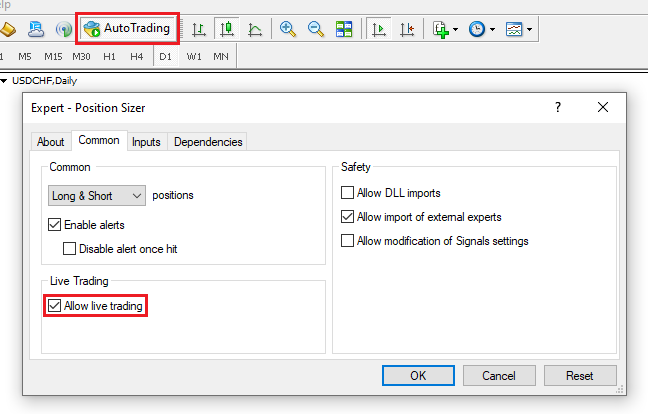
Autotrading should be enabled for trading to work. Here is how to enable it in MetaTrader 4:
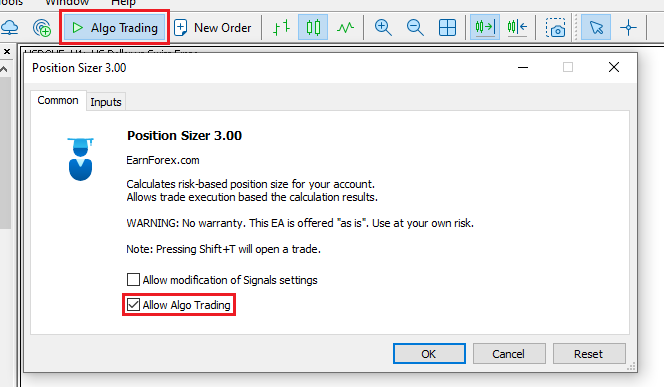
And here is how to enable Algo Trading in MetaTrader 5:
How to set a keyboard shortcut for trade execution
You can set a keyboard shortcut via the TradeHotKey input parameter. You can either use a single key (e.g., "T") or with a combination of
Warning!
There is a known issue with using the keyboard shortcut in MT4. If either
Demonstration video
This video demonstrates how you can use the Position Sizer expert advisor, showcasing its most important functions:
How to enable ATR parameters?
Below you can see a short demonstration of how to enable Average True Range (ATR) settings in the Position Sizer expert advisor to set ATR-based stop-loss or take-profit levels:
Manual backtesting with Position Sizer
You can use the Position Sizer in the visual mode of the Strategy Tester to backtest your manual trading strategies. It will calculate the position size and place the trades as usual. You will be able to monitor their profit/loss and close them when necessary. In the end, you will be able to see the standard MetaTrader backtesting report. The buttons that let you close trades display profit/loss in the square brackets with the points followed by currency P&L.

The panel cannot be dragged on the screen, but its position can be set via input parameters. The interaction with the EA is rather slow in the Strategy Tester because there are no direct chart events — everything is processed only when a new tick arrives.
In MetaTrader 5, the backtesting support is very limited: there is no line dragging and no edit field processing, while button clicks sometimes fail to register. Still, it can be used to backtest your manual trading strategies.
Input parameters
The EA has a set of input parameters besides the panel-based controls. The Position Sizer's display options and a number of default options are set via standard MetaTrader inputs.
Compactness
- ShowMainLineLabels (default = true) — if true, SL and TP distance in points will be shown below the stop-loss and take-profit lines.
- ShowAdditionalSLLabel (default = false) — if true, percentage and money risk will be displayed above the stop-loss line.
- ShowAdditionalTPLabel (default = false) — if true, percentage and money targets and a risk-to-reward ratios will be displayed above the take-profit lines. If multiple take-profits are used, the relevant trade size will also be displayed there.
- ShowAdditionalEntryLabel (default = false) — if true, total position size will be displayed above the entry line.
- DrawTextAsBackground (default = false) — if true, the line labels will be drawn as background. It can be useful if the labels are obscuring something on the chart.
- HideAccSize (default = false) — if true, the account size display and button will be hidden.
- HideMoneyAndPointsValues (default = false) — if true, money and point values of risk and reward fields and labels will be hidden.
- ShowPointValue (default = false) — if true, the point value will be displayed in the bottom of the Main tab.
- ShowMaxPSButton (default = false) — if true, the maximum position size button will be displayed near the position size field.
- StartPanelMinimized (default = false) — if true, the panel will be created in a minimized state.
- ShowATROptions (default = false) — if true, the panel will display options for ATR indicator to be used for SL/TP calculation.
- ShowMaxParametersOnTrading (default = true) — if true, the Trading tab of the panel will display the fields to limit maximum number, volume, and risk of trades. Set to false to reduce the tab's vertical size.
- ShowFusesOnTrading (default = true) — if true, the Trading tab of the panel will display the fields of the so-called trade fuses: on slippage, spread, and SL/Entry distance. Set to false to reduce the tab's vertical size.
- ShowCheckboxesOnTrading (default = true) — if true, the Trading tab of the panel will display the checkboxes that affect how trades are executed. Set to false to reduce the tab's vertical size.
- HideEntryLineOnInstant (default = false) — if true, the Entry line will be hidden when working with Instant orders.
- ShowAdditionalMarginSettings (default = false) — if true, the Margin tab will show additional information on margin utilization and the Trading tab will show additional restrictions options based on margin utilization.
- AdditionalTradeButtons (default = None) — can be one of four options:
- None — no additional Trade button; only the one on the Trading tab is present.
- Above the Entry line — a floating Trade button just above the Entry line will be shown.
- Main tab — a Trade button in the top-left corner of the Main tab will be shown.
- Both — both of the above additional Trade buttons will appear.
Fonts
- SL Label Font Color (default = clrGreen) — font color for the stop-loss line label.
- TP Label Font Color (default = clrGoldenrod) — font color for the take-profit line label.
- Stop Price Label Font Color (default = clrPurple) — font color for the stop price line label.
- Entry Label Font Color (default = clrBlue) — font color for the entry line label.
- Labels Font Size (default = 13) — font size for the text in labels.
- Labels Font Face (default = "Courier") — font face for the text in labels.
Lines
- Entry Line Color (default = clrBlue) — color of the entry line.
- Stop-Loss Line Color (default = clrGreen) — color of the stop-loss line.
- Take-Profit Line Color (default = clrGoldenrod) — color of the take-profit line.
- Stop Price Line Color (default = clrPurple) — color of the stop price line for stop limit orders (MT5 only).
- BE Line Color (default = clrNONE) — color of the breakeven lines.
- Entry Line Style (default = STYLE_SOLID) — entry line style.
- Stop-Loss Line Style (default = STYLE_SOLID) — stop-loss line style.
- Take-Profit Line Style (default = STYLE_SOLID) — take-profit line style.
- Stop Price Line Style (default = STYLE_DOT) — stop price line style for stop limit orders (MT5 only).
- BE Line Style (default = STYLE_DOT) — breakeven line style.
- Entry Line Width (default = 1) — entry line width.
- Stop-Loss Line Width (default = 1) — stop-loss line width.
- Take-Profit Line Width (default = 1) — take-profit line width.
- Stop Price Line Width (default = 1) — stop price line width for stop limit orders (MT5 only).
- BE Line Width (default = 1) — breakeven line width.
Defaults
All default parameters can be changed via the panel. They are added here for the sake of convenience — you can save them to a settings file or to create chart templates.
- TradeDirection (default = Long) — the default trade direction. Can be Long or Short.
- SL (default = 0) — if non-zero, the stop-loss level of a newly attached Position Sizer will be set to this value in points. Will also turn on the Stop-loss button on the main tab.
- TP (default = 0) — if non-zero, the take-profit level of a newly attached Position Sizer will be set to this value in points.
- Stop-Limit Distance (default = 0) — the default stop-limit price distance, in points. For Stop-Limit orders only.
- TakeProfitsNumber (default = 1) — if greater than 1, multiple take-profit levels will be available on the Trading tab to split the position in several trades with different take-profits.
- EntryType (default = Instant) — the default order type. Can be Instant or Pending.
- ShowLines (default = true) — if true, SL, TP, and Entry lines won't be hidden.
- LinesSelected (default = true) — if true, SL, TP, and Entry lines will be selected for moving. Be careful not to delete them occasionally!
- ATRPeriod (default = 14) — the default period for ATR indicator.
- ATRMultiplierSL (default = 0) — the default multiplier for ATR value when calculating ATR-based stop-loss.
- ATRMultiplierTP (default = 0) — the default multiplier for ATR value when calculating ATR-based take-profit.
- ATRTimeframe (default = PERIOD_CURRENT) — if set to some specific timeframe, a newly attached Position Sizer will use this timeframe for ATR calculation.
- SpreadAdjustmentSL (default = false) — the default state of the spread adjustment button. If true, the stop-loss level will be adjusted by the spread value.
- SpreadAdjustmentTP (default = false) — the default state of the spread adjustment button. If true, the take-profit level will be adjusted by the spread value.
- Commission (default = 0) — the default commission size.
- CommissionType (default = Currency units) — the default commission type.
- AutoCommission (default = Currency units) — if true, the commission is automatically received from the broker's server. MT5 only.
- AccountButton (default = Balance) — the default state of the Account button. Can be Balance, Equity, or Balance - Risk (account balance minus the current portfolio risk).
- Risk (default = 1) — the default value for percentage risk.
- MoneyRisk (default = 0) — if greater than zero, will be used as the default value for money risk and the percentage risk will be calculated based on the money risk.
- IncludeOrders (default = INCLUDE_ORDERS_ALL) — the default value for the Include orders switch on the Risk tab.
- IgnoreOrdersWithoutSL (default = false) — the default value for the Ignore orders without stop-loss checkbox on the Risk tab.
- IgnoreOrdersWithoutTP (default = false) — the default value for the Ignore orders without take-profit checkbox on the Risk tab.
- IncludeSymbols (default = INCLUDE_SYMBOLS_ALL) — the default value for the Include symbols switch on the Risk tab.
- IncludeDirections (default = INCLUDE_DIRECTIONS_ALL) — the default value for the Include directions switch on the Risk tab.
- CustomLeverage (default = 0) — the default value for the Custom leverage field on the Margin tab.
- MagicNumber (default = 2022052714) — the default Magic number for the Trading tab.
- Commentary (default = "") — the default order commentary for trades.
- AutoSuffix (default = false) — if true, a suffix will be automatically appended to the order commentary.
- CommentBalance (default = false) — if true, current balance value will be appended to the order commentary.
- DisableTradingWhenLinesAreHidden (default = false) — the default value for the Disable trading when lines are hidden checkbox on the Trading tab.
- MaxSlippage (default = 0) — the default value for the maximum slippage on the Trading tab.
- MaxSpread (default = 0) — the default value for the maximum spread on the Trading tab.
- MaxEntrySLDistance (default = 0) — the default maximum entry/SL distance for the Trading tab.
- MinEntrySLDistance (default = 0) — the default minimum entry/SL distance for the Trading tab.
- MinEntrySLDistance (default = 0) — the default minimum entry/SL distance for the Trading tab.
- MaxRiskPercentage (default = 0) — the default maximum risk for a trade setup for the Trading tab.
- MaxMarginPerc (default = 0) — the default maximum margin utilization percentage for a trade setup for the Trading tab.
- MaxPositionSizeTotal (default = 0) — the default maximum total open volume to tolerate in the account. A zero value means no limit.
- MaxPositionSizePerSymbol (default = 0) — the default maximum open volume per symbol to tolerate in the account. A zero value means no limit.
- SubtractOPV (default = false) — the default value for the Subtract open positions volume checkbox on the Trading tab.
- SubtractPOV (default = false) — the default value for the Subtract pending orders volume checkbox on the Trading tab.
- DoNotApplyStopLoss (default = false) — the default value for the Do not apply stop-loss checkbox on the Trading tab.
- DoNotApplyTakeProfit (default = false) — the default value for the Do not apply take-profit checkbox on the Trading tab.
- AskForConfirmation (default = true) — the default value for the Ask for confirmation checkbox on the Trading tab.
- PanelPositionX (default = 0) — the default horizontal distance from the selected panel position corner.
- PanelPositionY (default = 15) — the default vertical distance from the selected panel position corner.
- PanelPositionCorner (default = CORNER_LEFT_UPPER) — the default panel position corner.
- TPLockedOnSL (default = false) — the default state of the take-profit "lock" on the stop-loss. If true, the take-profit tracks the stop-loss distance automatically.
- TrailingStop (default = 0) — the default trailing stop value in points for the Trading tab.
- BreakEven (default = 0) — the default breakeven value in points for the Trading tab.
- ExpiryMinutes (default = 0) — the default expiry duration for a pending order for the Trading tab.
- MaxNumberOfTradesTotal (default = 0) — the default total maximum number of trades to tolerate in the account. A zero value means no limit.
- MaxNumberOfTradesPerSymbol (default = 0) — the default maximum number of trades per symbol to tolerate in the account. A zero value means no limit.
- MaxTotalRisk (default = 0) — the default maximum total risk to tolerate in the account. A zero value means no limit.
- MaxTotalRiskPerSymbol (default = 0) — the default maximum risk per symbol to tolerate in the account. A zero value means no limit.
- MaxMarginPercTotal (default = 0) — the default maximum total margin utilization percentage for the account. A zero value means no limit.
- MaxMarginPercPerSymbol (default = 0) — the default maximum margin utilization percentage per symbol for the account. A zero value means no limit.
- SLDistanceInPoints (default = false) — if true, stop-loss will be set in points and the SL line will be following the entry line.
- TPDistanceInPoints (default = false) — if true, take-profit will be set in points and the TP line will be following the entry line.
- StopLimitDistanceInPoints (default = false) — if true, stop-limit level will be set in points and the stop-limit price line will be following the entry line. For Stop-Limit orders only.
- MarginUtilizationBase (default = Balance) — what to use to calculate margin utilization percentage?
- Balance — current account balance.
- Starting balance — starting account balance set by the user.
- Free margin — account free margin.
- MUBStartingBalance (default = 0) — the default starting balance value for margin utilization percentage calculation.
Keyboard shortcuts
- TradeHotKey (default = "Shift+T") — a case-insensitive hotkey shortcut to open a new trade based on the calculations. Supports
Shift andCtrl modifiers. - SwitchOrderTypeHotKey (default = "O") — a case-insensitive hotkey shortcut to switch the order type. Supports
Shift andCtrl modifiers. - SwitchEntryDirectionHotKey (default = "TAB") — a case-insensitive hotkey shortcut to switch the trade direction. Supports
Shift andCtrl modifiers. - SwitchHideShowLinesHotKey (default = "H") — a case-insensitive hotkey shortcut to toggle lines' visibility. Supports
Shift andCtrl modifiers. - SetStopLossHotKey (default = "S") — a case-insensitive hotkey shortcut to set the stop-loss to where the mouse pointer is. Supports
Shift andCtrl modifiers. - SetTakeProfitHotKey (default = "P") — a case-insensitive hotkey shortcut to set the take-profit to where the mouse pointer is. Supports
Shift andCtrl modifiers. - SetEntryHotKey (default = "E") — a case-insensitive hotkey shortcut to set the entry line to where the mouse pointer is. If current order type is set to Instant, it will be switched to Pending. Supports
Shift andCtrl modifiers. - MinimizeMaximizeHotkey (default = "`") — a case-insensitive hotkey shortcut to minimize or maximize the panel. Supports
Shift andCtrl modifiers. - SwitchSLPointsLevelHotKey (default = "
Shift +S ") — a case-insensitive hotkey shortcut to switch Stop-loss between points and level modes. SupportsShift andCtrl modifiers. - SwitchTPPointsLevelHotKey (default = "
Shift +P ") — a case-insensitive hotkey shortcut to switch Take-profit between points and level modes. SupportsShift andCtrl modifiers.
Miscellaneous
- TP_Multiplier (default = 1) — the multiplier value for the take-profit button.
- UseCommissionToSetTPDistance (default = false) — if true, the take-profit button will take into account the commission field when calculating the appropriate TP level.
- ShowSpread (default = No) — show spread either in Points or as percentage of SL.
- AdditionalFunds (default = 0) — funds to be added to the account size for the purpose of risk and position size calculation. For example, this could be some funds you hold outside the broker's account but consider a part of your Forex risk capital.
- CustomBalance (default = 0) — you can set custom balance size for the expert advisor. For example, if you are calculating position size for another account. This parameter will override the AdditionalFunds parameter.
- ATRCandle (default = Current candle) — which candle to use to get the ATR value from — current or previous.
- CalculateUnadjustedPositionSize (default = false) — if true, position size calculation result will not be adjusted using broker's minimum/maximum volume and volume step parameters.
- SurpassBrokerMaxPositionSize (default = false) — if true, the EA will surpass the broker's maximum volume limit by opening multiple trades.
- RoundDown (default = true) — if true, position size and potential reward are rounded down. If false, normal math rounding rule is used. Switching to false may lead you to risking more than you planned.
- QuickRisk1 (default = 0) — the percentage risk value to be assigned to the first quick button. Alongside with the second quick risk button, it enables you to quickly set a specific risk level.
- QuickRisk2 (default = 0) — the percentage risk value to be assigned to the second quick button. Alongside with the first quick risk button, it enables you to quickly set a specific risk level.
- ObjectPrefix (default = "PS_") — the prefix for chart objects' names. It lets Position Sizer avoid conflicts with other chart tools.
- SymbolChange (default = SYMBOL_CHART_CHANGE_EACH_OWN) — what to do when chart's symbol changes:
- SYMBOL_CHART_CHANGE_EACH_OWN — each symbol will try to load each own settings if they exist.
- SYMBOL_CHART_CHANGE_HARD_RESET — a hard reset of all panel settings will occur.
- SYMBOL_CHART_CHANGE_KEEP_PANEL — panel settings will be kept unchanged.
- DisableStopLimit (default = false) — if true, the Stop Limit order type will be skipped when switching through order types via the panel. This is relevant only in MT5.
- TradeSymbol (default = "") — if a non-empty value is given, it will be used as a trading symbol for trading. This can be useful when trading custom symbols in MT5.
- DisableTradingSounds (default = false) — if true, no sounds will be played during trade execution.
- IgnoreMarketExecutionMode (default = true) — if true, the Market execution mode will be ignored for during the trade opening process. Set to false if you experiencing issues opening trades with stop-loss and take-profit.
- MarketModeApplySLTPAfterAllTradesExecuted (default = false) — if true, SL and TP levels will be applied to positions only after all trades finish executing in the Market execution mode. This is relevant only if IgnoreMarketExecutionMode is set to false and symbol uses Market execution.
- DarkMode (default = false) — if true, the panel's color scheme will switch to a dark mode.
- AutoDetectDarkMode (default = false) — if true, the panel will auto-detect your MT5 color theme and set its own dark mode option accordingly.
- SettingsFile (default = "") — if given, the Position Sizer will load its panel settings from that file. The file can only be loaded from the \MQL4\Files\ or \MQL5\Files\ subfolder of your platform's data folder.
- PrefillAdditionalTPsBasedOnMain (default = true) — if true, newly additional take-profit levels will be pre-filled based on the main TP value.
- AskBeforeClosing (default = false) — if true, you will be prompted for confirmation when closing the panel.
- CapMaxPositionSizeBasedOnMargin (default = false) — if true, the calculated position size will be automatically capped by the maximum position size allowed by the available margin.
- LessRestrictiveMaxLimits (default = false) — if true, the Position Sizer will open a smaller trade if some restricting parameters from the Trading tab do not allow opening the entire calculated trade.
- Long Button Color — the color of the trade direction button when it is set to Long.
- Short Button Color — the color of the trade direction button when it is set to Short.
- Trade Button Color — the color of the Trade buttons.
- Do Not Delete Lines/Labels (default = false) — if true, the lines and line labels created by the Position Sizer will remain on the chart after the EA is detached.
- Convert Instant to Pending (default = false) — if true, the Instant order will be converted to a Pending order if either maximum or minimum Entry-to-SL distance restrictions (on the Trading tab) fail.
Demonstration video on input parameters
You can see a visual demonstration of how the Position Sizer's input parameters (as of version 3.00) work in this detailed video:
Screenshots
Main tab
The main tab is the biggest one and looks nice on any background — this one is white for example. The take-profit and stop-loss lines' colors have been changed via input parameters for better readability. The order type is set to Stop Limit here, so the purple stop price line is also visible on the chart.

Risk tab
Black background color and chart grid do not interfere with the panel as you can see on this screenshot of the Risk tab. The panel is set to a dark mode, to reduce the screen brightness. The risk outputs show Infinity as there is, apparently, a sell order without stop-loss.

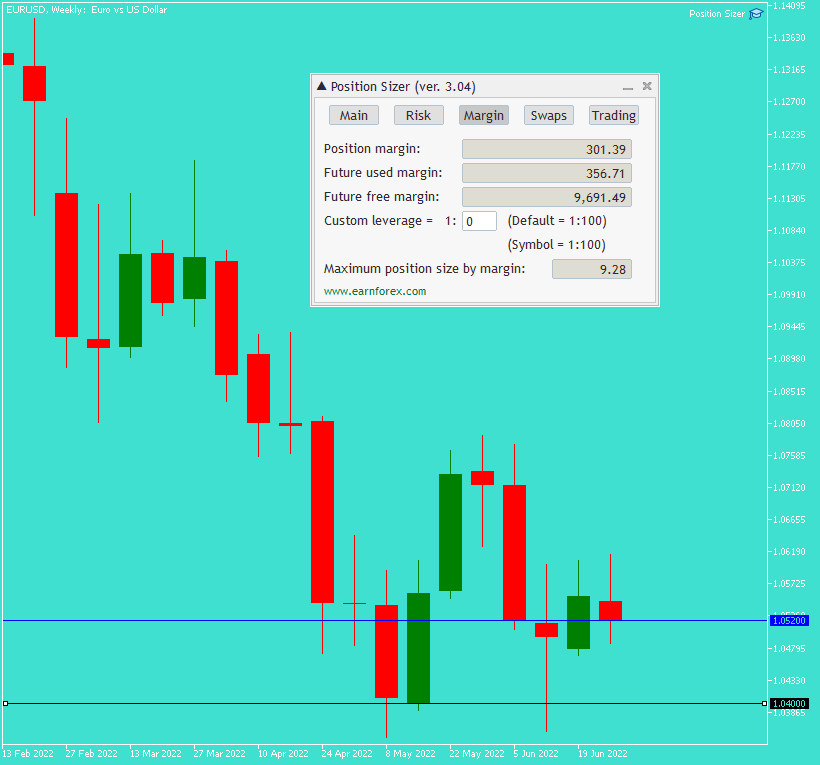
Margin tab
Even the wildest color scheme works well with Position Sizer. In this case, cyan background is combined with green and red candlesticks. Stop-loss color is set to black.
Swaps tab
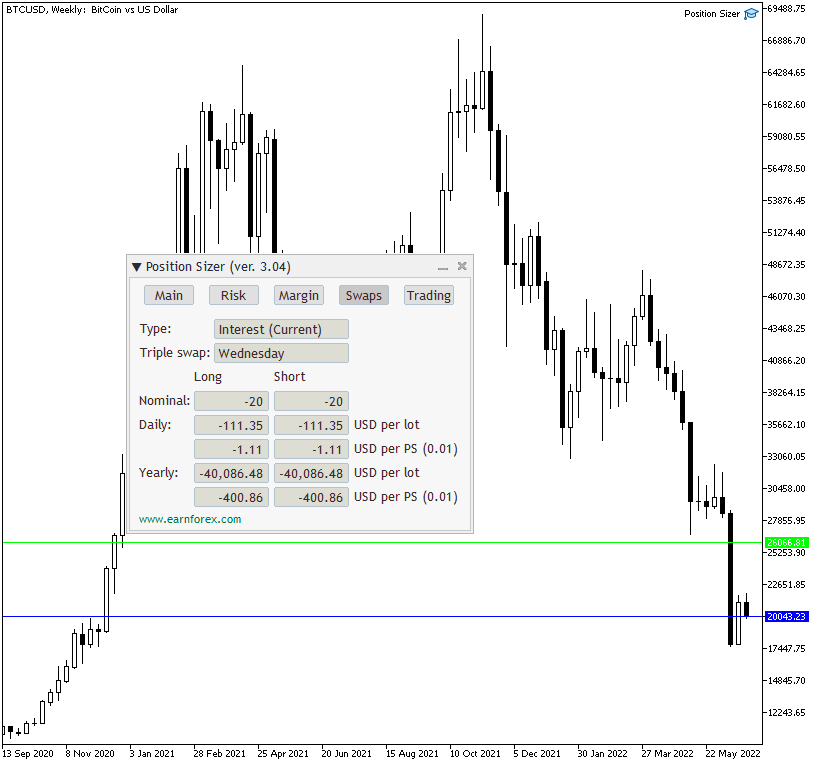
This example shows swaps tab with a classic black and white color scheme chart. This broker is charging some serious rollover fees for margin trading in Bitcoin.
Trading tab
When the panel is set to background, it becomes transparent and you can easily analyze the exposed chart. At the same time, you are able to see the values used for trading purposes.

Minimized panel
Minimizing the panel in one click makes it completely non-obtrusive and allows trader to easily see the entire chart.
Download (ver. 3.16b, 2026-09-14)
Position Sizer for MetaTrader 4 Position Sizer for MetaTrader 5Position Sizer is being developed via a dedicated GitHub repository. You are encouraged to actively participate in the improvement of this EA by submitting your own features via pull-requests and by reviewing existing suggestions, changes, fixes, and so on.
Installation
To install the expert advisor, make sure that you copy the entire folder from the archive to \MQL4\Experts\ or \MQL5\Experts\ (if you are on MetaTrader 5).
The EA folder should contain the following files in addition to Translations and Images subfolders:
- Defines.mqh
- Position Sizer.mq4 or Position Sizer.mq5
- Position Sizer.mqh
- Position Sizer Trading.mqh
- HorizontalRadioGroup.mqh
- errordescription.mqh (MT5 only)
- TesterSupport.mqh
- EF-Icon-64x64px.ico
You need to compile Position Sizer.mq4 (or Position Sizer.mq5), not any of the other files.
This how-to video explains how to install the Position Sizer EA for MetaTrader 5, but the process is quite similar for MetaTrader 4:
Installing Position Sizer on macOS
The installation process on newer macOS devices (M1, M2, M3, M3 Pro, M3 Max, etc.) is somewhat different from installing the Position Sizer on Windows. Please watch this video to see how the Position Sizer is installed on a MetaTrader for macOS (via WINE):
If the method described in the video doesn't work for you, you can try following these steps (given for the MT5 version, but the process is very similar for MT4):
- Run MetaEditor (press
F4 when in MetaTrader). - Drag the files from the downloaded archive one by one to MetaEditor.
- Use File->Save As to save them to the proposed location. Translation files should be saved into the Translations subfolder in that location.
- You can save all files except for the EF-Icon-64x64px.ico file in that way. Omit EF-Icon-64x64px.ico.
- Open Position Sizer.mq5.
- Find the following line and either remove it or comment it out:
#property icon "EF-Icon-64x64px.ico"
- You can now either compile Position Sizer.mq5 or restart MetaTrader (for the compilation to be performed automatically).
Translating Position Sizer
The panel's interface, input parameters, and description can be translated. In addition to English, the following languages are supported: Arabic, Chinese (Simplified), Chinese (Traditional), Japanese, Portuguese (Brazilian), Spanish, Russian, Ukrainian. More languages will be added in the future.
You can switch the language by editing and then compiling the Position Sizer.mq4 or Position Sizer.mq5 file. You just need to uncomment the respective line at the top of the file and click the compile button.
Here is an example screenshot with the line for enabling the Ukrainian language highlighted:

And here it is shown uncommented with the compile button highlighted:

It is actually easy to create your own custom translation of the Position Sizer's interface. It doesn't require any coding skills. The translation file consists of just a few hundred terms and phrases.
Frequently asked questions
I get compilation errors when compiling Position Sizer. How do I solve this?
First, make sure that you are compiling the correct file — Position Sizer.mq4 in MetaTrader 4 or Position Sizer.mq5 in MetaTrader 5. Second, make sure that the other files — Defines.mqh, Position Sizer.mqh, Position Sizer Trading.mqh, and errordescription.mqh (in MT5) — are placed in the same folder as the file you compile. If the problem isn't solved, please post in the official discussion thread, stating the version of Position Sizer, version of MetaTrader, and providing a copy or a screenshot of the compilation errors.
I installed the expert advisor but when I add it to a chart, nothing happens. Why?
Most likely, you need to compile it. To do this, left-click it in the list of expert advisors in MetaTrader's Navigator window and press Enter. MetaEditor will open the EA's source code. Now press
Position Sizer doesn't work correctly. What do I do?
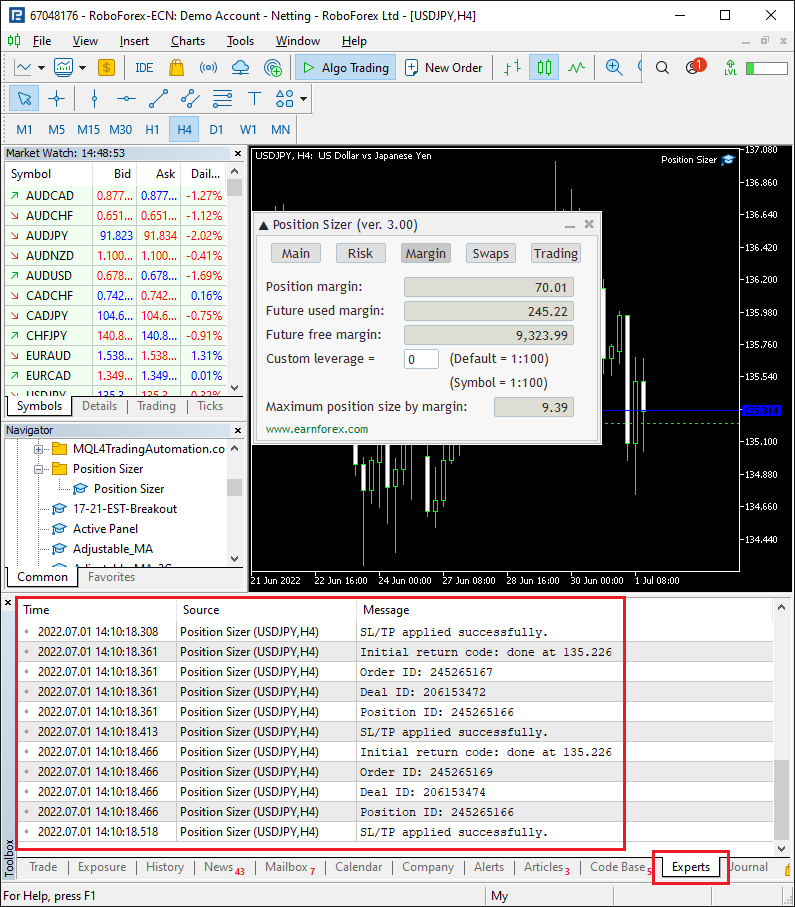
To help you with the issue, I would need to know what version of the EA you are using, what version of MetaTrader (including the build number) you are using, and also what broker, account type, and account currency you are trying it on. Additionally, please provide the output in the Experts tab of your Terminal/Toolbox subwindow:
I enter, let's say, 1% risk, but the Results column shows 0.87%. I want to risk, let's say $5,000, but end up risking $4,350. Why?
The most probable reason for that is that increasing the position size by the minimum possible increment would lead to a position size with a risk greater than the given percentage. The Position Sizer rounds the position size down in such cases, aiming to reduce the actual risk rather than to overshoot the specified value. You can always set the CalculateUnadjustedPositionSize input parameter to true to make the Position Sizer to show the exact calculated position size, but you won't be able to open such a trade with this broker because it won't comply with the broker's restrictions on the minimum position volume step.
Discussion
Do you have any suggestions or questions regarding this expert advisor?
Discuss Position Sizer with other traders and MQL programmers on the forum.
You can also subscribe to our monthly newsletter to keep yourself updated about future changes to the Position Sizer expert advisor.
You might want to open a trading account with any of the MT4 Forex brokers to use the Position Sizer for MetaTrader 4. If you want to use an MT5 version of the Position Sizer, feel free to open an account with a broker that offers MetaTrader 5 platform.
Looking for a similar tool for the cTrader platform? Try our cTrader Position Sizer robot!
Changelog
3.16b — 2026-09-14 (MT5 only)
- Fixed a crashing bug in newer builds of MT5 (6193+).
3.16a — 2026-08-31 (MT5 only)
- Fixed a bug that would allow position opening even when margin utilization restrictions are breached in some cases.
- Fixed incorrect total margin utilization calculation.
3.16 — 2026-08-25
- Added basic support for Strategy Tester backtesting in MT5.
- Added automatic commission retrieval from the broker's server in MetaTrader 5 version. It is now a default method. Set AutoCommission to false to disable.
- Added an option (HideMoneyAndPointsValues) to hide all risk and reward values in points and currency units, leaving only percentage values.
- Added an option (ConvertToPendingIfMaxMinEntrySLFails) to convert an instant (market) order to a pending (stop or limit) one when maximum or minimum distance from entry to stop-loss (set via the Trading tab) fails its check.
- Added an option (StopLimitDistanceInPoints) for the Stop-Limit price to be changed to distance in points for MT5 Stop-Limit orders.
- Added new trade error return codes to errordescription.mqh in MT5.
- Changed spread adjustment checkboxes to buttons that now work in all modes (not only ATR-based).
- Changed the max margin fuse on the Trading tab to respect the LessRestrictiveMaxLimits input setting.
- Changed margin utilization to ignore pending orders' margin.
- Fixed a minor glitch in label positioning in MT4.
- Fixed a bug with TP line becoming selected in TP-locked-on-SL mode sometimes.
- Fixed a small bug with SL label/button not changing correctly when switching between distance and level using a hotkey.
- Fixed a bug in the MT5 version when breakeven and trailing stop functions could use point and digits values of an incorrect symbol.
- Fixed a glitch when breakeven lines could stay on the chart after disabling the breakeven (by setting it to zero).
- Fixed a minor bug with Stop-Limit price and its normalization.
3.15 — 2026-06-02
- Added support for point value display when it is less than 0.01.
- Added alerts when SL/TP application fails in the Market Execution mode.
- Optimized hotkey processing.
- Changed how the Max risk % per trade field on the Trading tab works when LessRestrictiveMaxLimits is set to true. It will now allow opening a smaller trade.
- Changed how trailing stop and breakeven filter trades by magic number. Now, if the Magic number field is set to zero, they will work with all trades irrespective of their magic numbers.
- Changed how SL/TP is applied post-opening in the Market Execution mode. It will now retry up to 10 times per position if failing. This change applies to MT5 only. In MT4, it already worked liked that before.
- Fixed take-profit update speed when it is locked to the stop-loss and the latter is updated via a hotkey.
- Fixed multiple code typos.
- Fixed a potential infinite loop issue.
- Fixed a bug in swaps calculation in MT4.
- Fixed a potential bug with custom balance calculation.
- Fixed multiple instances of potentially incorrect comparison of double variables.
- Fixed a bug that would wipe additional TP values when changing the number of take-profits via input parameters.
- Fixed a bug that would prevent the TP multiplier entered via the panel to load properly when restarting MT5.
- Fixed some chart object tooltips.
- Fixed a bug that would sometimes allow opening more trades than allowed via the Max number of trades field.
- Fixed some error message texts.
- Fixed some translation issues.
- Fixed a bug with the custom leverage not getting updated when changing the respective input parameter on an already attached instance of the Position Sizer (MT5 only).
- Fixed a potential memory leak from undeleted CTrade objects (MT5 only).
3.14 — 2026-02-25
- Added an option to display margin utilization information on the Margin tab (the Show additional margin settings/info? parameter). This can be useful when trading with some prop firms who restrict how much margin can be used by your trades.
- Added an option to restrict position opening based on total margin utilization, per-symbol margin utilization, or margin utilization of the currently calculated position.
- Added an option to append current account balance to order commentary when a trade is taken (the CommentBalance parameter).
- Improved performance by optimizing the text label drawing function.
- Changed the MT5 version to work with
GetTickCount64function to avoid the internal timer overflowing. - Fixed how hotkeys work so that they would still trigger when a non-English keyboard layout is used.
- Fixed dummy horizontal line objects appearing on the chart.
- Fixed a bug when margin calculations weren't carried out when the panel was minimized.
- Fixed the display of line labels going off-screen on HiDPI screens in MT5.
3.13 — 2025-11-20
- Fixed a bug, which prevented hotkeys with the Shift modifier from working.
3.12 — 2025-11-19
- Added TP multiplier field to the panel. Previously, it required modification via input parameters.
- Added translations the EA description.
- Added translations for input parameters in MT5.
- Added Japanese translation of the panel's interface (contributed by Satoru Hoshino).
- Added an option to let the Position Sizer detect dark mode automatically based on the terminal's settings.
- Added large icons for Hi-DPI displays.
- Added dark mode icons.
- Updated hotkey processing functions to support more keys.
- Optimized some slow places in the code.
- Changed Risk tab filters from click buttons to radio buttons for faster switching.
- Fixed a minor glitch with Stop price appearing in the order confirmation window even for orders that are not Stop-Limit in MT5.
- Fixed a minor glitch with a decimal separator appearing in the money risk result field when the account currency has no decimal places (JPY for example). MT5 only.
- Fixed a minor glitch with the percentage risk result field not rounding properly in some cases. MT5 only.
- Fixed a potential freeze issue when
OnTimergets called during deinitialization. - Fixed an issue with additional take-profits not getting pre-filled when main take-profit is set using the
P hotkey despite the fact that such pre-filling was required according to the input parameters. - Fixed a compilation bug that could appear in some MT4 platforms due to another version of the
CompareDoublesfunction declared in stdlib.mqh. - Removed a minor notification message that could previously flood the terminal's log.
3.11 — 2025-04-24
- Added an input parameter to avoid deleting the Position Sizer's lines and line labels when the EA is removed.
- Added two input parameters to set colors for the Long/Short order direction button.
- Added an input parameter to set the color for the Trade buttons.
- Added the Include directions switch to the Risk tab to filter either All, Buy only, or Sell only when calculating risk and reward data.
- Changed how the TP-locked-on-SL feature works. It is now turned on and off via a dedicated checkbox on the Main tab rather than being bound to the TP button.
- Changed the ShowLineLabels input parameter to ShowMainLineLabels and it no longer controls additional line labels.
- Changed how often the Position Sizer refreshes the account and symbol information to avoid calculations based on stale data.
- Changed the Count pending orders checkbox on the Risk tab to a button that switches between All, Pending orders, and Open positions.
- Changed the Ignore symbols switch to the Include symbols switch on the Risk tab.
- Fixed a minor bug in the MT5 version when the hide/show lines hotkey worked with some small delay.
- Fixed a bug with the SL/TP values not resetting to defaults when changing the chart's symbol while the SymbolChange parameter is set to Reset to defaults on symbol change.
- Fixed a bug with the outside Trade button not changing color when the Dark Mode is switched on.
3.10 — 2024-12-06
- Added support for Strategy Tester backtesting in MetaTrader 4. Unfortunately, this feature won't be available in MT5 for the time being.
- Added panel translations to the MT4 version of the Position Sizer.
- Added an input parameter (CapMaxPositionSizeBasedOnMargin) to automatically limit the calculated position size with the maximum position size available based on the account's free margin.
- Added a button to switch between ignoring no trades, ignoring trades in other symbols, and ignoring trades in the current symbol to the Risk tab.
- Added an option (via input parameters) to let the trade open even when its execution would lead to the max volume/risk values (set via the Trading tab) being exceeded. The trade will be reduced in size to fit into the given max values.
- Added Chinese (traditional) panel translation (contributed by user fxchess from our forum).
- Added a max risk fuse to the Trading tab to prevent a trade from executing when the risk exceeds the given value.
- Added support for the new swaps type in MT5: profit currency.
- Changed messages for 'autotrading disabled' situation. Now two distinct messages will be used: one for the EA's properties, the other one for the platform's options.
- Changed the TP line to be non-selectable when the TP-locked-on-SL mode is on.
- Changed the description of the SettingsFile input parameter to correctly state that a custom settings file should be put in the
\Files\PS_Settings\folder. - Fixed the bug that caused changed edit values to reset when the panel got refreshed at the same as the edit was about to save in MT5.
- Fixed how the TradeSymbol input parameter is used in MT5. Now it will be used in all the calculations to avoid problems with custom symbols' specifications.
- Fixed the bug that caused ATR SL multiplier to initialize at zero even when SL distance is non-zero.
- Fixed the bug with ATR TP not turning off when setting it to zero.
- Fixed the bug that caused the TP distance to be set to some very large value when using the
Shift +P hotkey to switch from level to distance. - Fixed the bug that caused a delay for the TP line movement when it was in the TP-locked-on-SL mode in MT5.
- Fixed display of swap values with too many decimal places in MT5.
- Fixed the bug that caused the take-profit line to appear unselected in MT5 even when lines should be selected by default.
- Fixed a minor bug when loading an ini-file.
- Fixed the bug that caused the Entry line fail to re-appear when HideEntryLineForInstant was set to true and you switched from an Instant to Pending order.
- Fixed the calculation of the automatic TP line placement when UseCommissionToSetTPDistance is set to true. It is now based on Risk Money Result rather than Risk Money Input.
3.09 — 2024-05-23
- Fixed a bug that could cause the trade button to trigger when pressing unrelated buttons.
- Fixed a bug that could cause the panel to get stuck in the initialization process when the SL line was generated at the same price as the Entry line.
- Fixed a bug with deleting the settings file when closing the panel.
3.08 — 2024-05-16
- Added optional additional Trade buttons (see AdditionalTradeButtons input parameter).
- Added keyboard modifiers for the increase and decrease buttons to add/subtract in multiples of the tick size:
Ctrl (×10),Shift (×100), andCtrl +Shift (×1000). - Added some additional logging when a trade is executed.
- Added an option (HideEntryLineOnInstant) to hide the Entry line for Instant orders.
- Added an automatic replacement from comma to period as a decimal separator for values entered via the panel's input fields. This can be helpful if your system decimal separator is comma.
- Added an input parameter (AskBeforeClosing) to ask for a confirmation when closing the panel.
- Fixed a bug in MT5 that could sometimes cause the Breakeven feature to fail.
- Fixed a bug that prevented hotkeys from being turned off.
- Fixed a bug with the Maximum Position Size Total value overwriting the the Maximum Position Size per Symbol value.
- Fixed a bug with trades not executing when stop-loss or take-profit are too close to entry but the respective ignore SL or ignore TP checkboxes are ticked.
- Fixed a bug when additional TP values could change when switching from Short to Long or vice versa.
- Fixed a bug that could lead to a glitch with take-profit values when switching TP from levels to points via a hotkey.
- Fixed a bug with the additional Entry label remaining on the chart when the respective input parameter (ShowAdditionalEntryLabel) was set to false after it had been true.
- Changed the additional take-profits to follow the main take-profit when it is "locked" on the stop-loss.
- Changed all warnings from alerts to prints.
3.07 — 2023-10-20
- Added an optional additional label for the Entry line to display the total position volume calculated by the Position Sizer.
- Added new hotkeys (
Shift +S andShift +P by default) to switch stop-loss and take-profit values from level to points and vice versa. - Added risk-to-reward ratio calculations to the Risk tab.
- Added the expiration time field and parameter to allow setting a time limit for pending orders.
- Added a new hotkey ('`' by default) to minimize/maximize the panel.
- Fixed TP button colors in the dark mode.
- Fixed hotkeys to not trigger when they are set to work without Shift/Ctrl, but either Shift or Ctrl are pressed.
- Fixed the margin calculation in the MT5 version to take into account the maintenance margin when required.
- Fixed a bug when changing the hotkey input parameters for an already attached Position Sizer could fail to work.
- Fixed a potential array out-of-range error that could appear under certain rare circumstances.
- Fixed additional TP fields scaling on the panel for HiDPI screens.
- Changed the take-profit hotkey to switch off the TP-lock-on-SL when triggered.
- Changed where the panel setting files are stored. They are now saved and loaded from the PS_Settings subfolder of MetaTrader's Files folder. Older settings files will be loaded correctly if they are found in the previous location.
- Changed default colors for TP and SL lines to goldenrod and green respectively.
3.06 — 2023-08-14
- Added a hotkey to set the Entry line to the price level at the mouse pointer's current position (SetEntryHotKey).
- Added files with Arabic, Chinese (Simplified), and Spanish translations of the panel for the MT5 version of the expert advisor.
- Fixed a bug that caused TP levels (when set in points) to drift from their given values.
- Fixed a bug where incorrect previous SL was reported upon application of a trailing stop or breakeven.
- Fixed a potential 'array out of range' error when switching symbols.
- Fixed a bug with SL not resetting to default on symbol change when required by the SymbolChange parameter.
- Fixed a bug when SL and TP lines could get set to levels that don't respect the symbol's tick sizer property.
- Removed the possibility for the Stop-Loss to be set to zero.
3.05 — 2023-07-25
- Added a new input parameter (PrefillAdditionalTPsBasedOnMain) to control whether newly added TPs are pre-filled or not.
- Added a file with Portuguese (Brazilian) translation (contributed by Matheus Sevaroli) for the MT5 version of the expert advisor.
- Fixed the Reward calculation display when some of the additional take-profit levels are zero. It will now calculate reward only for those trades that have a non-zero TP.
- Fixed a bug with position size restriction and subtraction settings not actually working.
- Fixed a bug that caused the SymbolChange = Reset to Defaults to not work for most fields.
- Fixed a bug that prevented normal updating of entry and TP levels when lines were hidden.
- Fixed a bug in MT4 version that could sometimes cause an 'array out of range' error.
3.04 — 2023-07-20
- Added a dark theme mode, which can be set via the DarkMode input parameter.
- Added an option to display breakeven lines at levels where the Position Sizer will apply breakeven to existing positions.
- Added the Entry line label to display the distance from the current price to the Entry level for pending orders.
- Added input parameters (ShowMaxParametersOnTrading, ShowFusesOnTrading, and ShowCheckboxesOnTrading) to make the Trading tab more compact.
- Added separate total and per-symbol fields to control volume, risk, and number of trades on the Trading tab.
- Added an input parameter (SettingsFile) to let users load their own custom settings file with panel fields configured according to their needs. The EA won't delete custom settings files.
- Added two new hotkeys — to set a stop-loss (SetStopLossHotKey) and a take-profit (SetTakeProfitHotKey) to the price level at the mouse pointer's current position.
- Added an option to change the translation of the panel's interface in MetaTrader 5. Language files are currently only available for Ukrainian and Russian. Users can create and use their own translation files.
- Changed the breakeven mechanism to take into account the size of the commission if UseCommissionToSetTPDistance is set to true.
- Changed the additional TP fields to appear with some non-zero value if the main TP is non-zero.
- Fixed a bug when switching the chart's symbol could result in line labels disappearing if SymbolChange was set to Keep panel as is.
- Fixed a bug in the MT5 version that resulted in the trade type not resetting properly when SymbolChange was set to Reset to defaults on symbol change.
- Fixed a bug that resulted in false warnings and incorrect position size calculation when the EA failed to get the symbol information at the first attempt.
- Fixed a bug that resulted in some of the +/- buttons to remain on the chart when the panel was minimized.
- Fixed a bug that resulted in the stop-loss not keeping its correct distance when SLDistanceInPoints was set to true.
- Fixed a bug when the additional funds asterisk remained visible even when the panel was minimized.
- Fixed a bug in the MT5 version that resulted in the risk field resetting to default when the user clicked on the position size field after setting it to a custom value.
- Fixed a bug that resulted in the stop-loss line sometimes disappearing on a symbol change.
- Fixed a bug in the MT5 version that resulted in the Stop Price line appearing after switching from Stop Limit to Instant and setting the DisableStopLimit input parameter to true.
- Fixed a bug that would result in wrong value appearing in the account size field after clicking on it and then clicking outside if the value contained a thousands separator.
- Fixed a bug in the MT5 version that caused a critical 'array out of range' error when clicking on the +/- buttons for a single take-profit field.
- Fixed a bug in the MT4 version that caused a critical 'array out of range' error when switching the chart symbol to a one with more additional TPs saved in a settings file.
- Fixed a bug that caused the risk to be calculated based on the percentage value instead of the money value when Custom Balance was updated even if the MoneyRisk parameter was greater than 0.
- Fixed a bug with ATR timeframe button not working.
- Fixed a bug with incorrect volume share allocation when adding a new TP.
- Fixed a bug in the MT5 version that caused a critical 'stack overflow' error when the EA failed to convert a symbol's profit or margin currency.
- Fixed a bug that would cause TP values set in points to shift when dragging doing some unrelated chart manipulations.
3.03 — 2023-03-29
- Added an option to set commission in percentage of the contract's value.
- Added a possibility to use fractional values for custom leverage and symbol leverage.
- Added an option to surpass the broker's maximum position with multiple trades (SurpassBrokerMaxPositionSize).
- Added an option to apply SL/TP to market execution mode trades only after all positions are opened (MarketModeApplySLTPAfterAllTradesExecuted).
- Added an option to limit maximum total risk per pair or overall.
- Added support for trade execution when the Position Sizer is attached to a custom symbol in MT5. The actual symbol for trading is set via the TradeSymbol input parameter.
- Added a warning when broker has tick value set to zero for a Forex trading instrument.
- Added a hotkey setting (SwitchHideShowLinesHotKey) to hide/show the EA's lines.
- Added an input parameter (DisableTradingSounds) to disable sounds during trade execution.
- Added a possibility to use Escape, Tab, Backspace, and Caps Lock keys for panel hotkeys.
- Added a new hotkey setting (SwitchOrderTypeHotKey) to quickly switch order type.
- Added quick buttons to modify Entry, Stop-loss, Take-profit, and Stop price values.
- Added a possibility to add and remove additional take-profits directly on the panel.
- Added a panel button to quickly populate take-profit volume shares based on three different schemes: equal, descending, ascending.
- Added the Stop limit line label to show the distance from Entry.
- Added an option to switch the spread display from points to stop-loss ratio via the ShowSpread input parameter.
- Added a setting (DisableStopLimit) to disable the Stop limit order type selection when switching via the 'Order type' button.
- Changed the trading function to check the symbol's execution mode only if the relevant input parameter (IgnoreMarketExecutionMode) is set to false.
- Changed the 'All symbols' checkbox to apply to 'Max # of trades', 'Max total volume', and 'Max total risk' fields simultaneously.
- Changed the margin currency display to switch to the currency pair's base currency when conversion to the account currency is impossible.
- Changed the 'Ignore orders without stop-loss/take-profit' checkbox to two separate checkboxes: 'Ignore orders without stop-loss' and 'Ignore orders without take-profit'.
- Fixed the algorithm for trading volume distribution between multiple TP trades on trade execution.
- Fixed a bug that would cause stop-loss to sometimes reset to zero.
- Fixed a bug that was causing some panel edit values to reset to previous value after changing them.
- Fixed a bug that resulted in a failing trade execution following a switch from a currency pair with Stop Limit order type to another pair.
- Fixed a bug that caused the open trade's commentary to be "PS EA" despite empty the empty Order commentary field.
- Fixed a bug that caused wrong values in volume shares after changing the TakeProfitsNumber input parameter.
- Fixed a bug that resulted in the take-profit line not disappearing even after setting TP to zero.
- Fixed the ATR timeframe button to remain in the Current state when the default ATR timeframe is set to Current.
- Fixed a bug that would sometimes cause SL/TP lines to snap back when dragging them in the ATR mode.
- Fixed a bug that would deselect SL/TP/Entry lines on chart template change.
- Fixed a bug with lines re-appearing on platform profile change even if the 'Hide lines' button was pressed.
- Fixed rounding issues with the risk value in the additional stop-loss label.
- Fixed a bug with incorrect processing of the situation when Stop-loss is equal to Entry.
- Fixed the default PositionSize input parameter to make it override the percentage Risk setting.
- Fixed incorrect volume calculation that could sometimes occur on the Risk tab in MT5.
- Fixed a bug that caused the 'Do not apply take-profit' checkbox to be ignored.
- Fixed a minor bug that would sometimes cause line labels to freeze on the chart.
- Fixed a bug that would sometimes cause the EA initialization to fail in MT5.
- Improved currency conversion for calculations in MT5.
- Optimized the EA initialization and deinitialization phases to significantly improve the loading speed when switching the chart symbol.
- Removed the PanelOnTopOfChart input parameter. Use the 'Chart on foreground' checkbox in the chart's settings instead.
3.02 — 2022-08-12
- Fixed a bug that could result in wrong or malfunctioning position size calculation when switching the chart's symbol (MT5 only).
- Fixed the Commentary and Auto-Suffix fields which weren't working correctly (MT5 only).
- Fixed a bug that prevented newly set default input parameters to change the respective fields on the panel.
- Fixed a bug that could result in reward-related Main tab elements to show up when some other tab was selected.
- Fixed a bug that sometimes prevented the Position Size field change from registering when the panel was calculating the Risk based on the Position Size.
- Moved the ShowATROptions input parameter to the Compactness inputs group.
- Removed the redundant Stop Price Label Color input parameter as there is no such label (MT5 only).
- Made some purely cosmetic changes.
3.01 — 2022-07-28
- Fixed a critical bug for breakeven functioning with sell orders.
- Fixed bugs related to the trading hotkey.


